
TerraBloom ECMF-200
TerraBloom ECMF-200 Inline Duct Fan User Manual
Model: ECMF-200 | Brand: TerraBloom
1. Introduction
This manual provides detailed instructions for the installation, operation, and maintenance of your TerraBloom ECMF-200 Quiet 8" Inline Duct Fan. Designed with an energy-efficient EC motor and a 0-100% variable speed controller, this fan is suitable for a wide range of applications including indoor grow facilities, vertical farms, HVAC systems, and general exhaust ventilation.

Figure 1: TerraBloom ECMF-200 Inline Duct Fan with included variable speed controller.
Broad Spectrum of Uses
The TerraBloom ECMF-200 fan is highly versatile, capable of creating negative pressure, exhausting odors and smoke, simulating wind, and intaking fresh air. Its applications span across various environments:

Figure 2: Versatile applications of the ECMF-200 fan.
2. Key Features
- Versatile Applications: Used in indoor grow facilities, vertical farms, heating/cooling transfer, drying, air filtration, and more. Create negative pressure, exhaust odors/smoke, simulate wind, and intake fresh air.
- Energy Efficient: Built with a brushless EC motor and dual jet blades, delivering 569 CFM airflow at 74 Watts max. Efficient even at lower speeds, with no wasted electricity.
- Flexible Control: Allows speed adjustments from 0 to 100% using the included variable speed controller without disruptive noise. Upgrade options available for wireless remote control (Model: ECMF-WR) or intelligent thermostat speed controller (Model: SC-ECMF).
- Durable Protection: Coated steel housing resists rust and safeguards the motor and blades from accidental damage and harsh elements. IPX4 ingress protection rating.

Figure 3: Performance metrics of the ECMF-200 fan.

Figure 4: Design principles of the TerraBloom fan.

Figure 5: Details of the EC Motor and control compatibility.
3. Setup
The TerraBloom ECMF-200 fan is designed for straightforward installation in various ducting systems. A mounting bracket is included to facilitate secure placement.
Installation Steps:
- Choose Location: Select a suitable location within your ducting system that allows for optimal airflow and easy access for maintenance. Ensure the location can support the fan's weight.
- Secure Mounting: Use the included mounting bracket to securely attach the fan to a stable surface or structure. Ensure the fan is level to prevent vibration and noise.
- Connect Ducting: Connect the fan to your existing ductwork using appropriate clamps or fasteners. Ensure all connections are airtight to maximize efficiency and prevent air leaks.
- Electrical Connection: Plug the fan into a standard AC power outlet. Connect the variable speed controller to the fan as instructed in the operating section.

Figure 6: Key features for easy installation and durability.
4. Operating Instructions
The ECMF-200 fan comes with a variable speed controller, allowing precise adjustment of airflow from 0% to 100% of its maximum capacity. This ensures optimal performance for various ventilation needs while minimizing noise.
Using the Variable Speed Controller:
- Power On: Ensure the fan is properly connected to a power source and the speed controller is plugged into the fan.
- Adjust Speed: Rotate the dial on the variable speed controller to increase or decrease the fan's speed. The fan will respond smoothly to adjustments.
- Monitor Noise: The EC motor is designed for quiet operation, especially at lower speeds. Adjust the speed to achieve desired airflow and noise levels for your environment.

Figure 7: Variable Speed Controller for precise airflow management.

Figure 8: The fan's quiet operation for undisturbed environments.
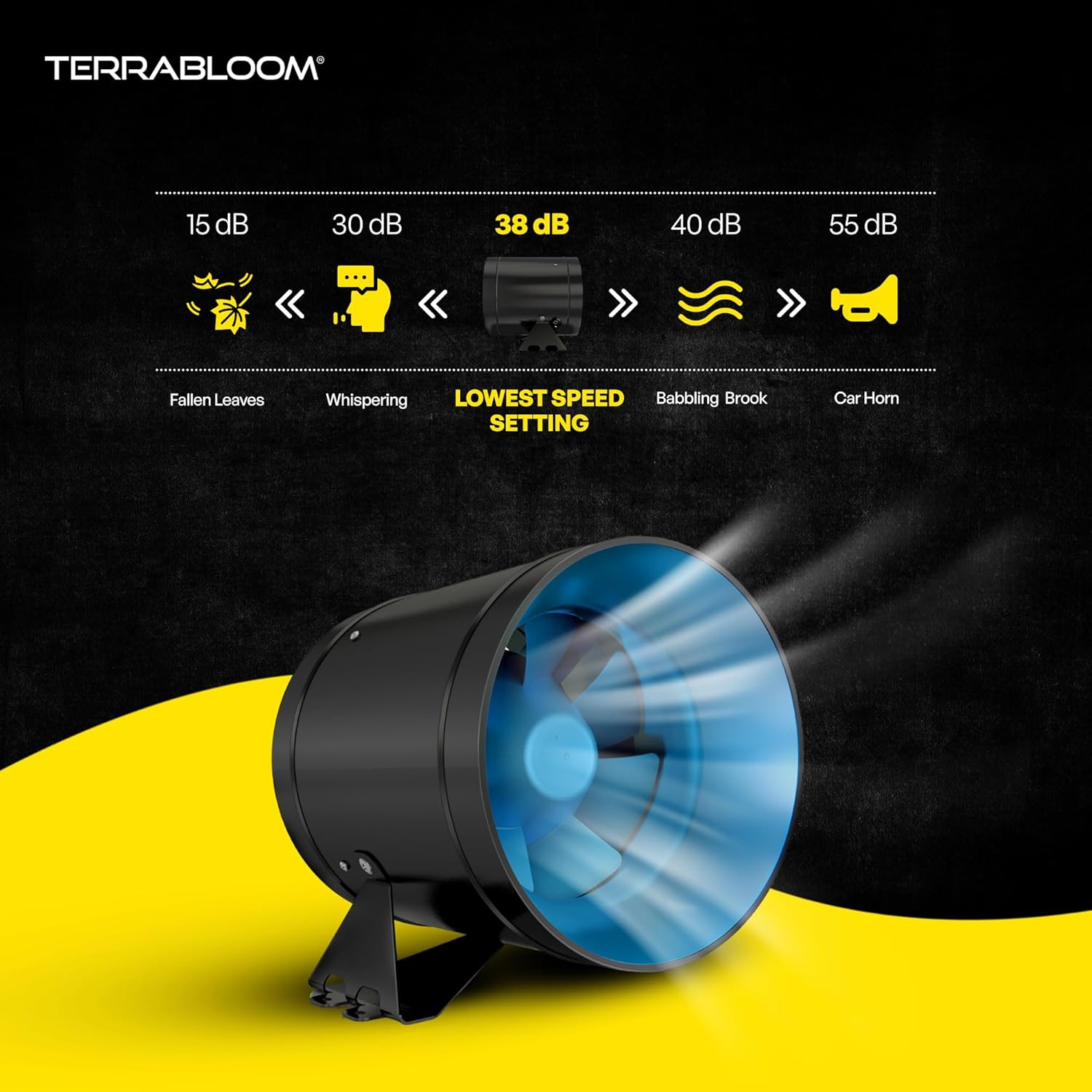
Figure 9: Noise level comparison, highlighting the fan's quiet operation at its lowest speed setting.
Official Product Video: Sound Output at Variable Speeds
Video 1: Demonstrates the sound output of the TerraBloom ECMF-200 8" Inline Duct Fan at various speeds, measured by a sound level meter.
5. Maintenance
Regular maintenance ensures the longevity and optimal performance of your TerraBloom inline duct fan.
Recommended Maintenance Schedule:
- Monthly: Inspect the fan blades and housing for dust and debris accumulation. Clean with a soft, dry cloth. For heavy buildup, a slightly damp cloth can be used, ensuring the fan is unplugged and completely dry before re-powering.
- Quarterly: Check all electrical connections and ensure they are secure. Inspect the ducting for any tears or disconnections that could affect airflow.
- Annually: Perform a thorough inspection of the motor and bearings. While the EC motor is designed for long-term, maintenance-free operation, an annual check can identify any potential issues early.
Always unplug the fan from the power source before performing any maintenance or cleaning.
6. Troubleshooting
If you encounter issues with your TerraBloom ECMF-200 fan, refer to the following common problems and solutions:
| Problem | Possible Cause | Solution |
|---|---|---|
| Fan does not turn on. | No power, loose connection, faulty controller. | Check power outlet, ensure all cables are securely connected. Test with a different outlet if possible. Verify controller is functioning. |
| Reduced airflow. | Blocked ducting, dirty fan blades, incorrect speed setting. | Inspect ducting for obstructions. Clean fan blades. Increase speed setting on the controller. |
| Excessive noise or vibration. | Loose mounting, foreign object in fan, damaged blades. | Ensure fan is securely mounted. Unplug and inspect for foreign objects. Contact support if blades appear damaged. |
If the problem persists after attempting these solutions, please contact TerraBloom customer support.
7. Specifications
| Attribute | Value |
|---|---|
| Duct Diameter | 8” (200mm) |
| Airflow | 569 CFM |
| Power | 74W |
| Noise Level | 38-62 dBA |
| Bearings | Dual Ball |
| Product Dimensions | 8.7 x 8.7 x 8.8 in. (approx. 0.34"D x 0.34"W x 0.35"H from other spec) |
| Ingress Protection Rating | IPX4 |
| Certifications | ETL Listed, HVI Certified, Energy Star |
| Item Model Number | 8-ECMF |
| Manufacturer | TerraBloom |
| Power Source | AC |

Figure 10: Product size details and specifications.

Figure 11: Efficient design and fan component details.
8. Warranty
The TerraBloom ECMF-200 Inline Duct Fan is covered by a 2-Year Limited Warranty from the date of purchase. This warranty covers defects in materials and workmanship under normal use. Please retain your proof of purchase for warranty claims.
For detailed warranty terms and conditions, please visit the official TerraBloom website or contact customer support.

Figure 12: Built to last, engineered for excellence, including 2-year warranty information.
9. Customer Support
For any questions, technical assistance, or warranty inquiries, please contact TerraBloom customer support:
- Website: Visit the TerraBloom Store on Amazon
- Email: support@terrabloom.com
- Phone: 1-800-XXX-XXXX
Our support team is available to assist you with any product-related concerns.
Related documentsECMF-200


Ask a question about this manual
Ask about setup, troubleshooting, compatibility, parts, safety, or missing instructions. Manuals+ will review the question and use this page’s manual context to help answer it.