1. Product Overview
The Milwaukee M18 PACKOUT Radio Charger (Model 2950-20) is a durable, high-performance audio solution designed for jobsite environments. It integrates seamlessly with the PACKOUT modular storage system, providing robust sound, charging capabilities for M18 batteries, and device charging via USB.
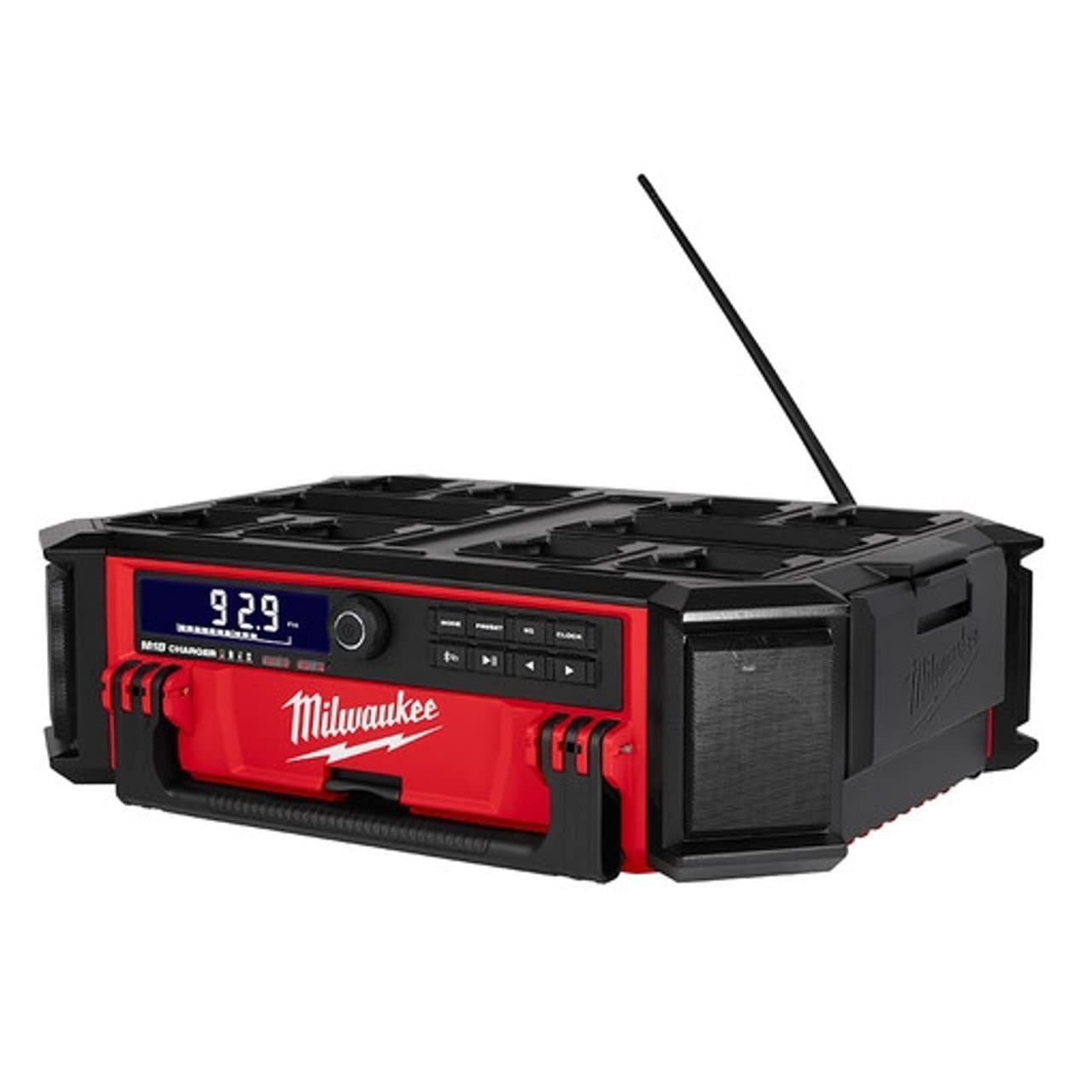
Figure 1: Milwaukee M18 PACKOUT Radio Charger (Model 2950-20) with key dimensions.
2. Setup
2.1 Battery Installation
- Locate the battery compartment on the side of the unit.
- Open the weather-sealed compartment cover.
- Insert a fully charged Milwaukee M18 battery into the designated slot until it clicks securely into place.
- Close the compartment cover firmly to ensure a weather-sealed connection.
2.2 Power Connection
- For AC power and battery charging, locate the integrated power cord on the side of the unit.
- Unwrap the power cord from its storage hooks.
- Plug the power cord into a standard 120V AC outlet.
- The unit will automatically begin charging any inserted M18 battery.
3. Operating Instructions
3.1 Controls Overview
The control panel features a central power/volume knob, mode selection buttons, preset buttons, equalizer controls, and a clock button. Playback controls (play/pause, skip forward/backward) are also present.

Figure 2: Detailed view of the control panel.
3.2 Power On/Off and Volume
- To power on/off: Press and hold the central power/volume knob.
- To adjust volume: Rotate the central power/volume knob clockwise to increase volume and counter-clockwise to decrease.
3.3 Radio Operation (AM/FM, Presets)
- Press the MODE button to cycle through available modes (Bluetooth, AM, FM, Auxiliary).
- Once in AM or FM mode, use the forward/backward arrow buttons to tune to desired stations.
- To save a preset: Tune to the desired station, then press and hold a PRESET button (1-9) until the display confirms storage.
- To recall a preset: Briefly press the corresponding PRESET button.
3.4 Bluetooth Connectivity
- Press the MODE button until "Bluetooth" is selected. The Bluetooth indicator will flash.
- On your mobile device, enable Bluetooth and search for "Milwaukee Radio".
- Select the radio from your device's Bluetooth list to pair. The indicator will become solid when connected.
- Use your device or the radio's playback controls (play/pause, skip) to manage audio.
3.5 Charging Devices
- Open the weather-sealed compartment on the side of the unit.
- Locate the USB charging port inside.
- Connect your mobile device or other USB-powered device using a compatible USB cable.
- Close the compartment cover to protect your device from jobsite elements while charging.
3.6 Equalizer and Clock Settings
- Press the EQ button to access equalizer settings (Bass, Treble). Use the arrow buttons to adjust levels.
- Press the CLOCK button to set the time. Use the arrow buttons to adjust hours and minutes, then press CLOCK again to confirm.
4. Maintenance
- Cleaning: Wipe the unit with a damp cloth. Do not use harsh chemicals or abrasive cleaners. Ensure all compartments are closed before cleaning.
- Storage: Store the radio in a dry, protected area when not in use. Ensure the power cord is neatly wrapped and secured.
- Battery Care: Always use genuine Milwaukee M18 batteries. Follow battery charging and storage guidelines provided with your M18 batteries.
5. Troubleshooting
- No Power: Ensure the unit is properly plugged into an AC outlet or that a charged M18 battery is securely installed. Check the power outlet for functionality.
- No Sound: Verify volume is turned up. Check that the correct audio source (AM/FM/Bluetooth/Aux) is selected. Ensure Bluetooth device is paired and playing audio.
- Poor Radio Reception: Extend the antenna fully. Try repositioning the unit to improve signal.
- Bluetooth Pairing Issues: Ensure the radio is in Bluetooth mode and discoverable. Forget the device on your mobile phone and attempt to re-pair. Ensure no other devices are actively connected to the radio.
- Battery Not Charging: Confirm the unit is plugged into a live AC outlet. Ensure the M18 battery is correctly inserted. Check for any error indicators on the display.
6. Specifications
| Feature | Specification |
|---|---|
| Model Number | 2950-20 |
| Manufacturer | Milwaukee Electric |
| Power Source | Battery Powered (M18) / AC Power |
| Product Dimensions | 22"L x 16.2"W x 6.7"H |
| Item Weight | 4 pounds |
| Connectivity | Bluetooth, USB, AM/FM Radio |
| Display Style | LCD |
| Special Features | Built-In Clock, Weather-Sealed Compartment, Bottle Opener |
7. Warranty and Support
This Milwaukee M18 PACKOUT Radio Charger is covered by a Manufacturer Warranty. For specific warranty details, registration, or support, please refer to the documentation included with your product or visit the official Milwaukee Electric website. Keep your purchase receipt as proof of purchase for warranty claims.


