Introduction
Thank you for choosing a Tommy Hilfiger timepiece. This instruction manual provides essential information for the proper setup, operation, and maintenance of your Tommy Hilfiger Women's Multifunction Quartz Analog Watch, Model 1782143. Please read this manual carefully to ensure optimal performance and longevity of your watch.
Watch Components

Image 1: Front view of the Tommy Hilfiger Women's Multifunction Quartz Analog Watch, Model 1782143. This image displays the watch face with its white sunray dial, rose gold-tone hands and Roman numerals, three sub-dials for day, date, and 24-hour display, and the crystal-embellished bezel. The rose gold-tone stainless steel bracelet is also visible.
- Crown: Used for setting the time and date.
- Pushers (Buttons): Used to adjust the day and date sub-dials.
- Hour, Minute, Second Hands: Indicate the current time.
- Sub-dials: Display the day of the week, date of the month, and a 24-hour indicator.
- Bracelet: Rose gold-tone stainless steel band.
Setup
1. Setting the Time
- Pull the crown out to the second click position.
- Rotate the crown to move the hour and minute hands clockwise until the desired time is set. Ensure the AM/PM is correctly set if the watch has a 24-hour indicator or date changes at midnight.
- Push the crown back into the normal position to start the watch.
2. Setting the Date and Day
This watch features multifunction sub-dials for date and day. The specific adjustment method may vary slightly, but generally involves the crown and pushers.
- Setting the Date: Pull the crown out to the first click position. Rotate the crown to adjust the date sub-dial. If your watch has pushers, one pusher typically advances the date.
- Setting the Day: Use the other pusher to advance the day sub-dial. Some models may require rotating the crown in the first click position in the opposite direction to adjust the day.
- After setting, push the crown back into the normal position.
Note: Avoid setting the date or day between 9 PM and 3 AM, as this can interfere with the automatic date change mechanism and potentially damage the movement.
3. Bracelet Adjustment
The stainless steel bracelet can be adjusted for a comfortable fit. This typically involves removing or adding links. It is recommended to have this procedure performed by a professional jeweler to prevent damage to the bracelet or clasp.
Operating Your Watch
Basic Timekeeping
Once the time and date are set, your quartz watch will operate continuously. The second hand will move in distinct steps, indicating the passage of time. The sub-dials will automatically advance the day and date at midnight.
Multifunction Dials
- Day Sub-dial: Indicates the current day of the week (e.g., MON, TUE).
- Date Sub-dial: Indicates the current day of the month (e.g., 1-31).
- 24-Hour Sub-dial: Displays the time in a 24-hour format, useful for distinguishing AM/PM.
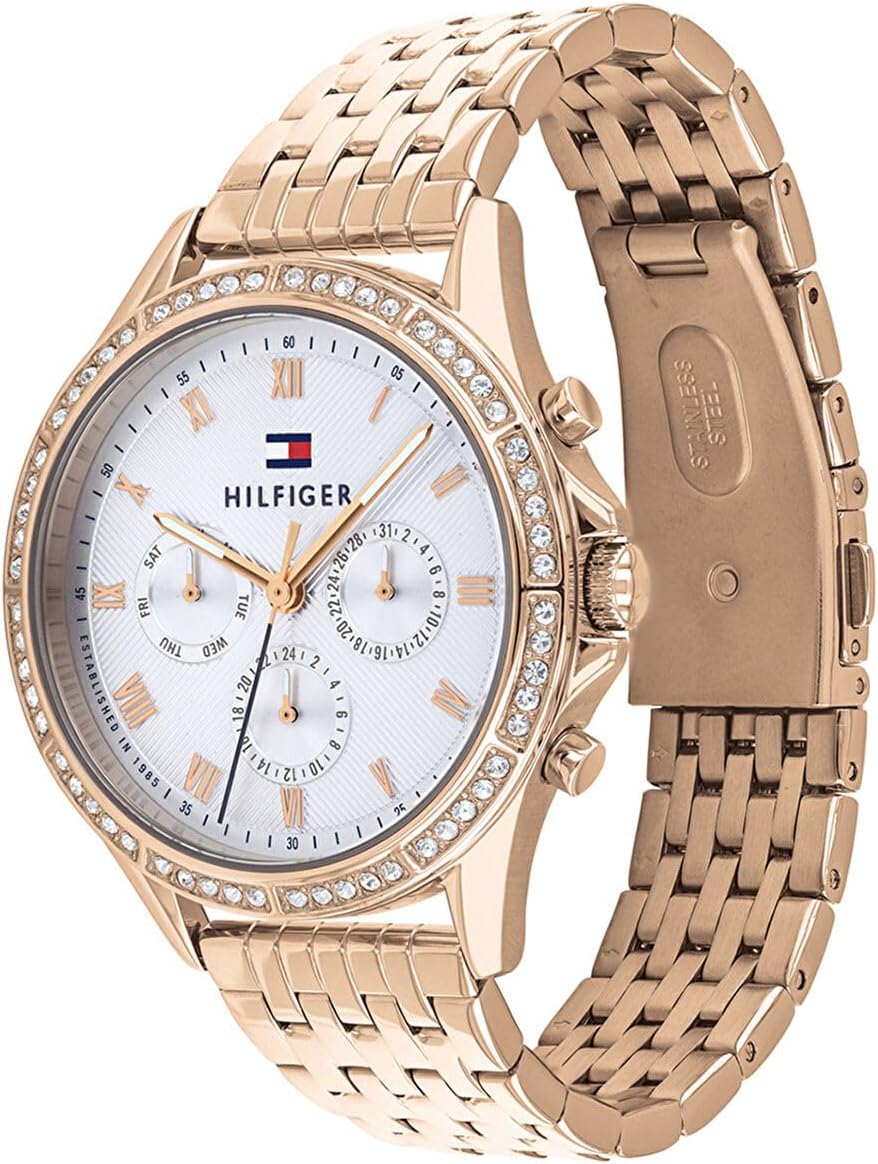
Image 2: Angled view of the Tommy Hilfiger Women's Multifunction Quartz Analog Watch, Model 1782143. This perspective highlights the watch's profile, the texture of the rose gold-tone stainless steel bracelet, and the detailing on the crown and pushers.
Maintenance
Cleaning Your Watch
To maintain the appearance of your watch, regularly wipe the case and bracelet with a soft, dry cloth. For stubborn dirt, a slightly damp cloth can be used, followed by immediate drying. Avoid using harsh chemicals or abrasive materials.
Water Resistance (3 ATM)
Your watch has a water resistance rating of 3 ATM (30 meters/100 feet). This means it is suitable for everyday use and can withstand splashes of water or brief exposure to rain. It is not suitable for showering, bathing, swimming, diving, or any water sports. Ensure the crown is fully pushed in at all times to maintain water resistance.
Battery Replacement
The watch is powered by a lithium metal battery. When the watch stops running, it indicates the battery needs replacement. Battery replacement should be performed by a qualified watch technician to ensure the correct battery type is used and the water resistance seal is properly re-established.
Storage
When not wearing your watch for extended periods, store it in a cool, dry place away from direct sunlight and extreme temperatures. Keeping it in its original box or a watch case can protect it from dust and scratches.
Troubleshooting
| Problem | Possible Cause | Solution |
|---|---|---|
| Watch not running | Battery depleted; Crown not pushed in | Replace battery (professional service recommended); Push crown fully into normal position |
| Time/Date incorrect | Needs adjustment; Crown accidentally pulled out | Refer to 'Setting the Time' and 'Setting the Date and Day' sections; Ensure crown is fully pushed in |
| Condensation inside crystal | Exposure to extreme temperature changes or moisture ingress | Seek professional service immediately to prevent damage to the movement |
Specifications

Image 3: Back view of the Tommy Hilfiger Women's Multifunction Quartz Analog Watch, Model 1782143. This image shows the stainless steel case back with engraved Tommy Hilfiger branding, '100% STAINLESS STEEL', and 'WATER RESISTANT'.
- Model Number: 1782143
- Movement: Quartz Multifunction
- Case Material: Stainless Steel, Rose Gold-tone Plated
- Bracelet Material: Stainless Steel, Rose Gold-tone Plated
- Dial: White Sunray with Rose Gold-tone Roman Numerals and Hands
- Sub-dials: Day, Date, 24-Hour
- Water Resistance: 3 ATM (30 meters / 100 feet)
- Dimensions (L x W x H): Approximately 4.13 x 3.94 x 3.15 cm
- Weight: Approximately 120 grams
- Battery: 1 Lithium Metal (included)
Warranty and Support
Your Tommy Hilfiger watch is covered by a limited warranty against manufacturing defects. Please refer to the warranty card included with your purchase for specific terms, conditions, and duration of coverage. Keep your proof of purchase for warranty claims.
For service or support, please contact the authorized Tommy Hilfiger watch service center or the retailer from whom you purchased the watch. Do not attempt to open or repair the watch yourself, as this may void the warranty.


