
1. Introduction
Welcome to the world of fresh coffee with your new KRUPS KM550D50 Personal Café Grind Drip Maker. This appliance is designed to provide the freshest and most delicious coffee by grinding whole beans just before brewing, or by brewing pre-ground coffee. Its compact design makes it ideal for personal use, delivering a superior coffee experience with every cup.
This manual provides essential information for the safe and efficient operation, maintenance, and troubleshooting of your coffee maker. Please read it thoroughly before first use and keep it for future reference.
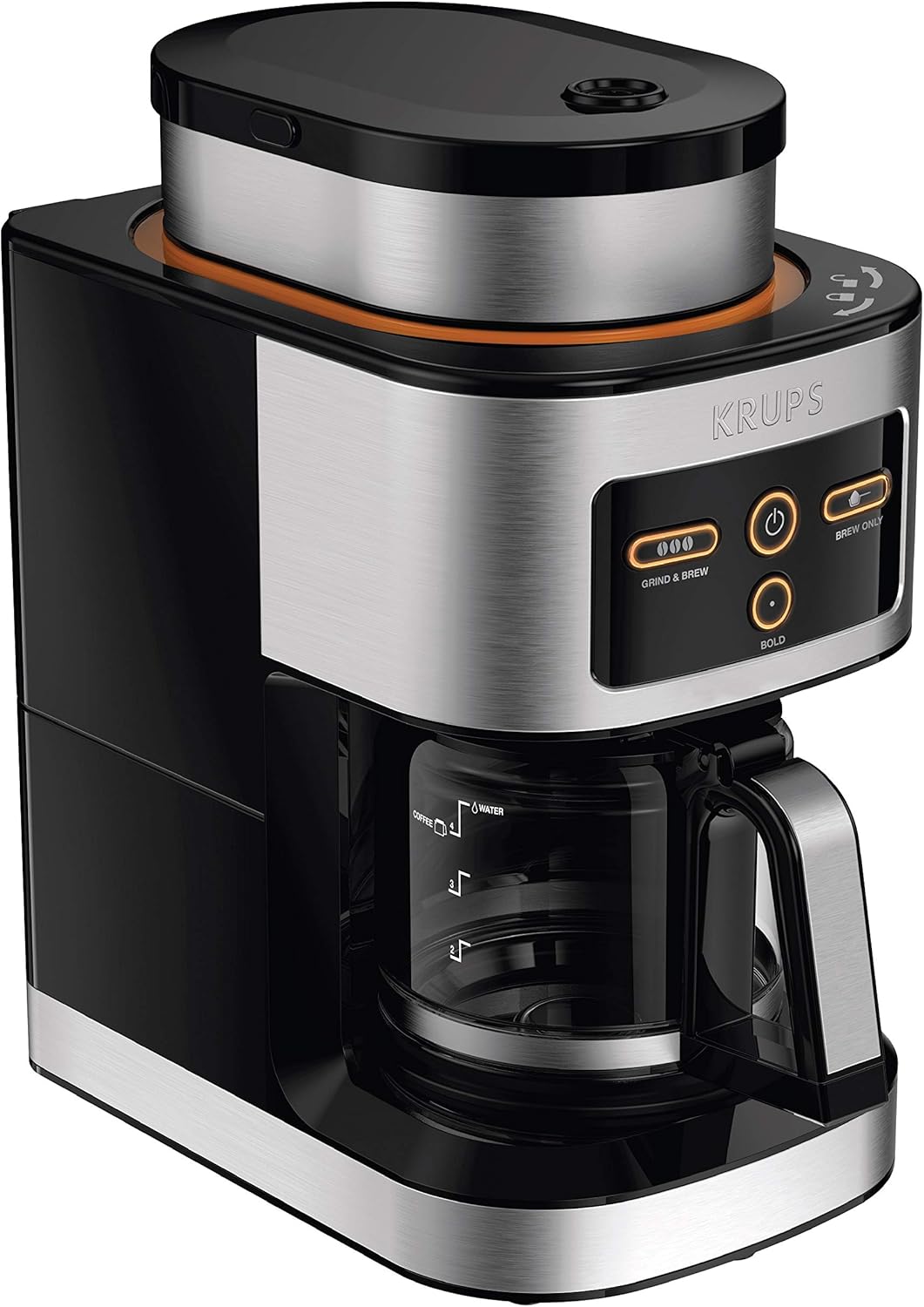
Figure 1: KRUPS KM550D50 Personal Café Grind Drip Maker Coffee Grinder.
2. Important Safety Information
When using electrical appliances, basic safety precautions should always be followed to reduce the risk of fire, electric shock, and/or injury to persons, including the following:
- Read all instructions.
- Do not touch hot surfaces. Use handles or knobs.
- To protect against fire, electric shock, and injury to persons, do not immerse cord, plugs, or coffee maker in water or other liquid.
- Close supervision is necessary when any appliance is used by or near children.
- Unplug from outlet when not in use and before cleaning. Allow to cool before putting on or taking off parts, and before cleaning the appliance.
- Do not operate any appliance with a damaged cord or plug or after the appliance malfunctions, or has been damaged in any manner. Return appliance to the nearest authorized service facility for examination, repair, or adjustment.
- The use of accessory attachments not recommended by the appliance manufacturer may result in fire, electric shock, or injury to persons.
- Do not use outdoors.
- Do not let cord hang over edge of table or counter, or touch hot surfaces.
- Do not place on or near a hot gas or electric burner, or in a heated oven.
- Always attach plug to appliance first, then plug cord into the wall outlet. To disconnect, turn any control to "off", then remove plug from wall outlet.
- Do not use appliance for other than intended use.
- Scalding may occur if the lid is removed during the brewing cycles.
3. Product Overview
The KRUPS KM550D50 is a compact and versatile coffee maker designed for convenience and fresh brewing. Key features include:
- Grind and Brew Function: Grinds whole coffee beans to release delicious aroma and automatically brews for the freshest taste.
- Dual Brewing Capability: Can either grind and brew whole coffee beans or brew pre-ground coffee.
- Powerful Stainless Steel Burr Grinder: Premium flat burr grinder with 2 settings for coarse or fine grind to suit your favorite coffee beans type. Easily grinds oily and flavored beans.
- Easy to Clean & Dishwasher Safe Parts: Designed for easy cleaning; all parts in contact with coffee can be disassembled and cleaned in a dishwasher.
- Accessories Included: Stainless steel permanent filter, KRUPS coffee scoop, cleaning brush, and glass coffee pot with fill water mark indicators.
- Compact Design: Ideal for smaller spaces, brews up to 4 cups (20 fl. oz.).
- Automatic Keep Warm: Maintains coffee temperature for a period after brewing.

Figure 2: Front view of the coffee maker highlighting key components like the ON/OFF button, Grind & Brew button, Brew Only button, Bold setting, and Automatic Keep Warm plate.

Figure 3: Close-up view of the premium stainless steel burr grinder, which adjusts for medium or dark roasts.
4. Setup
Before first use, ensure all packaging materials are removed and clean all removable parts as described in the "Maintenance" section.
- Placement: Place the coffee maker on a flat, stable, heat-resistant surface, away from water sources and direct heat.
- Power Connection: Plug the power cord into a suitable electrical outlet. Ensure the voltage matches the appliance's requirements.
- Initial Cleaning Cycle: Before brewing coffee for the first time, run a full brewing cycle with only water to clean the internal components.
- Fill the water reservoir with fresh, cold water up to the MAX line.
- Place the empty carafe on the warming plate.
- Press the "Brew Only" button to start the cycle.
- Once complete, discard the water and rinse the carafe.
5. Operating Instructions
Your KRUPS KM550D50 offers two primary brewing modes: Grind & Brew for whole beans and Brew Only for pre-ground coffee.
5.1. Brewing with Whole Beans (Grind & Brew)
- Fill Water Reservoir: Open the lid and fill the water reservoir with fresh, cold water according to the desired number of cups (up to 4 cups / 20 fl. oz.). Refer to the water level markings on the carafe and reservoir.
- Add Whole Beans: Open the bean hopper lid. Add the desired amount of whole coffee beans into the bean hopper. Use the included KRUPS coffee scoop for accurate measurement (typically 1 scoop per cup). Do not overfill.
- Select Grind Setting: Adjust the burr grinder setting (if applicable) for your preferred grind size (fine or coarse).
- Place Carafe: Ensure the glass carafe is properly placed on the warming plate.
- Start Brewing: Press the "GRIND & BREW" button. The machine will automatically grind the beans and then begin the brewing process.
- For a stronger coffee, press the "BOLD" button before starting the brew cycle.
- Enjoy: Once brewing is complete, the machine will automatically switch to the keep-warm function. Carefully remove the carafe to pour and enjoy your fresh coffee.

Figure 4: Illustrates the simple one-touch operation: add beans, then press the Grind & Brew button.

Figure 5: Shows the choice between brewing whole beans (Grind & Brew) or pre-ground coffee (Brew Only).
5.2. Brewing with Pre-Ground Coffee (Brew Only)
- Fill Water Reservoir: Open the lid and fill the water reservoir with fresh, cold water according to the desired number of cups.
- Add Pre-Ground Coffee: Place the permanent filter (or a paper filter, if preferred) into the filter basket. Add the desired amount of pre-ground coffee into the filter.
- Place Carafe: Ensure the glass carafe is properly placed on the warming plate.
- Start Brewing: Press the "BREW ONLY" button. The machine will begin the brewing process.
- Enjoy: Once brewing is complete, the machine will automatically switch to the keep-warm function. Carefully remove the carafe to pour and enjoy your coffee.
5.3. Product Overview Video
Watch this official product overview video for a visual guide on the KRUPS KM550D50 Personal Café Grind Drip Maker Coffee Grinder's features and operation.
Video 1: Official product overview of the KRUPS Personal Drip Coffee Maker, demonstrating its key functionalities.
6. Maintenance
Regular cleaning ensures optimal performance and extends the life of your coffee maker. Always unplug the appliance before cleaning and allow it to cool down.
6.1. Daily Cleaning
- Carafe and Lid: Wash the glass carafe and its lid with warm, soapy water after each use. Rinse thoroughly. The carafe is not dishwasher safe.
- Permanent Filter & Filter Basket: Remove the permanent filter and filter basket. Discard used coffee grounds. Wash these parts with warm, soapy water and rinse thoroughly. These parts are dishwasher safe (top rack recommended).
- Bean Hopper & Grinder Assembly: After each use, especially when using the grind function, remove the bean hopper and grinder assembly. Use the included cleaning brush to remove any residual coffee grounds. Wash with warm, soapy water and rinse. These parts are dishwasher safe (top rack recommended).
- Exterior: Wipe the exterior of the coffee maker with a damp cloth. Do not use abrasive cleaners or scouring pads.

Figure 6: Illustrates how the brewing parts can be disassembled for easy cleaning, with many parts being dishwasher safe.
6.2. Descaling
Mineral deposits from water can build up over time and affect performance. Descale your coffee maker every 2-3 months, or more frequently if you have hard water.
- Prepare Descaling Solution: Mix 1 part white vinegar with 2 parts water. Fill the water reservoir with this solution up to the 4-cup mark.
- Run Descaling Cycle: Place the empty carafe on the warming plate. Press the "Brew Only" button to run a full brewing cycle with the descaling solution.
- Rinse Cycles: After the descaling cycle is complete, discard the solution. Fill the water reservoir with fresh, cold water and run two full "Brew Only" cycles with just water to rinse out any remaining descaling solution.
7. Troubleshooting
If you encounter issues with your coffee maker, refer to the following table for common problems and solutions.
| Problem | Possible Cause | Solution |
|---|---|---|
| Coffee is too weak. | Not enough coffee grounds/beans; incorrect grind size; "BOLD" setting not used. | Increase coffee amount; select finer grind setting; use the "BOLD" button. |
| Coffee is too strong. | Too much coffee grounds/beans; incorrect grind size. | Decrease coffee amount; select coarser grind setting. |
| Coffee maker not brewing. | No water in reservoir; not plugged in; carafe not properly placed. | Fill water reservoir; check power connection; ensure carafe is correctly positioned. |
| Grinder is clogged or not working. | Beans are too oily or sticky; grinder parts are dirty/clogged. | Clean the grinder assembly thoroughly (refer to Maintenance section); use less oily beans. |
| Water overflowing from filter basket. | Too much coffee grounds; filter clogged; carafe not on warming plate. | Reduce coffee amount; clean filter; ensure carafe is correctly placed. |
If the problem persists after trying these solutions, please contact KRUPS customer support.
8. Specifications
- Model: KM550D50
- Color: Silver
- Brand: KRUPS
- Style: Grind and Brew Coffee Maker
- Capacity: 4 cups / 20 fl. oz. (1.3 Pounds)
- Product Dimensions: 9 x 6.3 x 11.6 inches
- Item Weight: 7.19 pounds
- Manufacturer: KRUPS
- UPC: 010942225997
9. Warranty and Support
For detailed warranty information and customer support, please refer to the official KRUPS website or the warranty card included with your product. You can also find the official User Manual (PDF) here.
For technical assistance or to inquire about replacement parts, please contact KRUPS customer service directly. Have your model number (KM550D50) and purchase date ready when contacting support.


