
Titanium Stick 225
Titanium Stick 225 Inverter Welder User Manual
Model: Stick 225
1. Introduction
Thank you for choosing the Titanium Stick 225 Inverter Welder. This manual provides essential information for the safe and effective operation, setup, maintenance, and troubleshooting of your new welding machine. Please read this manual thoroughly before operating the welder to ensure proper use and to prevent injury or damage.
2. Safety Information
WARNING: Welding can be dangerous. Protect yourself and others from serious injury or death. Read and understand this manual and all warning labels on the equipment.
2.1 General Safety Precautions
- Always wear appropriate Personal Protective Equipment (PPE), including a welding helmet with proper shade, flame-resistant clothing, welding gloves, and safety shoes.
- Ensure the work area is well-ventilated to avoid inhaling welding fumes.
- Keep a fire extinguisher nearby and know how to use it.
- Never weld near flammable materials or in explosive atmospheres.
- Ensure all electrical connections are secure and properly grounded.
2.2 Electrical Safety
- Do not operate the welder with wet hands or in damp conditions.
- Inspect power cords and welding cables for damage before each use. Replace damaged cables immediately.
- Connect the welder to a properly rated and grounded power supply.
- Avoid touching live electrical parts.
2.3 Arc Ray and Burn Prevention
- Arc rays can cause eye and skin burns. Use a welding helmet with a suitable filter lens and protective clothing.
- Hot metal and sparks can cause severe burns. Allow welded materials to cool before handling.
3. Product Overview
The Titanium Stick 225 Inverter Welder is a powerful and portable Shielded Metal Arc Welding (SMAW) machine designed for both shop and field use. It features advanced inverter technology for superior arc performance and a lightweight design.
3.1 Key Features
- Inverter Technology: Provides easy arc starts and a stable, reliable arc.
- Lightweight Design: Weighs only 16.5 lbs, making it highly portable.
- Dual Voltage Capability: Operates on both 120V and 240V input power.
- DC Output: Results in a smoother bead profile.
- Over-Current Protection: With an indicator light to ensure longevity and protect the machine.
- Easy-Access Controls: For precise adjustment of welding settings.
- Included Accessories: Comes with an electrode holder and ground clamp.
3.2 Components and Controls
Familiarize yourself with the main components and controls of your welder.
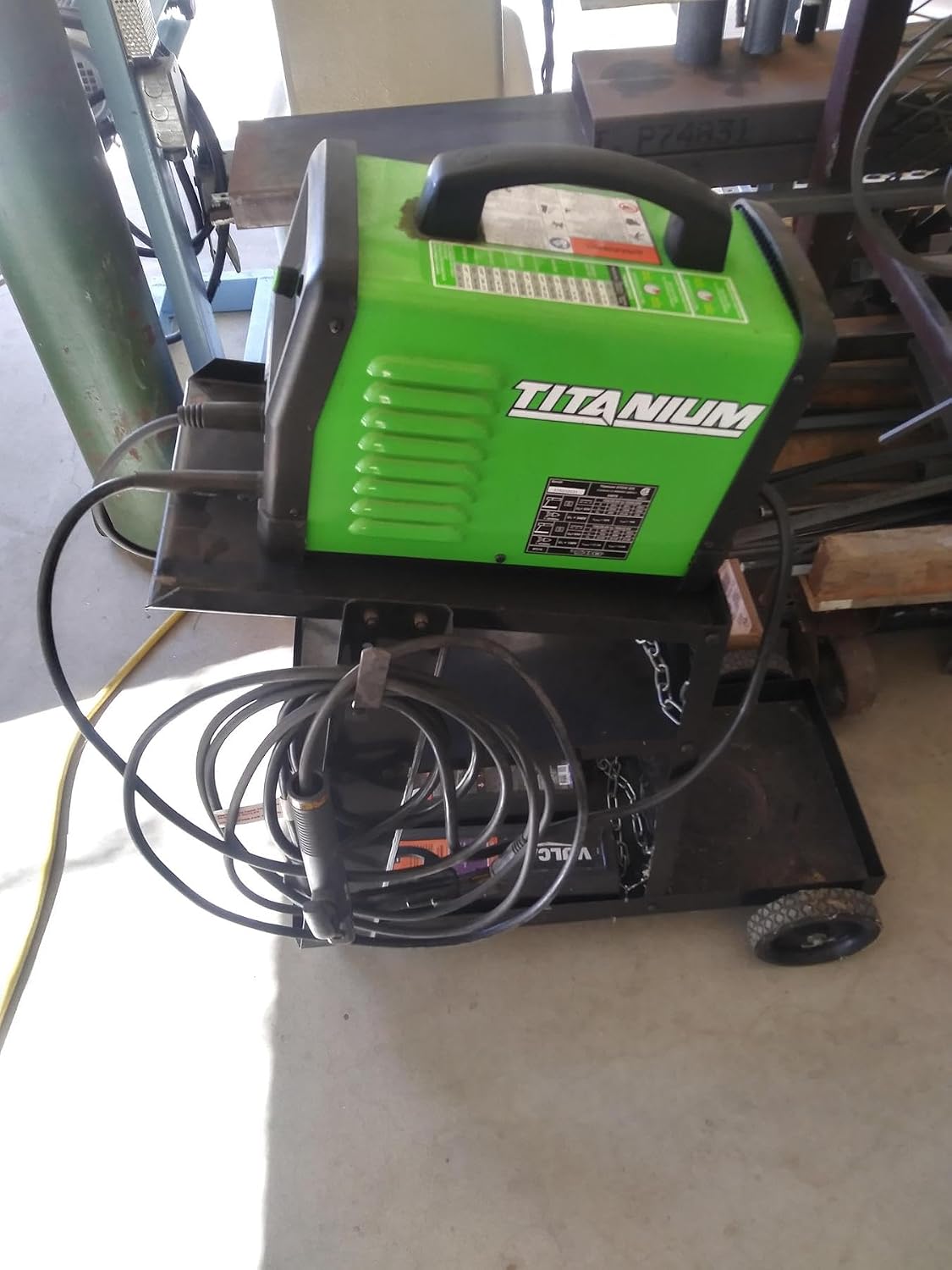
Figure 3.1: Titanium Stick 225 Inverter Welder on a welding cart, showcasing its compact size and portability.

Figure 3.2: Front view of the Titanium Stick 225 Inverter Welder, showing the control panel, power input, and welding lead connections.
- Control Knob: Adjusts welding current (amperage).
- Power Switch: Turns the welder ON/OFF.
- Over-Current Indicator Light: Illuminates if the machine is overloaded or overheated.
- Input Voltage Selector (if applicable): Automatically detects or manually selects 120V/240V.
- Electrode Holder Connection: Positive (+) terminal for connecting the electrode holder.
- Ground Clamp Connection: Negative (-) terminal for connecting the ground clamp.
4. Setup
4.1 Power Connection
- Ensure the welder's power switch is in the OFF position.
- Connect the power cord to a suitable 120V or 240V grounded electrical outlet. The welder features dual voltage technology, automatically adapting to the input voltage.
- Verify the power supply circuit can handle the welder's current requirements.
4.2 Welding Cable Connections
- Connect the electrode holder cable to the positive (+) terminal on the welder. Twist to secure.
- Connect the ground clamp cable to the negative (-) terminal on the welder. Twist to secure.
- Attach the ground clamp securely to the workpiece or a clean, bare metal part of the welding table, ensuring good electrical contact.
4.3 Electrode Installation
- Select the appropriate electrode type and diameter for your welding application.
- Insert the bare end of the electrode into the jaws of the electrode holder. Ensure it is held firmly.
5. Operating Instructions
5.1 Powering On and Setting Current
- With all connections secure and the electrode installed, turn the power switch to the ON position.
- Adjust the control knob to set the desired welding current (amperage) based on the electrode type, diameter, and material thickness. Refer to electrode manufacturer recommendations.
5.2 Welding Process (SMAW)
- Position yourself comfortably and safely, ensuring clear visibility of the weld area.
- Lower your welding helmet.
- Strike an arc by lightly scratching or tapping the electrode against the workpiece.
- Maintain a consistent arc length and travel speed to produce a smooth, uniform weld bead.
- When finished, lift the electrode from the workpiece to break the arc.
- Allow the workpiece to cool before handling. Chip off any slag.
6. Maintenance
Regular maintenance ensures the longevity and optimal performance of your welder.
- Cleaning: Periodically clean the welder's exterior with a dry, soft cloth. Use compressed air to blow out dust from the cooling vents, ensuring the machine is unplugged.
- Cable Inspection: Regularly inspect welding cables, power cords, and connections for cuts, abrasions, or loose fittings. Replace damaged components immediately.
- Storage: Store the welder in a clean, dry environment, away from excessive dust, moisture, and extreme temperatures.
7. Troubleshooting
This section addresses common issues you might encounter with your Titanium Stick 225 Inverter Welder.
| Problem | Possible Cause | Solution |
|---|---|---|
| Welder does not power on | No power from outlet; Power cord damaged; Welder switch OFF | Check power outlet and circuit breaker; Inspect and replace power cord; Turn welder switch ON |
| No arc or weak arc | Poor ground connection; Incorrect current setting; Wet or improper electrode; Damaged welding cables | Ensure ground clamp has good contact; Adjust current setting; Use dry, correct electrode; Inspect and replace cables |
| Over-current indicator light is on | Overheating due to prolonged use; Insufficient ventilation; Input voltage too low | Allow welder to cool down; Ensure clear airflow to vents; Check input voltage |
| Excessive spatter | Current too high; Arc length too long; Incorrect electrode angle | Reduce current; Shorten arc length; Adjust electrode angle |
8. Specifications
| Feature | Specification |
|---|---|
| Model | Stick 225 |
| Welding Process | SMAW (Stick) |
| Input Voltage | 120V / 240V (Dual Voltage) |
| Output Current Type | Direct Current (DC) |
| Weight | 16.5 lbs |
| Technology | Inverter |
9. Warranty and Support
For warranty information, technical support, or service inquiries, please refer to the warranty card included with your product or contact the retailer or manufacturer directly. Keep your purchase receipt as proof of purchase.
For further assistance, please visit the official Titanium website or contact their customer service department.
Related documentsStick 225


Ask a question about this manual
Ask about setup, troubleshooting, compatibility, parts, safety, or missing instructions. Manuals+ will review the question and use this page’s manual context to help answer it.