
1. Important Safety Information
Before operating the Einhell Power Generator TC-PG 55/E5, read and understand all safety warnings and instructions in this manual. Failure to follow these instructions may result in electric shock, fire, serious injury, or death.
- Carbon Monoxide Hazard: Generators produce carbon monoxide, a colorless, odorless, poisonous gas. Operate the generator outdoors in a well-ventilated area, far from windows, doors, and vents. Never operate indoors or in partially enclosed spaces.
- Fire Hazard: Gasoline is highly flammable. Refuel in a well-ventilated area with the engine off and cool. Do not smoke or allow open flames near the generator.
- Electrical Shock Hazard: Do not operate the generator in wet conditions. Ensure all electrical connections are secure and dry. Ground the generator properly.
- Hot Surfaces: The generator engine and muffler become very hot during operation and remain hot for some time after shutdown. Avoid contact to prevent burns.
- Children and Pets: Keep children and pets away from the generator, especially during operation.
2. Setup and Assembly
This section details the initial steps required to prepare your generator for first use.
2.1 Unpacking and Inspection
Carefully remove the generator from its packaging. Inspect for any damage that may have occurred during shipping. Report any damage to your dealer immediately.
2.2 Wheel and Handle Assembly
Attach the wheels and transport handle to the generator frame. These components facilitate moving the generator. Refer to the included hardware for proper attachment.

Image: Detached handle and wheel components for the Einhell Power Generator, ready for assembly onto the main frame.
2.3 Battery Connection (for Electric Start)
For models equipped with electric start, connect the battery terminals. Ensure correct polarity: positive (+) to positive and negative (-) to negative. Secure the battery in its designated holder.

Image: A close-up view of the generator's battery, showing the terminals for connection.
2.4 Adding Engine Oil
Locate the oil fill cap/dipstick. Add the recommended type and amount of engine oil (refer to the specifications section for details) to the crankcase. Do not overfill. Check the oil level before each use.
2.5 Adding Fuel
Fill the fuel tank with fresh, unleaded gasoline. The generator has a 25-liter fuel tank. Use a funnel to prevent spills. Do not fill above the maximum level indicator. Ensure the fuel cap is securely tightened after refueling.
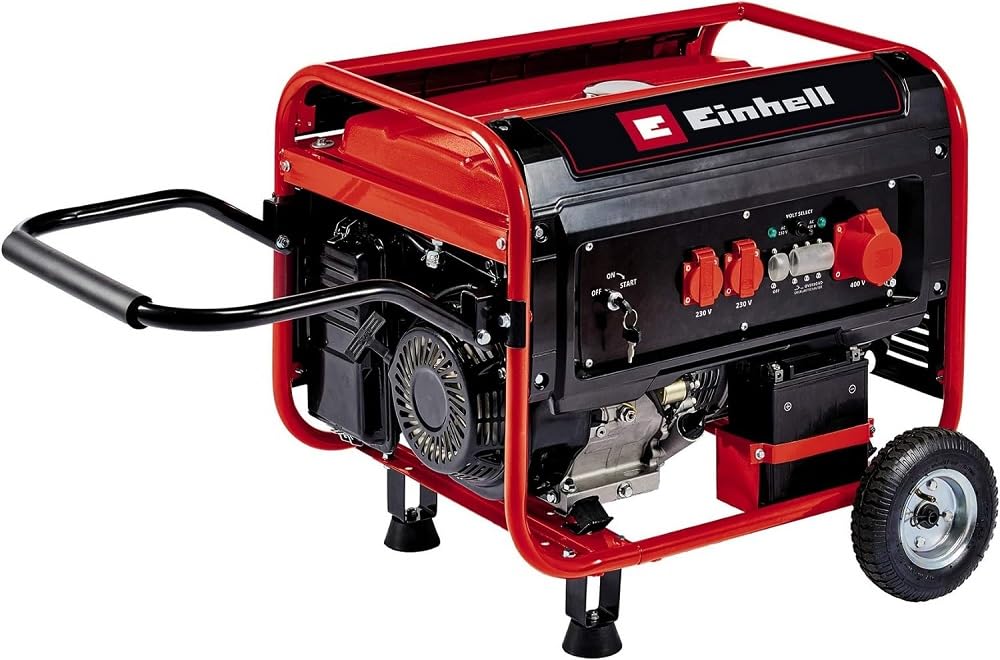
Image: The Einhell Power Generator TC-PG 55/E5, fully assembled and ready for use, with a person connecting a power cord.
3. Operating Instructions
Follow these steps for safe and efficient operation of your generator.
3.1 Starting the Generator
- Ensure the generator is on a level surface and in a well-ventilated outdoor area.
- Turn the fuel valve to the 'ON' position.
- Move the choke lever to the 'CHOKE' position (if the engine is cold).
- For electric start: Turn the ignition key to the 'START' position. Release the key once the engine starts.
- For manual start: Pull the recoil starter handle firmly until the engine starts.
- Once the engine starts, gradually move the choke lever to the 'RUN' position.
- Allow the engine to warm up for a few minutes before connecting electrical loads.
3.2 Connecting Electrical Devices
The generator is equipped with two 230 V sockets and one 400 V socket. Connect your devices only after the generator is running stably.

Image: A person connecting an electrical cord to one of the 230 V sockets on the generator's control panel.
3.2.1 230 V Sockets
These sockets provide standard household power. Ensure the total wattage of connected devices does not exceed the generator's running wattage (3000 W) or maximum wattage (3300 W) for 230 V outlets.

Image: A detailed view of the two 230 V power outlets located on the control panel of the generator.
3.2.2 400 V Socket
This socket is for higher power requirements. The maximum wattage for the 400 V outlet is 5500 W. Do not overload this circuit.

Image: A close-up of the single 400 V power outlet on the generator's control panel.
3.3 Overload Protection
The generator is equipped with an overload switch. If the connected load exceeds the generator's capacity, the overload switch will trip, cutting power output. Reduce the load and reset the switch to restore power.

Image: A detailed view of the overload switch and surrounding controls on the generator's panel.
3.4 Automatic Voltage Regulation (AVR)
The integrated AVR system helps maintain a stable output voltage, protecting sensitive electronics from voltage fluctuations.

Image: A graph demonstrating the stable voltage output provided by the Automatic Voltage Regulation (AVR) system.
3.5 Shutting Down the Generator
- Disconnect all electrical loads from the generator.
- Turn the engine switch to the 'OFF' position.
- Turn the fuel valve to the 'OFF' position.
- Allow the generator to cool down completely before storage.
4. Maintenance
Regular maintenance ensures the longevity and reliable operation of your generator.
4.1 Engine Oil Check and Change
Check the engine oil level before each use. Change the engine oil after the first 20 hours of operation, and then every 100 hours or annually, whichever comes first. Refer to the manual for the correct oil type and procedure.
4.2 Air Filter Cleaning
Inspect the air filter regularly. Clean or replace it if it is dirty or clogged. A dirty air filter can reduce engine performance and increase fuel consumption.
4.3 Spark Plug Inspection
Inspect the spark plug periodically. Clean or replace it if it is fouled or worn. Ensure the correct gap is maintained.
4.4 Fuel System Maintenance
If storing the generator for an extended period (more than 30 days), drain the fuel tank and carburetor to prevent fuel degradation and gumming. Alternatively, use a fuel stabilizer.
4.5 Oil Deficiency Protection
The generator is equipped with an oil deficiency protection system that automatically shuts down the engine if the oil level drops too low. This protects the engine from damage. If this occurs, check and refill the engine oil.
5. Troubleshooting
This section provides solutions to common operational issues.
| Problem | Possible Cause | Solution |
|---|---|---|
| Engine does not start | No fuel Low oil level Choke in wrong position Spark plug issue Battery discharged (electric start) | Add fresh fuel Add engine oil Adjust choke Inspect/clean/replace spark plug Charge/replace battery |
| No power output | Overload switch tripped Circuit breaker tripped Faulty connection | Reduce load and reset overload switch Reset circuit breaker Check all connections |
| Engine runs rough | Stale fuel Dirty air filter Spark plug issue | Drain and refill with fresh fuel Clean/replace air filter Inspect/clean/replace spark plug |
| Generator shuts down during operation | Low oil level Overheating No fuel | Check and add oil Ensure adequate ventilation, reduce load Refuel |
6. Technical Specifications
| Feature | Specification |
|---|---|
| Brand | Einhell |
| Model Number | 4152562 (TC-PG 55/E5) |
| Engine Type | 4-Stroke Petrol Engine |
| Engine Displacement | 389 cm³ |
| Engine Power Maximum | 7.5 Kilowatts |
| Fuel Type | Gasoline |
| Tank Volume | 25 Liters |
| Running Wattage (230V) | 3000 Watts |
| Maximum Wattage (230V) | 3300 Watts |
| Maximum Wattage (400V) | 5500 Watts |
| Total Power Outlets | 3 (2 x 230 V, 1 x 400 V) |
| Frequency | 50 Hz |
| Ignition System Type | Electric start |
| Item Weight | 80.4 Kilograms |
| Special Features | AVR (Automatic Voltage Regulation), Overload Switch, Oil Deficiency Protection |

Image: Icon for 4-Stroke Petrol Engine.

Image: Icon for 389 cm³ Engine Displacement.

Image: Icon for High Capacity 25 L Tank.

Image: Icon for 230 V Sockets (3000 W / max. 3300 W).

Image: Icon for 400 V Socket (3600 W / max. 5500 W).
7. Warranty and Support
For warranty information, please refer to the warranty card included with your product or visit the official Einhell website. For technical support, spare parts, or service inquiries, please contact Einhell customer service directly. Keep your purchase receipt and model number (TC-PG 55/E5 or 4152562) available when contacting support.


