1. Introduction and Overview
This manual provides detailed instructions for the installation, operation, and maintenance of your Soundstream VRN-DD7HB Double DIN Bluetooth In-Dash Car Stereo Receiver. Please read this manual thoroughly before using the product to ensure proper functionality and to prevent damage.
The VRN-DD7HB is designed to enhance your in-car audio experience with features such as Smart Sense Glass Panel Touch Screen Technology, Bluetooth V4.0 for hands-free calling and A2DP wireless audio playback, and compatibility with OEM steering wheel controls and rear view cameras.
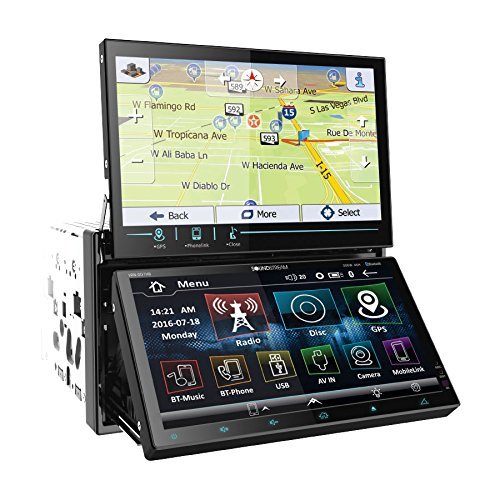
Figure 1.1: Front view of the Soundstream VRN-DD7HB Car Stereo Receiver, showcasing its double DIN form factor and touchscreen display.
2. Safety Information
To ensure safe operation and prevent injury or damage, observe the following precautions:
- Do not operate the unit in a manner that distracts you from driving. Always prioritize road safety.
- Consult a professional for installation to avoid electrical damage or improper wiring.
- Do not disassemble or modify the unit. This may cause malfunction or electric shock.
- Keep the volume at a level where you can still hear outside traffic sounds.
- Proposition 65 Warning: This product contains chemicals known to the State of California to cause cancer and birth defects or other reproductive harm.
3. Setup and Installation
Professional installation is highly recommended for this car stereo receiver. Incorrect wiring can cause severe damage to the unit or your vehicle's electrical system.
3.1 Wiring Connections
Ensure all power, ground, speaker, and accessory wires are connected correctly according to your vehicle's wiring diagram and the unit's wiring harness. Pay close attention to the following:
- Power (Yellow): Connect to constant 12V power.
- Accessory (Red): Connect to switched 12V power (ignition).
- Ground (Black): Connect securely to a clean chassis ground point.
- Speaker Outputs: Connect to your vehicle's speakers, ensuring correct polarity.
- Rear View Camera Input: Connect the video output of your rear view camera to the designated input on the receiver. Ensure the reverse trigger wire is connected to your vehicle's reverse light circuit.
- Steering Wheel Control Input: Connect to your vehicle's OEM steering wheel control interface (if applicable). Refer to your vehicle's manual and the steering wheel control interface instructions for proper connection.
3.2 Mounting
Mount the double DIN unit securely into your vehicle's dashboard using the provided mounting hardware. Ensure there is adequate space for ventilation and wiring.
4. Operating Instructions
4.1 Power On/Off
Press the power button (usually located on the front panel or a soft-touch button on the screen) to turn the unit on or off. The unit will also power on/off with your vehicle's ignition.
4.2 Touch Screen Operation
The VRN-DD7HB features a Smart Sense Glass Panel Touch Screen. Navigate menus, select functions, and adjust settings by touching the corresponding icons or areas on the display.
4.3 Bluetooth Connectivity
- Pairing a Device:
- Ensure Bluetooth is enabled on your mobile device.
- On the VRN-DD7HB, navigate to the Bluetooth menu.
- Search for available devices on your mobile phone. The unit should appear as "Soundstream VRN-DD7HB" or similar.
- Select the unit on your phone to pair. Enter the PIN (usually "0000") if prompted.
- Once paired, the unit will confirm the connection.
- Hands-Free Calling: After pairing, you can make and receive calls directly through the unit using the built-in front panel Bluetooth microphone and your car's speakers.
- A2DP Audio Playback: Stream audio wirelessly from your paired device. Select the Bluetooth audio source on the receiver and control playback (play/pause, skip) from the unit or your phone.
4.4 Rear View Camera Input
When the vehicle is shifted into reverse, the unit will automatically display the image from the connected rear view camera on its 800x480 widescreen resolution display. This feature provides assistance for parking and maneuvering.
4.5 Steering Wheel Control
If an OEM steering wheel control interface is connected, you can program the unit to respond to your vehicle's steering wheel buttons for functions such as volume control, track skipping, and mode selection. Refer to the unit's settings menu for steering wheel control configuration.
5. Maintenance
Proper maintenance ensures the longevity and optimal performance of your car stereo receiver.
- Cleaning the Screen: Use a soft, lint-free cloth to gently wipe the touchscreen. For stubborn smudges, slightly dampen the cloth with water or a screen-safe cleaner. Avoid abrasive materials or harsh chemicals.
- General Cleaning: Keep the unit free from dust and debris. Use a soft brush or compressed air to clean vents and button areas.
- Avoid Extreme Temperatures: Do not expose the unit to extreme heat or cold, as this can affect its performance and lifespan.
6. Troubleshooting
If you encounter issues with your VRN-DD7HB, refer to the following common problems and solutions:
| Problem | Possible Cause / Solution |
|---|---|
| Unit does not power on. |
|
| No sound from speakers. |
|
| Bluetooth device fails to pair. |
|
| Rear view camera image not displayed. |
|
7. Specifications
| Feature | Detail |
|---|---|
| Model Number | VRN-DD7HB |
| Display | Smart Sense Glass Panel Touch Screen, 800x480 Widescreen Resolution |
| Bluetooth Version | V4.0 (Hands-Free Calling, A2DP Audio Playback) |
| Microphone | Built-in Front Panel Bluetooth Microphone |
| Connectivity Technology | Bluetooth, USB, 3.5mm Jack |
| Compatible Devices | Smartphone, Speaker |
| Controller Type | Android (via Bluetooth/USB connection) |
| Audio Output Mode | Stereo |
| Surround Sound Channel Configuration | 4.0 |
| Output Power | 220 Watts |
| Color | BLACK |
| Product Dimensions | 11.3 x 4.7 x 9.2 inches |
| Item Weight | 9.01 pounds |
8. Warranty and Support
This product is offered as a renewed item. Renewed products are professionally inspected and tested to work and look like new. If not satisfied with the purchase, renewed products are typically eligible for replacement or refund under the Amazon Renewed Guarantee. Please refer to the specific terms and conditions of the Amazon Renewed Guarantee for details regarding your purchase.
For technical support or further assistance, please contact the seller or refer to the Soundstream official website for general product information.


