
MARVO kg901
MARVO KG901 Mechanical Gaming Keyboard User Manual
Model: KG901 | Brand: MARVO
1. Introduction
Thank you for choosing the MARVO KG901 Mechanical Gaming Keyboard. This manual provides essential information for setting up, operating, and maintaining your keyboard to ensure optimal performance and longevity. Please read this manual thoroughly before using the product.

Image: Top view of the MARVO KG901 Mechanical Gaming Keyboard, showcasing its compact TKL layout and vibrant rainbow backlighting.
2. Setup
2.1 Package Contents
- MARVO KG901 Mechanical Gaming Keyboard
- USB Cable (integrated)
- User Manual (this document)
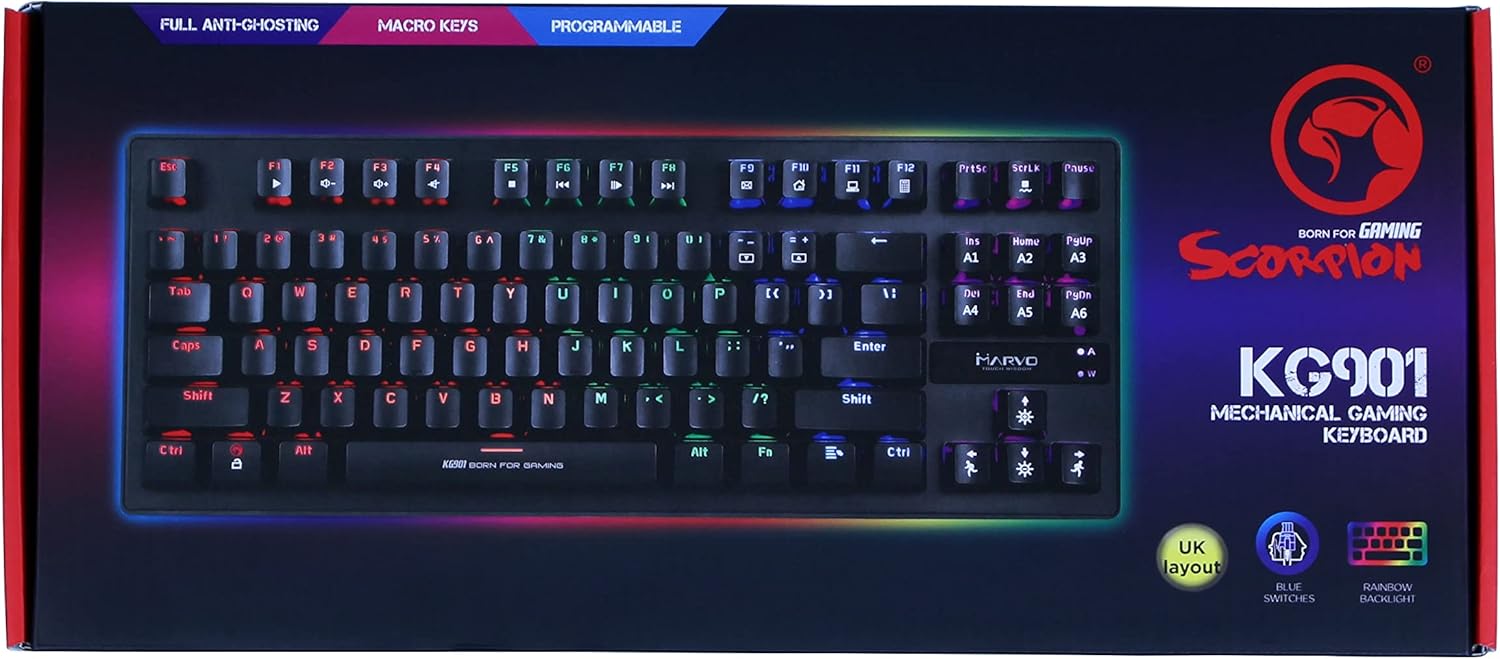
Image: The retail packaging for the MARVO KG901 Mechanical Gaming Keyboard, indicating key features.
2.2 Connecting the Keyboard
- Ensure your computer is powered on.
- Locate an available USB port on your computer.
- Plug the USB connector of the KG901 keyboard into the USB port.
- The keyboard will be automatically detected and installed by your operating system. No additional drivers are typically required for basic functionality.
3. Operating Instructions
3.1 Basic Keyboard Functions
The MARVO KG901 functions as a standard QWERTY keyboard. All keys are plug-and-play for typing and general computer use.
3.2 Backlight Control
The KG901 features 6-color rainbow backlighting with various effects. Use the following key combinations to control the lighting:
- Fn + Ins: Cycle through different backlight modes.
- Fn + Home: Adjust backlight brightness (usually 3-4 levels).
- Fn + PgUp: Change backlight color (if applicable to the mode).
- Fn + Del: Adjust backlight speed for dynamic modes.
- Fn + End: Turn backlight on/off.

Image: Angled view of the MARVO KG901 keyboard, highlighting the illuminated keys and compact design.
3.3 Macro Key Programming
The keyboard features five driverless programmable macro keys (M1-M5). Refer to the advanced customization software for detailed instructions on recording and assigning macros. The software allows for complex key sequences and functions to be assigned to these dedicated keys.
3.4 N-Key Rollover and Anti-Ghosting
The KG901 supports full N-Key Rollover (NKRO) and anti-ghosting. This means that every keypress is registered independently, even when multiple keys are pressed simultaneously, preventing missed inputs during intense gaming sessions.
3.5 Multimedia Functions
Utilize the Fn key in combination with the F-keys (F1-F12) for multimedia controls:
- Fn + F1-F12: Specific multimedia functions (e.g., Play/Pause, Volume Up/Down, Mute, Previous/Next Track). Refer to the keycap legends for exact functions.
4. Maintenance
Proper maintenance ensures the longevity and performance of your keyboard.
4.1 Cleaning
- Disconnect the keyboard from your computer before cleaning.
- Use a soft, lint-free cloth slightly dampened with water or a mild cleaning solution to wipe the keycaps and surface.
- For dust and debris between keys, use compressed air.
- Avoid using harsh chemicals, abrasive cleaners, or excessive moisture.
4.2 Storage
When not in use for extended periods, store the keyboard in a cool, dry place away from direct sunlight and extreme temperatures.
5. Troubleshooting
5.1 Keyboard Not Responding
- Ensure the USB cable is securely plugged into both the keyboard and the computer.
- Try plugging the keyboard into a different USB port on your computer.
- Restart your computer.
- Test the keyboard on another computer if possible to rule out a computer-specific issue.
5.2 Backlight Not Working
- Ensure the backlight is not turned off (try Fn + End).
- Adjust the brightness (Fn + Home).
- Cycle through different lighting modes (Fn + Ins).
5.3 Keys Not Registering or Double-Typing
- Clean the affected key(s) as per the Maintenance section.
- Ensure no debris is lodged under the keycap or switch.
- If the issue persists, it may indicate a hardware fault.

Image: A close-up view of the blue mechanical switches used in the MARVO KG901 keyboard, known for their tactile and clicky feedback.
6. Specifications
| Feature | Description |
|---|---|
| Model | KG901 |
| Brand | MARVO |
| Color | Black |
| Keyboard Type | Mechanical Gaming Keyboard |
| Switch Type | Blue Mechanical Switches |
| Layout | TKL (Tenkeyless), UK Layout |
| Number of Keys | 87 |
| Backlighting | 6-Color Rainbow Backlit |
| Anti-Ghosting | Full N-Key Rollover |
| Macro Keys | 5 Programmable (Driverless) |
| Connectivity | Wired USB |
| Compatible OS | PC, Laptop (Windows 7 or newer, Mac OS X 10.3 Panther and above) |
| Construction | Metal front plate, High-quality ABS |

Image: The underside of the MARVO KG901 keyboard, showing its sturdy construction and product label.
7. Warranty and Support
Specific warranty information and detailed support contacts were not provided in the product data. For warranty claims, technical support, or further assistance, please refer to the manufacturer's official website or contact your point of purchase.
You may find additional resources and software downloads on the official MARVO website.
Related documentskg901


Ask a question about this manual
Ask about setup, troubleshooting, compatibility, parts, safety, or missing instructions. Manuals+ will review the question and use this page’s manual context to help answer it.