1. Product Overview
The Contixo R1 Smart Robot Toy is an interactive and educational companion designed for children. It features voice control, touch sensors, and the ability to record and replay voices, sing, and dance. This compact robot provides an engaging experience, promoting language skills, creativity, and cognitive development.
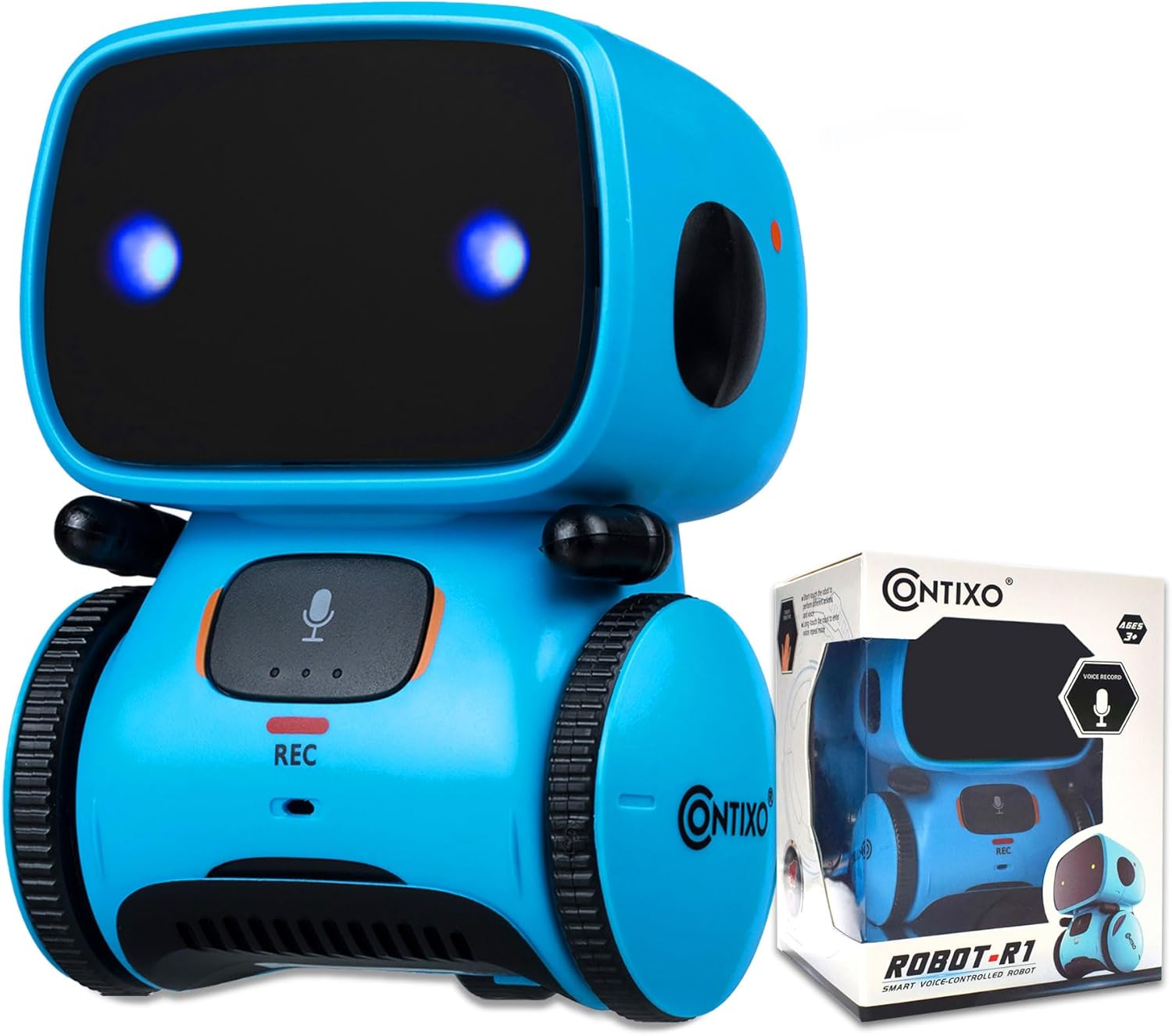
Figure 1.1: Contixo R1 Smart Robot Toy and its packaging.

Figure 1.2: The Contixo R1 robot engaging children, promoting various developmental skills.
2. Setup and Battery Installation
Before using your Contixo R1 robot, you will need to install 3 AAA batteries (not included). Ensure the batteries are inserted with the correct polarity.
- Locate the battery compartment on the back or bottom of the robot.
- Open the battery compartment cover.
- Insert 3 AAA batteries, matching the positive (+) and negative (-) terminals as indicated inside the compartment.
- Close the battery compartment cover securely.

Figure 2.1: The Contixo R1 robot and required AAA batteries for operation.
Once batteries are installed, locate the power switch, typically on the side or back of the robot, and slide it to the 'ON' position to activate the robot.

Figure 2.2: Key components of the Contixo R1 robot, including the power switch.
3. Operating Instructions
3.1 Voice Control
The Contixo R1 robot responds to voice commands. Speak clearly and directly to the robot for optimal recognition. The robot can engage in interactive conversations and respond to various prompts.

Figure 3.1: The robot responding to a voice command to dance.
3.2 Touch Sensor Functions
The robot is equipped with touch sensors that allow for direct interaction. Touching specific areas on the robot's head or body can trigger different movements or responses, such as turning left, turning right, walking forward, or walking backward.

Figure 3.2: The robot's voice and touch activation features.
Figure 3.3: Location of touch buttons on the robot.
3.3 Voice Recording and Playback
The Contixo R1 robot can record and replay short voice messages. This feature allows users to record their own voice or a child's voice for repeated playback.
- Press and hold the 'REC' button (located on the robot's front).
- Speak clearly into the robot's microphone. The robot can record up to three voice segments, each approximately 8 seconds long.
- Release the 'REC' button to stop recording.
- To play back the recorded message, briefly press the 'REC' button.

Figure 3.4: Capturing and replaying voice messages with the robot.

Figure 3.5: The robot's record mode, showing the REC button.
3.4 Dancing and Singing
The Contixo R1 robot can perform pre-programmed dances and songs, providing entertainment and encouraging movement. These functions are typically activated through voice commands or specific touch sensor interactions.

Figure 3.6: The robot performing dances and songs independently.

Figure 3.7: Multiple robots demonstrating singing and dancing features.
3.5 Movement and Rotation
The robot is designed for dynamic movement, including forward, backward, and 360-degree flexible rotation. These movements are controlled via voice commands or touch sensor inputs.

Figure 3.8: Robot's movement capabilities, including rotation and linear motion.
4. Maintenance
To ensure the longevity and proper functioning of your Contixo R1 robot, follow these simple maintenance guidelines:
- Cleaning: The robot is made of durable plastic material that is easy to clean. Use a soft, dry cloth to wipe down the robot's surface. Avoid using harsh chemicals or abrasive cleaners.
- Battery Replacement: Replace batteries when the robot's performance diminishes or it stops responding. Always use new AAA batteries and dispose of old batteries responsibly.
- Storage: When not in use for extended periods, turn off the robot and remove the batteries to prevent leakage and damage. Store the robot in a cool, dry place away from direct sunlight.
5. Troubleshooting
If you encounter any issues with your Contixo R1 robot, please refer to the following common problems and solutions:
| Problem | Possible Cause | Solution |
|---|---|---|
| Robot does not turn on or respond. | Batteries are dead or incorrectly installed. Power switch is off. | Check battery polarity and replace with new AAA batteries. Ensure the power switch is in the 'ON' position. |
| Robot does not follow commands or falls frequently. | Low battery power. Obstruction in movement. | Replace batteries. Ensure the robot is on a flat, clear surface. Check for any debris in the wheels. |
| Voice recording is unclear or not working. | Microphone obstruction. Speaking too far or too quietly. | Ensure the microphone is clear. Speak clearly and closer to the robot. |
| Short battery life. | Frequent use of interactive features. Low quality batteries. | Use high-quality alkaline batteries. Turn off the robot when not in use. |
6. Specifications
| Feature | Detail |
|---|---|
| Product Dimensions | 5 x 3.5 x 3.5 inches |
| Item Weight | 13.1 ounces |
| Model Number | R1-Blue |
| Recommended Age | 36 months - 15 years |
| Batteries Required | 3 AAA batteries (not included) |
| Material | Durable Plastic |

Figure 6.1: Physical dimensions of the Contixo R1 robot.
7. Warranty and Support
Contixo is committed to providing outstanding customer service and technical support. If you encounter any problems or require assistance with your Contixo R1 Smart Robot Toy, please do not hesitate to contact our US-based customer service team. Your satisfaction is our priority.
For support, please refer to the contact information provided with your product packaging or visit the official Contixo website.


