
Introduction
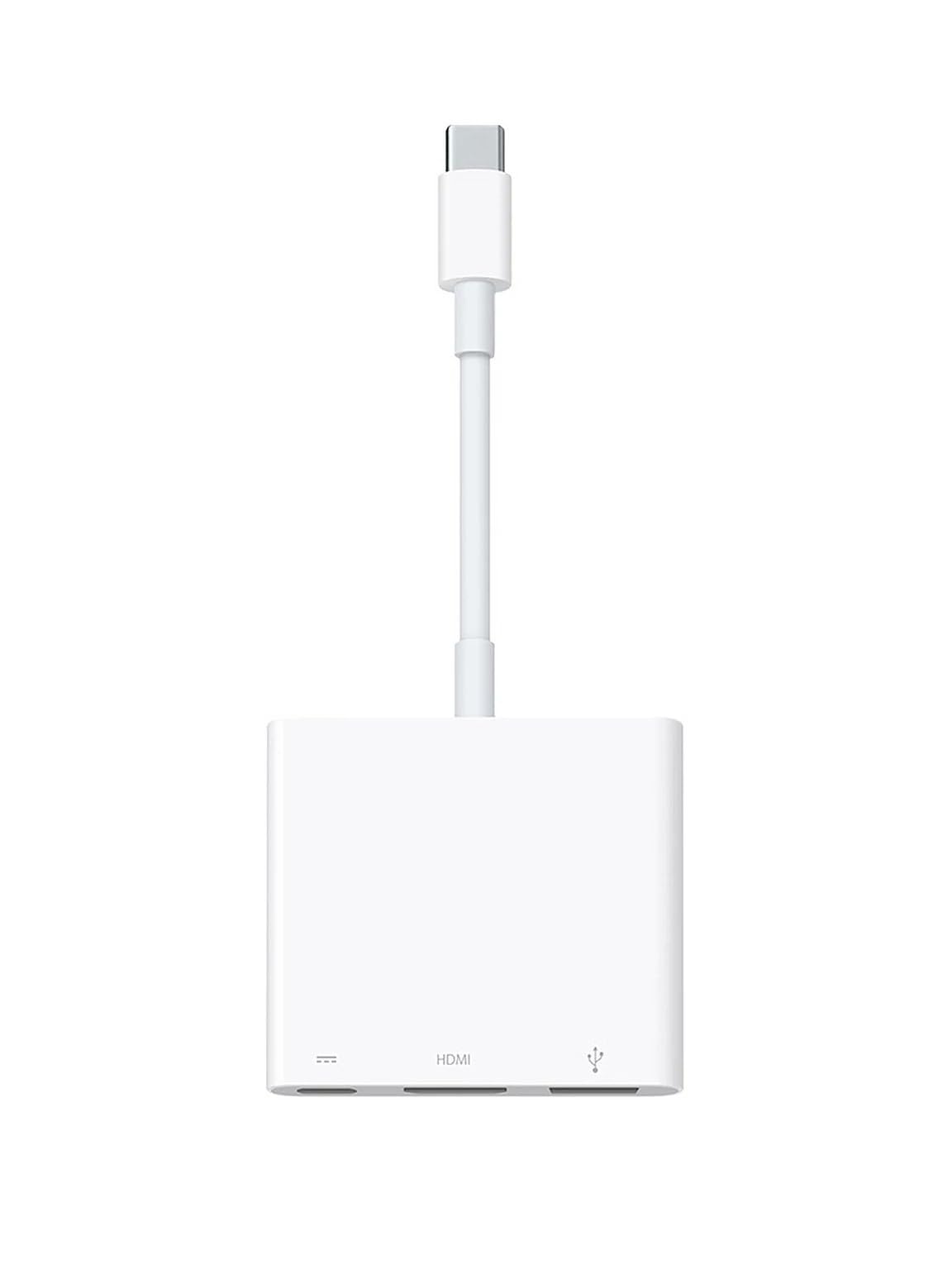
The Apple USB-C Digital AV Multiport Adapter provides versatile connectivity for your USB-C enabled Mac or iPad Pro. This adapter allows you to connect to an HDMI display, a standard USB device, and a USB-C charging cable simultaneously, expanding the capabilities of your device.
Package Contents
- Apple USB-C Digital AV Multiport Adapter
Product Overview
The adapter features three distinct ports designed for various connection needs:

This image displays the adapter's three ports: a USB-C port for power input, an HDMI port for video output, and a USB-A port for connecting standard USB devices.
- USB-C Port: Connects to your Mac or iPad Pro for data and power. This port also accepts a USB-C charging cable to provide power to the adapter and your connected device.
- HDMI Port: Connects to an HDMI-enabled display, television, or projector for video and audio output.
- USB-A Port: Connects to standard USB devices such as flash drives, cameras, or USB cables for syncing and charging iOS devices.
This image shows the USB-C connector, which plugs into your compatible Mac or iPad Pro.
Setup
Follow these steps to set up your Apple USB-C Digital AV Multiport Adapter:
- Connect the adapter's integrated USB-C connector to a USB-C or Thunderbolt 3 (USB-C) port on your Mac or iPad Pro.
- Connect an HDMI cable (sold separately) from the adapter's HDMI port to your TV, monitor, or projector.
- (Optional) Connect a standard USB device, such as a flash drive or camera, to the adapter's USB-A port.
- (Optional) To charge your Mac or iPad Pro while using the adapter, connect a USB-C charging cable to the adapter's dedicated USB-C input port and then to a power source.
Operating Instructions
Display Mirroring
Once connected, your Mac or iPad Pro display will automatically mirror to the HDMI-enabled TV or display. You may adjust display settings on your device, such as resolution or arrangement, through your device's system preferences or control center.
USB Device Connection
Connect compatible USB devices to the standard USB-A port. The adapter supports data transfer for devices like flash drives and cameras. It also facilitates syncing and charging for iOS devices when connected via a USB cable.
Charging
To maintain power to your Mac or iPad Pro while using the adapter, connect a USB-C charging cable to the adapter's dedicated USB-C input port. This allows pass-through charging to your device.
Troubleshooting
No Display Output
- Ensure all cables (USB-C to device, HDMI to display) are securely connected.
- Verify that your display is powered on and set to the correct HDMI input source.
- Check your Mac or iPad Pro's display settings to ensure external display detection.
- Try disconnecting and reconnecting the adapter and all associated cables.
USB Device Not Recognized
- Ensure the USB device is properly inserted into the adapter's USB-A port.
- Test the USB device directly with your Mac or iPad Pro (if possible) to rule out device-specific issues.
- Some high-power USB devices may require external power and might not function solely through the adapter.
Device Not Charging
- Ensure the USB-C charging cable is connected to the adapter's USB-C input port and a functional power source.
- Verify that the power adapter connected to the USB-C charging cable is functional and provides sufficient power for your device.
Specifications
| Feature | Detail |
|---|---|
| Brand | Apple |
| Model Number | MUF82ZM/A |
| Compatible Devices | Cameras, Projector (via HDMI) |
| Connector Type | HDMI, USB Type C, USB Type A |
| Item Dimensions (L x W x H) | 6.6 x 1.7 x 15.5 Centimeters |
| Finish Type | Matte |
| Number of Ports | 3 (1x USB-C input, 1x HDMI, 1x USB-A) |
| Weight | 0.06 Kilograms |
| UPC | 190198914439 |
| GTIN | 190198914439 |
Maintenance
To ensure optimal performance and longevity of your Apple USB-C Digital AV Multiport Adapter:
- Keep the adapter clean and free from dust. Use a soft, dry cloth for cleaning.
- Avoid exposing the adapter to extreme temperatures or moisture.
- Do not attempt to disassemble or repair the adapter yourself. Unauthorized repairs may void your warranty.
- Handle cables and connectors gently to prevent damage to the ports or the adapter itself.
Warranty and Support
This Apple USB-C Digital AV Multiport Adapter comes with a 1 Year Warranty from the date of purchase.
For technical support, warranty claims, or additional information, please visit the official Apple support website or contact Apple customer service directly.


