
Prolink PRO700SFC
Prolink PRO700SFC 650VA Line-Interactive UPS User Manual
Uninterruptible Power Supply with Super-Fast Charging and AVR
1. Introduction
The Prolink PRO700SFC series is a single-phase input/single-phase output Line-Interactive Uninterruptible Power Supply (UPS) system. It incorporates Prolink's Super-Fast Charging technology, enabling the battery to recharge to 90% capacity within 2-4 hours. This system is designed to provide stable backup power for home and small office applications, protecting connected equipment from power disturbances.
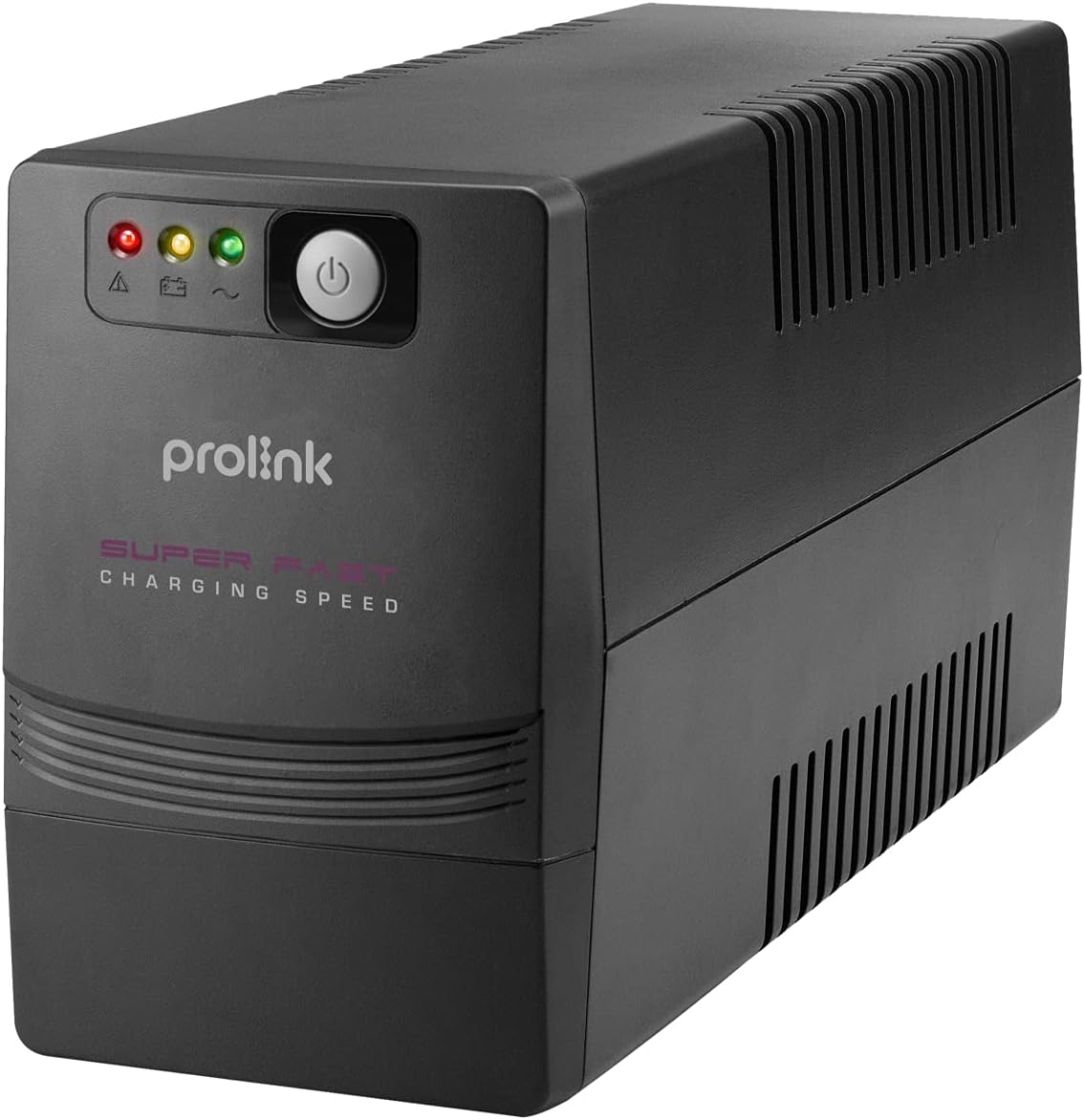
Figure 1: Front view of the Prolink PRO700SFC 650VA UPS.
2. Key Features
- Super Fast Charging: The battery can be recharged to 90% of its capacity within 2-4 hours.
- Surge Protection: Provides protection for connected equipment from incoming spikes and surges, safeguarding your network.
- Advanced Early Warning: Alerts users to output overload, high temperature, or low battery conditions, allowing time to correct the situation or safely shut down systems.
- Overload Protection: Initiates an alarm and automatic shutdown in case of overload, prolonging the UPS lifespan.
- Over Temperature Protection: Shuts down the power supply if internal temperatures become unacceptably high.

Figure 2: Key features and benefits of the Prolink PRO700SFC UPS.
3. Product Overview
3.1 Front Panel
The front panel features LED indicators and a power switch for easy operation and status monitoring.
3.2 Rear Panel
The rear panel provides connections for power input, backup outlets, and communication ports.
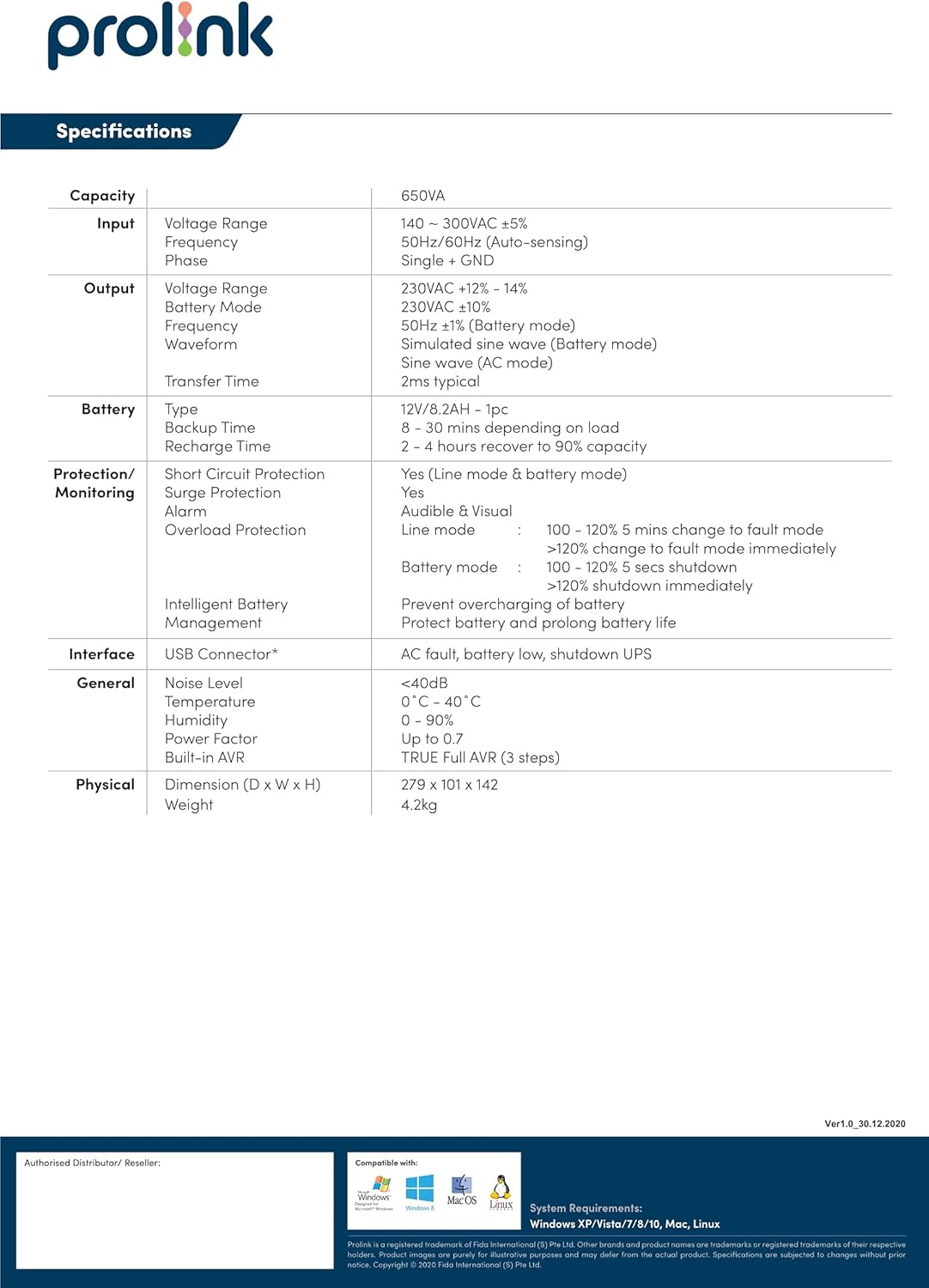
Figure 3: Front and Rear Panel Layout of the PRO700SFC(U) UPS.

Figure 4: Detailed view of the rear panel connections.
4. Setup Instructions
- Unpacking: Carefully remove the UPS from its packaging. Inspect for any shipping damage.
- Placement: Place the UPS in a well-ventilated area, away from direct sunlight, heat sources, and excessive moisture. Ensure sufficient clearance around the unit for proper airflow.
- Initial Charging: Before initial use, connect the UPS to a standard AC power outlet for at least 8 hours to ensure the battery is fully charged. The UPS will charge whether it is turned on or off.
- Connecting Equipment: Plug your computer, modem, wireless router, and other critical network equipment into the backup outlets on the rear panel of the UPS. Do not connect surge protectors or power strips to the UPS outlets.
- Power On: Press and hold the power button on the front panel until the UPS powers on. The LED indicators will illuminate to show the operational status.
5. Operating Instructions
5.1 Powering On/Off
- To Power On: Press and hold the power button for approximately 3 seconds.
- To Power Off: Press and hold the power button for approximately 3 seconds until the unit shuts down.
5.2 LED Indicators
The front panel LEDs provide visual status of the UPS:
- Battery Mode LED: Green Flashing indicates the UPS is operating on battery power.
- AC Mode LED: Green Lighting indicates the UPS is operating on utility power.
5.3 Automatic Voltage Regulation (AVR)
The PRO700SFC features Automatic Voltage Regulation (AVR) to stabilize incoming utility power. If the input voltage fluctuates outside acceptable limits, the AVR function will automatically adjust the output voltage to a safe range without switching to battery power, thus preserving battery life.
5.4 Battery Mode Operation
During a power outage or significant voltage fluctuation beyond AVR capabilities, the UPS will automatically switch to battery power. An audible alarm will sound, and the Battery Mode LED will flash. This provides time to save your work and safely shut down connected equipment.
6. Maintenance
- Battery Care: To maximize battery life, ensure the UPS is connected to AC power at all times. Periodically discharge the battery completely (e.g., once every 3-6 months) by unplugging the UPS from the wall and allowing it to run on battery until it shuts down, then fully recharge it.
- Cleaning: Keep the UPS clean and free of dust. Use a dry cloth to wipe the exterior. Do not use liquid or aerosol cleaners. Ensure ventilation openings are not blocked.
- Storage: If storing the UPS for an extended period, ensure the battery is fully charged. Recharge the battery every three months to prevent permanent damage.
7. Troubleshooting
| Problem | Possible Cause | Solution |
|---|---|---|
| UPS does not power on | No AC input power; Low battery; UPS fault | Check power cord connection; Allow UPS to charge for 8 hours; Contact support |
| Short backup time | Battery not fully charged; Battery end-of-life; Overload | Charge battery fully; Replace battery; Reduce connected load |
| Continuous alarm in AC mode | Overload; Over temperature | Reduce connected load; Ensure proper ventilation |
| UPS switches to battery frequently | Unstable utility power; Input voltage out of range | Check utility power quality; Ensure UPS is connected to a stable power source |
8. Specifications
| Category | Specification |
|---|---|
| Capacity | 650VA |
| Input Voltage Range | 140 - 300VAC ±5% |
| Input Frequency | 50Hz/60Hz (Auto-sensing) |
| Output Voltage Range | 230VAC +12% - 14% |
| Output Waveform | Simulated Sine Wave (Battery mode) |
| Transfer Time | 2ms typical |
| Battery Type | 12V/7.2AH - 1pc |
| Battery Backup Time | 8 - 30 mins (depending on load) |
| Battery Recharge Time | 2 - 4 hours recover to 90% capacity |
| Protection/Monitoring | Short Circuit Protection, Surge Protection, Alarm, Overload Protection |
| Interface | USB Connector* (for PRO700SFCU model) |
| Noise Level | <40dB |
| Operating Temperature | 0°C - 40°C |
| Humidity | 0 - 90% |
| Power Factor | Up to 0.7 |
| Built-in AVR | TRUE Full AVR (3 steps) |
| Dimensions (D x W x H) | 279 x 101 x 142 mm |
| Weight | 4.2 kg |
*Specifications are subject to change without prior notice.
9. Warranty and Support
For warranty information, technical support, or service inquiries, please refer to the warranty card included with your product or visit the official Prolink website. Keep your purchase receipt as proof of purchase for warranty claims.
Related documentsPRO700SFC


Ask a question about this manual
Ask about setup, troubleshooting, compatibility, parts, safety, or missing instructions. Manuals+ will review the question and use this page’s manual context to help answer it.