
Inkbird 306A
Inkbird ITC-306A WiFi Temperature Controller User Manual
Model: ITC-306A
1. Introduction
The Inkbird ITC-306A WiFi Temperature Controller is designed for precise temperature control in various applications, primarily aquariums, breeding, and reptile hatching. It features dual probes for reliable temperature monitoring and offers remote control via a Wi-Fi enabled application.
Key features include:
- Dual Protections: Equipped with 2 relays to ensure the plugged heater can be turned off upon overheating, protecting your system.
- Two Probes for Reliability: Place probes at a distance; the controller alarms if the temperature difference exceeds 3°C (5°F), sending a notification to your mobile app.
- Customizable Heating Time: Set heating duration from 1 to 72 hours. An alarm sounds if the target temperature is not reached within the set time.
- Wide Temperature Setting Range: 20.0 to 35.0°C (68.0 to 95.0°F) for control, with a detectable range of -40 to 100°C (-40 to 212°F).
- Plug and Play: Compatible with most heaters (up to 1100W), requiring no complex assembly.
- APP Notification: Connects via 2.4 GHz Wi-Fi to send notifications for any exceptions directly to the INKBIRD app.
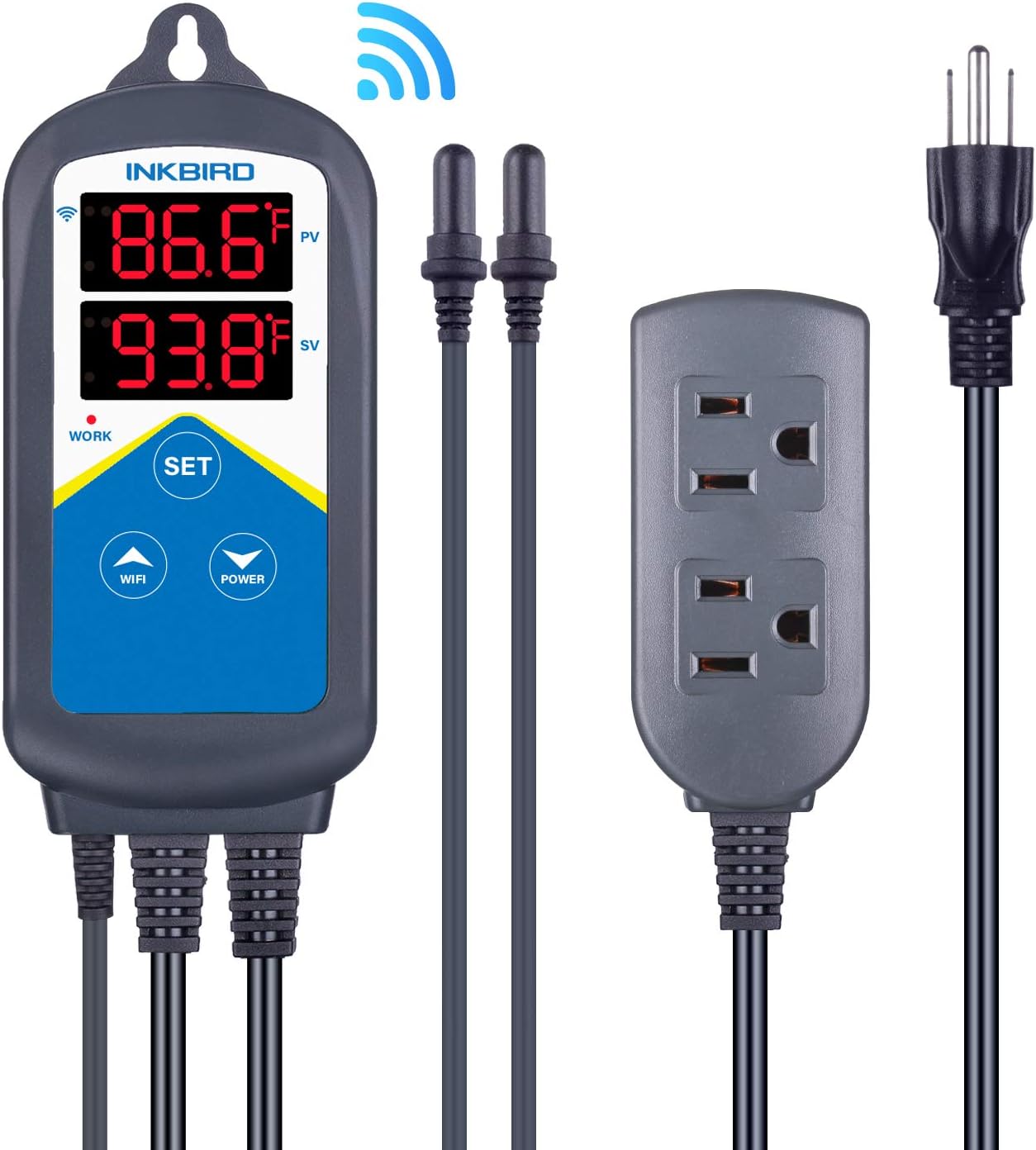
Figure 1: Inkbird ITC-306A WiFi Temperature Controller with its components, including the main unit, two temperature probes, and a dual-outlet power strip.
2. Setup
2.1 Unboxing and Initial Inspection
Upon receiving your Inkbird ITC-306A, carefully open the packaging and inspect all components for any signs of damage. The package should contain the temperature controller unit, two temperature probes, and a user manual.
Video 1: Unboxing the Inkbird ITC-306A WiFi Temperature Controller. This video demonstrates the contents of the package and the initial appearance of the device.

Figure 2: All components included in the Inkbird ITC-306A package: the main controller unit, two temperature probes, the dual-outlet power strip, and the user manual.
2.2 Physical Installation
- Mount the Controller: The controller unit can be mounted using the integrated hanging hole. Ensure it is placed in a dry location, away from direct water splashes.
- Connect Probes: Insert the two temperature probes into the designated ports on the bottom of the controller.
- Position Probes: Place both temperature probes into your aquarium or desired environment. For optimal accuracy and safety, position the two probes close to each other but not touching, ensuring they are fully submerged and stable. This allows the controller to detect significant temperature differences between the probes, triggering an alarm if necessary.
- Connect Heater: Plug your aquarium heater (or other heating device) into one of the output sockets on the power strip connected to the controller. The controller supports up to 1100W.
- Power On: Plug the controller's main power cord into a standard 120V AC outlet. The display will light up.

Figure 3: Proper placement of dual temperature probes. Both probes should be positioned at the same depth and close to each other to ensure accurate readings and effective temperature difference alarming.
2.3 App Download and Pairing
The Inkbird ITC-306A can be controlled and monitored remotely via the INKBIRD app. Ensure your Wi-Fi network is 2.4 GHz, as the device does not support 5 GHz networks.
- Download App: Search for "INKBIRD" in your App Store (iOS) or Google Play Store (Android), or scan the QR code provided in the manual or on the Inkbird website: https://inkbird.com/pages/app-download.
- Register/Login: Open the app and register a new account or log in if you already have one.
- Add Device: Tap the "+" or "add device" button in the app's home page. Select the ITC-306A from the list of available devices.
- Connect to Wi-Fi: Follow the in-app instructions to connect the controller to your 2.4 GHz Wi-Fi network. You will need to enter your Wi-Fi password. The device's LED symbol will flash during the configuration state.
- Confirmation: Once successfully connected, the device will appear in your app, and you can rename it for easy identification.

Figure 4: Visual guide for connecting the Inkbird ITC-306A to the INKBIRD mobile application, including QR code for app download and Wi-Fi pairing steps.
3. Operating Instructions
3.1 Setting Temperature via App
The INKBIRD app provides comprehensive control over your temperature controller:
- Real-time Monitoring: View the current temperature (PV) and set temperature (SV) directly from the app.
- Adjust Settings: Easily change the target temperature, set high/low temperature alarms, and adjust the continuous heating time.
- Temperature Unit Switch: Switch between Celsius (°C) and Fahrenheit (°F) as needed.
- Temperature Calibration: Calibrate the temperature reading if there is a discrepancy with a known accurate thermometer.
- Notifications: Receive push notifications on your phone if the temperature deviates from the set range or if there are probe abnormalities.
Video 2: Demonstrates how to control the Inkbird ITC-306A via the mobile application, including setting temperature and other parameters.
3.2 Manual Operation (On-Device)
You can also adjust basic settings directly on the controller unit using the physical buttons:
- SET Button: Press and hold the "SET" button for 2 seconds to enter the parameter setting mode.
- Up/Down Arrows: Use the arrow buttons to navigate through settings and adjust values.
- Confirm: Press "SET" again to confirm your selection and exit the setting mode.
- Power Button: Press and hold for 2 seconds to turn off the device. Short press to turn on or pause the socket power.

Figure 5: Close-up of the Inkbird ITC-306A display and control buttons, showing the current temperature (PV) and set temperature (SV).
4. Maintenance
- Cleaning: Regularly wipe the controller unit with a dry, soft cloth. Do not use abrasive cleaners or immerse the unit in water.
- Probe Care: Keep the temperature probes clean. Periodically remove them from the water and gently clean any buildup. Ensure the suction cups (if used) are securely attached.
- Calibration: It is recommended to calibrate the probes every 6 months using a laboratory-grade thermometer to ensure continued accuracy.
- Storage: If storing the device for an extended period, ensure it is clean and dry. Store in a cool, dry place.
5. Troubleshooting
| Problem | Possible Reason | Solution |
|---|---|---|
| "Er" Error on Display | Both probes have problems at the same time. | Check both probes for damage or improper connection. Replace if necessary. |
| "E1" or "E2" Error | Temperature Probe Abnormal. | Ensure the specific probe (E1 or E2) is properly plugged in and not damaged. |
| "E4" Error | Temperature difference between the two probes is greater than or equal to 3°C/5°F. | Ensure both probes are placed close to each other and are fully submerged in the same water body. |
| "E5" Error | Continuous Heating Time Alarm (heater has been on longer than preset time). | Check if the heater is functioning correctly or if the environment requires longer heating. Adjust continuous heating time in settings if needed. |
| Login Failed (App) | Password or account entry error. | Double-check your account and password. |
| Connection Failed (App) | Poor network, incorrect Wi-Fi password, or app issues. | Ensure 2.4 GHz Wi-Fi is stable. Re-enter Wi-Fi password. Try restarting the app or reinstalling it. |

Figure 6: The controller display showing an "Er" error, indicating a probe abnormality, and a corresponding notification on the INKBIRD app.
6. Specifications
| Feature | Specification |
|---|---|
| Brand | Inkbird |
| Model Name | 306A |
| Product Dimensions | 1.2"D x 2.6"W x 6.7"H |
| Controller Type | APP Control |
| Special Feature | Programmable |
| Color | Blue and White and Black |
| Specific Uses For Product | Aquarium Heater |
| Temperature Control Type | Heating |
| Connectivity Technology | Wi-Fi (2.4 GHz only) |
| Voltage | 120 Volts |
| Wattage | 1100 W |
| Item Weight | 1.03 pounds |
| Temperature Setting Range | 20.0 to 35.0°C (68.0 to 95.0°F) |
| Detectable Temperature Range | -40 to 100°C (-40 to 212°F) |
7. Warranty and Support
7.1 Warranty Information
INKBIRD TECH. C.L. warrants this controller for two (2) years from the date of purchase when operated under normal conditions by the original purchaser. The temperature probe is warranted for one (1) year. This warranty is limited to repair or replacement, at INKBIRD's discretion, of all or part of the controller. The original receipt is required for warranty purposes.
7.2 Technical Assistance
If you encounter any problems installing or using this controller, please carefully review this instruction manual and the troubleshooting section. For further assistance, you may contact INKBIRD support:
- Email: support@inkbird.com (Replies typically within 24 hours from Monday through Saturday).
- Website: Visit the official Inkbird website for common technical questions and resources: www.ink-bird.com.
Related documents306A


Ask a question about this manual
Ask about setup, troubleshooting, compatibility, parts, safety, or missing instructions. Manuals+ will review the question and use this page’s manual context to help answer it.