
1. Introduction
This manual provides detailed instructions for the installation, operation, and maintenance of your Qinlorgo DC Motor Speed Controller. This device is designed to control the speed and direction of brushed DC motors within the specified voltage and current ranges. Please read this manual thoroughly before use to ensure proper function and safety.
2. Product Features
- Durable Construction: Manufactured with a high-quality circuit board for extended service life.
- Stable and Reliable: Features convenient screw terminals for secure and quick wire connections.
- Direction Reversal: Capable of changing the rotation direction of the connected motor.
- Easy Operation: Simple knob rotation adjusts the output to control the brushed motor's revolving speed.
- Compact Design: Elegant and easy-to-use form factor.
3. Safety Information and Important Notes
- Power Supply: Connect only to a DC power supply. DO NOT connect directly to household 220V alternating current (AC).
- Motor Connection Required: This is a motor speed controller, not a power module. A motor MUST be connected for the speed control function to operate. Multimeter output readings will not change without a connected motor.
- Motor Type: This governor is designed exclusively for DC brushed motors. It is NOT suitable for DC brushless motors.
- Functionality: This device cannot be used as a voltage regulator or stabilizer. Its sole purpose is motor speed control.
- Current Limit: Do not exceed the maximum current rating of 3A.
4. Specifications
| Parameter | Value |
|---|---|
| Applicable Motor | Brushed DC Motor |
| Input Voltage | DC 6V, 12V, 24V |
| Maximum Current | 3A |
| Product Dimensions (L x W x H) | 50 x 32 x 15 mm (2.0 x 1.3 x 0.6 inches) |
| Item Weight | 34g (1.2 ounces) |
| Model Number | Qinlorgoux51ahev0t |
5. Setup and Wiring
The controller features clearly labeled screw terminals for input power and motor output. Ensure all connections are secure before applying power.
- Identify Terminals: Locate the 'IN' terminals for power input and 'OUT' terminals for motor connection.
- Connect Power Input: Connect your DC power supply (6V, 12V, or 24V) to the 'IN' terminals. Observe polarity: positive to '+' and negative to '-'.
- Connect Motor: Connect your brushed DC motor to the 'OUT' terminals. The polarity here will determine the initial direction of rotation.
- Connect Reversing Switch: The included switch is pre-wired to allow for motor direction reversal. Connect its wires as shown in the diagram.

Figure 1: Overview of the DC Motor Speed Controller with connected wires and reversing switch. Note the 'IN' and 'OUT' terminals.
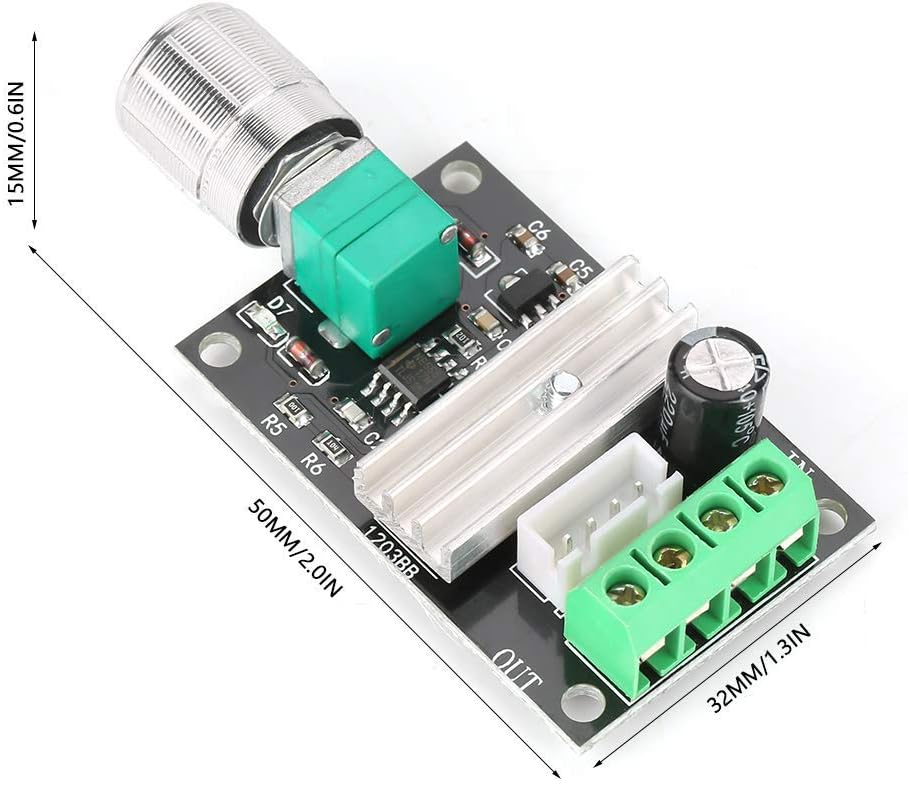
Figure 2: Physical dimensions of the controller board.
6. Operating Instructions
Once the controller is correctly wired and powered, you can begin operation:
- Power On: Ensure your DC power supply is active.
- Adjust Speed: Rotate the potentiometer knob (the silver knob on the board) clockwise to increase motor speed and counter-clockwise to decrease motor speed.
- Change Direction: Use the attached black switch to reverse the motor's direction of rotation. The switch typically has three positions: one for forward, one for reverse, and a center-off position.

Figure 3: Close-up of the speed control knob and the direction reversing switch.
7. Maintenance
The Qinlorgo DC Motor Speed Controller is designed for reliable operation with minimal maintenance. Follow these general guidelines:
- Keep Clean: Periodically clean the controller board to prevent dust and debris accumulation, which can affect performance. Use a soft, dry brush or compressed air.
- Avoid Moisture: Protect the device from water, humidity, and corrosive environments.
- Inspect Connections: Regularly check all wire connections to ensure they remain tight and secure.
- Operating Environment: Operate the controller within its specified temperature and humidity ranges to ensure optimal lifespan.
8. Troubleshooting
If you encounter issues with your motor speed controller, refer to the following troubleshooting steps:
- Motor Not Spinning:
- Verify that the DC power supply is connected correctly and providing the correct voltage (6V, 12V, or 24V).
- Ensure the motor is properly connected to the 'OUT' terminals.
- Confirm that the motor is a brushed DC motor. This controller is not compatible with brushless motors.
- Check the reversing switch position; it might be in the 'off' or neutral position.
- Speed Not Changing:
- Ensure a motor is connected. The controller requires a load (motor) to regulate speed effectively.
- Rotate the potentiometer knob through its full range to check for responsiveness.
- Intermittent Operation:
- Check all wire connections for looseness or poor contact.
- Ensure the current draw of your motor does not exceed the 3A maximum rating of the controller. Overloading can cause intermittent operation or damage.
9. Warranty and Support
This product is covered by a standard manufacturer's warranty against defects in materials and workmanship. For specific warranty terms, please refer to your purchase documentation or contact your retailer. For technical support or inquiries, please reach out to the Qinlorgo customer service department through your point of purchase.