
1. Introduction
This manual provides comprehensive instructions for the installation, configuration, and operation of the Fracarro CT-Bus GSM Mini Telephone Combiner. This device is designed to integrate with alarm systems via a bus connection, enabling GSM communication for alerts and remote control functionalities.
Please read this manual thoroughly before attempting any installation or operation to ensure proper functioning and to prevent damage to the device or associated systems.
2. Safety Information
- Electrical Safety: Installation must be performed by qualified personnel in accordance with local electrical codes. Disconnect power before installation or maintenance.
- GSM Module: Ensure proper SIM card insertion and secure antenna connection for optimal GSM signal.
- Environmental Conditions: Do not expose the device to moisture, extreme temperatures, or direct sunlight. Operate within specified temperature and humidity ranges.
- Interference: Keep the device away from strong electromagnetic fields to prevent interference.
- Maintenance: Refer to the maintenance section for cleaning and care instructions. Do not attempt to repair the device yourself.
3. Package Contents
Verify that all items are present in the package:
- Fracarro CT-Bus GSM Mini Telephone Combiner unit
- GSM Antenna
- Connection Cables (if applicable)
- Mounting Screws and Wall Plugs
- Quick Start Guide (this manual)
4. Product Overview
The Fracarro CT-Bus GSM Mini is a compact GSM telephone combiner designed for integration with compatible alarm control panels via a dedicated bus. It allows the alarm system to send voice calls and SMS messages to pre-programmed numbers in case of an event, and can also receive commands for remote control.
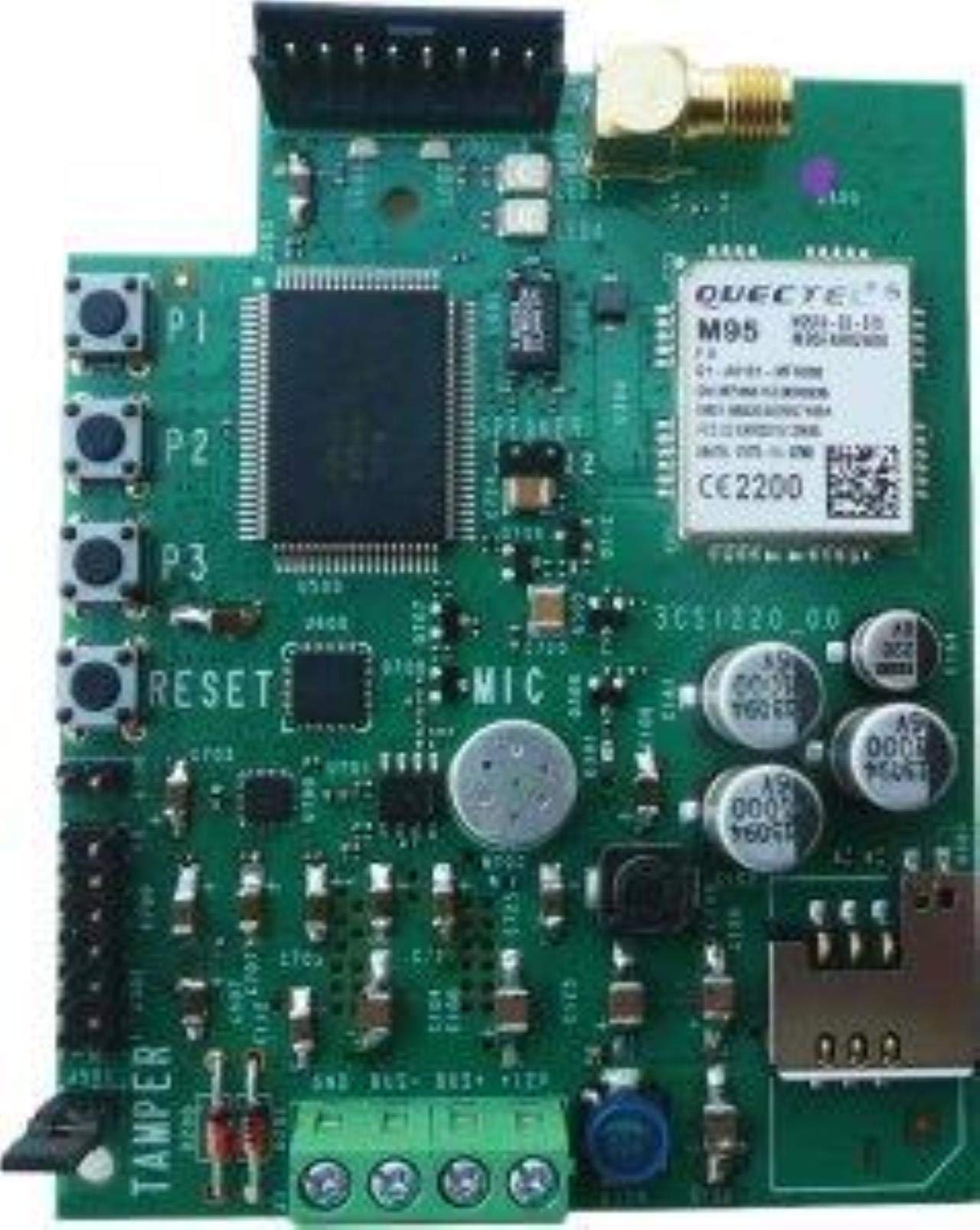
Figure 1: Front view of the Fracarro CT-Bus GSM Mini Telephone Combiner. The image displays the compact unit, typically showing the SIM card slot, antenna connector, and bus connection terminals.
Key Features:
- GSM communication for alarm events.
- Bus integration with compatible alarm control units.
- Remote control capabilities via SMS or call.
- Compact design for easy installation.
5. Setup
5.1. Installation Location
Choose a location that is:
- Within range of a good GSM signal.
- Protected from environmental elements (moisture, extreme temperatures).
- Accessible for maintenance but secure from unauthorized access.
- Close to the alarm control panel for bus connection.
5.2. SIM Card Insertion
- Ensure the device is powered off.
- Locate the SIM card slot on the device (refer to Figure 1).
- Insert a standard size (2FF) activated GSM SIM card into the slot, ensuring correct orientation.
- Gently push until it clicks into place.
5.3. Antenna Connection
Screw the provided GSM antenna onto the antenna connector on the device. Ensure it is finger-tight for a secure connection and optimal signal reception.
5.4. Wiring and Bus Connection
Connect the CT-Bus GSM Mini to the alarm control panel's bus terminals according to the wiring diagram provided with your specific alarm system and the CT-Bus GSM Mini. Typically, this involves connecting data lines (e.g., DATA+, DATA-) and power lines (e.g., +12V, GND).
Important: Refer to the specific wiring instructions for your alarm control panel model to ensure correct polarity and connection. Incorrect wiring can damage both devices.
5.5. Initial Power-Up and Configuration
- After all connections are secure, apply power to the alarm control panel. The CT-Bus GSM Mini will power on.
- Observe the status LEDs on the device. A blinking LED typically indicates searching for GSM network, while a solid LED indicates successful connection.
- Refer to your alarm control panel's programming manual for instructions on how to recognize and configure the CT-Bus GSM Mini on the system bus. This usually involves assigning an address or enabling the GSM module.
- Program the desired telephone numbers for voice calls and SMS alerts through the alarm control panel's interface.
6. Operating Instructions
6.1. Alarm Event Communication
When an alarm event occurs (e.g., intrusion, fire, panic), the alarm control panel will trigger the CT-Bus GSM Mini to initiate communication. The device will:
- Send pre-programmed SMS messages to designated recipients.
- Initiate voice calls to designated recipients, playing a pre-recorded message or allowing two-way communication if supported by the alarm panel.
6.2. Remote Control via GSM
The CT-Bus GSM Mini allows for remote control of certain alarm system functions (e.g., arming/disarming, checking status) via SMS commands or specific call sequences from authorized phone numbers. Refer to your alarm control panel's manual for the specific commands and procedures.
Note: Only authorized phone numbers programmed into the system will be able to send commands or receive alerts.
7. Maintenance
- Cleaning: Use a soft, dry cloth to clean the exterior of the device. Do not use liquid cleaners or abrasive materials.
- Antenna Check: Periodically ensure the GSM antenna is securely connected and undamaged.
- SIM Card: Ensure the SIM card is active and has sufficient credit (if prepaid) for communication.
- Firmware Updates: Check the Fracarro website for any available firmware updates for your device. Updates should only be performed by qualified technicians.
8. Troubleshooting
| Problem | Possible Cause | Solution |
|---|---|---|
| No GSM signal / LED not solid | Poor antenna connection, weak signal area, inactive SIM card. | Check antenna connection. Relocate device for better signal. Verify SIM card activation and credit. |
| No calls/SMS sent during alarm | Incorrect phone numbers programmed, SIM card issues, bus communication error. | Verify programmed numbers in alarm panel. Check SIM card status. Inspect bus wiring. |
| Remote commands not working | Unauthorized phone number, incorrect command format, GSM signal issue. | Ensure command is from an authorized number. Check command syntax. Verify GSM signal. |
| Device not recognized by alarm panel | Incorrect bus wiring, improper configuration in alarm panel. | Review bus wiring diagram. Check alarm panel's programming for device recognition. |
9. Specifications
- Model: CT-Bus GSM Mini
- Communication: GSM (2G)
- SIM Card Type: Standard (2FF)
- Bus Compatibility: Fracarro Bus systems (verify specific panel compatibility)
- Power Supply: Typically supplied via alarm panel bus (e.g., 12V DC)
- Operating Temperature: -10°C to +50°C (14°F to 122°F)
- Dimensions: (Specific dimensions not provided, placeholder) Approx. 80 x 50 x 20 mm
- Weight: (Specific weight not provided, placeholder) Approx. 100g
10. Warranty and Support
Fracarro products are covered by a standard manufacturer's warranty. Please refer to the warranty card included with your purchase or visit the official Fracarro website for detailed warranty terms and conditions.
For technical support, troubleshooting assistance, or service requests, please contact your authorized Fracarro dealer or visit the Fracarro support portal:
Website: www.fracarro.com
Customer Service: Refer to the contact information on the Fracarro website for your region.