
1. Overview
The Zircon 69580 Pro 35 Stud Sensor is an electronic stud finder designed to quickly and easily locate the edges of wood and metal studs, as well as detect live, unshielded AC electrical wiring behind walls. This tool is essential for safely mounting items, performing renovations, or any task requiring knowledge of wall infrastructure. Its intuitive design includes a SpotLite Pointing System and audio alerts to provide clear indications of detected objects.
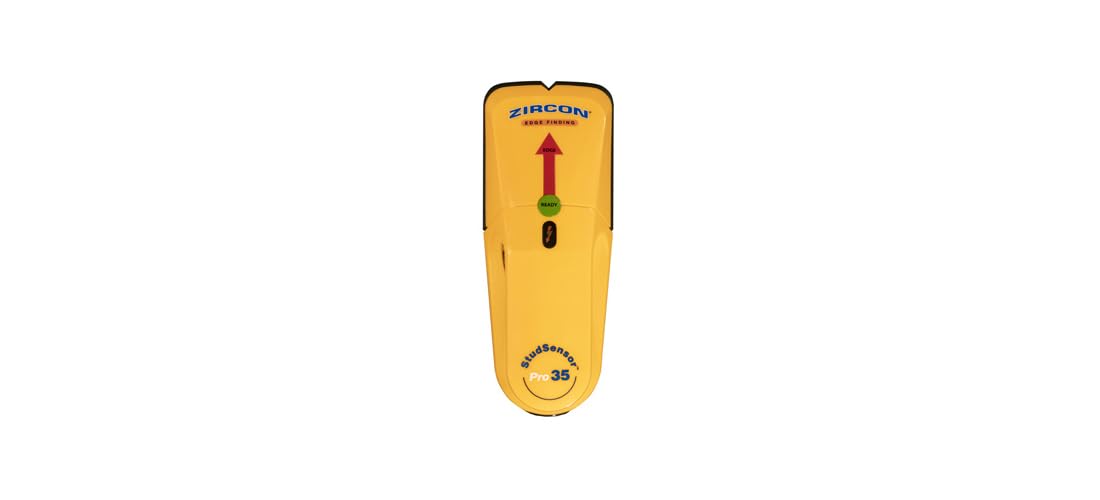
Figure 1: Zircon 69580 Pro 35 Stud Sensor
2. Key Features
- Stud Scan Mode: Locates edges of wood and metal studs up to 3/4 inch (19 mm) deep.
- Ready Light: Indicates when calibration is complete and the tool is ready for use.
- Edge Arrow: Lights up sequentially as the tool approaches a stud and fully illuminates when the stud edge is located.
- Patented Over-Stud Feature: Alerts the user if scanning begins directly over a stud, prompting a new starting location.
- Wire Warning Detection: Indicates the presence of live, unshielded AC electrical wiring up to 2 inches (50 mm) deep.
- SpotLite Pointer: Shines an arrow-shaped image on the scanned surface to clearly indicate the edge of a stud.
- "V" Marker Groove: Enables accurate marking of the stud edge location.
- Ergonomic Grip: Designed for a secure hold in either hand at any angle.
- Power Source: Uses one 9-volt battery (not included).
3. Setup
3.1 Battery Installation
- Open the battery compartment cover located on the back of the device.
- Insert a new 9-volt alkaline battery, ensuring correct polarity (+/-).
- Close the battery compartment cover securely.
Note: A 9-volt battery is not included with the product.
4. Operating Instructions
4.1 Calibration
- Place the Zircon 69580 Pro 35 flat against the wall where you intend to scan. Ensure it is not directly over a stud or dense material.
- Press and hold the Power button on the side of the tool. The green "Ready" light will illuminate, indicating successful calibration.
- Keep the Power button pressed throughout the scanning process.
4.2 Stud Finding (Edge Finding)
- After calibration, slowly slide the tool horizontally across the wall surface.
- As the tool approaches a stud, the Edge Arrow lights will illuminate sequentially.
- When the tool is directly over the edge of a stud, the Edge Arrow will fully illuminate, and an audio alert will sound. The SpotLite Pointer will project an arrow onto the wall.
- Mark this location using the "V" marker groove.
- Continue sliding past the stud until the lights turn off.
- Slide the tool back from the opposite direction to locate the other edge of the stud and mark it.
- The center of the stud is typically between the two marked edges.
4.3 Wire Warning Detection
- The Wire Warning indicator will illuminate when live, unshielded AC electrical wiring is detected within 2 inches (50 mm) of the wall surface.
- Exercise caution when the Wire Warning indicator is active. Always turn off power to the area before drilling or cutting into walls.
Video: Demonstrating the Zircon Pro 35 Stud Sensor's functionality.
Video: A user's review and demonstration of the Zircon Pro 35 Stud Sensor.
Video: User feedback on the Zircon stud and wire finder.
Video: A demonstration of the stud sensor in use.
Video: Explaining how the Zircon Stud Sensor works.
Video: A demonstration of finding studs and avoiding wiring.
5. Maintenance
- Keep the tool clean and free of dust and debris.
- Store in a dry place at room temperature.
- Remove the battery if the tool will not be used for an extended period to prevent leakage.
- Do not expose the tool to extreme temperatures or moisture.
6. Troubleshooting
- Inaccurate Readings: Ensure the tool is calibrated on a clear section of the wall before scanning. Avoid calibrating directly over a stud or dense material.
- No Detection: Check if the 9-volt battery is properly installed and has sufficient charge. Ensure the tool is held flat against the wall and moved slowly.
- Constant Beeping/Lights: This may indicate calibration over a stud or very dense material. Move to a different spot on the wall and recalibrate.
- Wire Warning Always On: This could be due to high humidity or static electricity. Try scanning in a different area or waiting for environmental conditions to change.
7. Specifications
| Specification | Value |
|---|---|
| Manufacturer | Zircon Corporation |
| Part Number | 69580 |
| Item Weight | 5.3 ounces |
| Product Dimensions | 1.5 x 3.87 x 12 inches |
| Item Model Number | 69580 |
| Material | Zircon |
| Stud Scan Depth | Up to 3/4 inch (19 mm) |
| Wire Warning Detection Depth | Up to 2 inches (50 mm) |
| Battery Required | Yes (1 x 9-volt, not included) |
8. Warranty and Support
For warranty information and customer support, please refer to the documentation included with your product at the time of purchase or visit the official Zircon website. Keep your proof of purchase for warranty claims.


