
1. Introduction
Thank you for purchasing the MUSE M-10 Red Radio Alarm Clock. This manual provides essential information for the safe and efficient operation of your device. Please read these instructions carefully before use and retain them for future reference.

Figure 1: MUSE M-10 Red Radio Alarm Clock. This image shows the front view of the red alarm clock with its digital LED display showing '12:00' and various control buttons on the top panel.
2. Safety Instructions
- Read all instructions before operating the appliance.
- Do not expose this appliance to rain or moisture to prevent fire or shock hazards.
- Ensure the power adapter is easily accessible.
- Only use attachments/accessories specified by the manufacturer.
- Do not place the product in direct sunlight or near heat sources.
- Avoid placing the product on surfaces that are unstable or subject to vibration.
- Do not open the casing; refer all servicing to qualified personnel.
- Dispose of used batteries responsibly, following local regulations.
3. Product Overview
3.1 Front Panel and Display
The front panel features a clear 0.6-inch white LED display for time and alarm indicators.
3.2 Top Panel Controls
The top panel houses all control buttons for easy access:
- MEM: Memory button for saving and recalling radio presets.
- SET: Button for setting time and alarm parameters.
- AL1: Alarm 1 setting button.
- AL2: Alarm 2 setting button.
- << HR: Hour adjustment button (backward).
- MIN >>: Minute adjustment button (forward).
- SNOOZE: Activates the snooze function during an alarm.
- SLEEP: Activates the sleep timer function.
- DIMMER: Adjusts the display brightness.

Figure 2: Overview of the MUSE M-10 Red Radio Alarm Clock's functions, including its 0.6-inch white LED display, PLL radio, 20 FM presets, dimmer, dual alarm, snooze, and sleep features.
4. Setup
4.1 Power Connection
Connect the provided AC adapter to the DC IN jack on the rear of the unit and then plug it into a standard wall outlet. The unit will power on and the display will light up.
4.2 Battery Backup Installation
For time and alarm settings backup during a power outage, install 2 x AAA batteries (not included) into the battery compartment located on the bottom of the unit. Ensure correct polarity (+/-) when inserting batteries.
5. Operating Instructions
5.1 Setting the Time
- Press and hold the SET button until the hour digits flash.
- Use the << HR or MIN >> buttons to adjust the hour.
- Press SET again, and the minute digits will flash.
- Use the << HR or MIN >> buttons to adjust the minutes.
- Press SET once more to confirm and exit time setting mode.
5.2 Setting Alarms (Alarm 1 and Alarm 2)
The unit features two independent alarms.
- Press and hold the AL1 (or AL2) button until the alarm hour digits flash.
- Use the << HR or MIN >> buttons to set the desired alarm hour.
- Press AL1 (or AL2) again, and the alarm minute digits will flash.
- Use the << HR or MIN >> buttons to set the desired alarm minutes.
- Press AL1 (or AL2) again to select the alarm source: Buzzer or Radio.
- Press AL1 (or AL2) once more to confirm and activate the alarm. An alarm icon will appear on the display.
5.3 FM Radio Operation
The unit has a PLL FM radio with 20 preset stations.
- Tuning: Press the << HR or MIN >> buttons to manually tune the radio frequency. Press and hold these buttons for automatic scanning to the next available station.
- Saving Presets: Tune to your desired station. Press and hold the MEM button until 'P01' (or the next available preset number) flashes. Use << HR or MIN >> to select a preset number, then press MEM again to save.
- Recalling Presets: Briefly press the MEM button to cycle through saved preset stations.
5.4 Snooze Function
When an alarm sounds, press the SNOOZE button to temporarily silence the alarm for approximately 9 minutes. The alarm will sound again after this period.
5.5 Sleep Timer Function
Press the SLEEP button repeatedly to set a sleep timer (e.g., 90, 60, 30, 15 minutes, or OFF). The radio will play for the selected duration and then automatically turn off.
5.6 Display Dimmer
Press the DIMMER button repeatedly to cycle through display brightness levels: High, Low, or Off.

Figure 3: Key features of the MUSE M-10 Red Radio Alarm Clock, including snooze, radio or buzzer alarm, dimmable display, and FM PLL radio with 20 presets.
6. Maintenance
- Cleaning: Wipe the unit with a soft, dry cloth. Do not use abrasive cleaners or solvents.
- Battery Replacement: Replace backup batteries annually or when the display shows signs of dimming during power outages.
- Storage: If storing the unit for an extended period, remove the backup batteries to prevent leakage.
7. Troubleshooting
| Problem | Possible Cause | Solution |
|---|---|---|
| No power/Display off | Power adapter not connected or faulty. | Check power adapter connection. Try a different outlet. |
| Alarm does not sound | Alarm not activated or set incorrectly. | Ensure alarm icon is visible on display. Re-check alarm time and source settings. |
| Poor radio reception | FM antenna not extended or poor signal area. | Fully extend the FM wire antenna. Adjust its position for better reception. |
| Time/settings lost after power outage | Backup batteries not installed or depleted. | Install new AAA batteries for backup. |
8. Specifications
- Model: M-10 RED
- Brand: MUSE
- Display: 0.6-inch White LED, Digital
- Radio: FM PLL Radio with 20 Presets
- Alarm: Dual Alarm (Buzzer or Radio)
- Special Features: Snooze, Sleep Timer, Display Dimmer (High/Low/Off)
- Power Source: AC Adapter (included), 2 x AAA batteries for backup (not included)
- Dimensions (L x W x H): 12 x 7 x 10.9 cm (approximately 4.7 x 2.8 x 4.3 inches)
- Weight: 200 grams (approximately 0.44 lbs)
- Material: Plastic
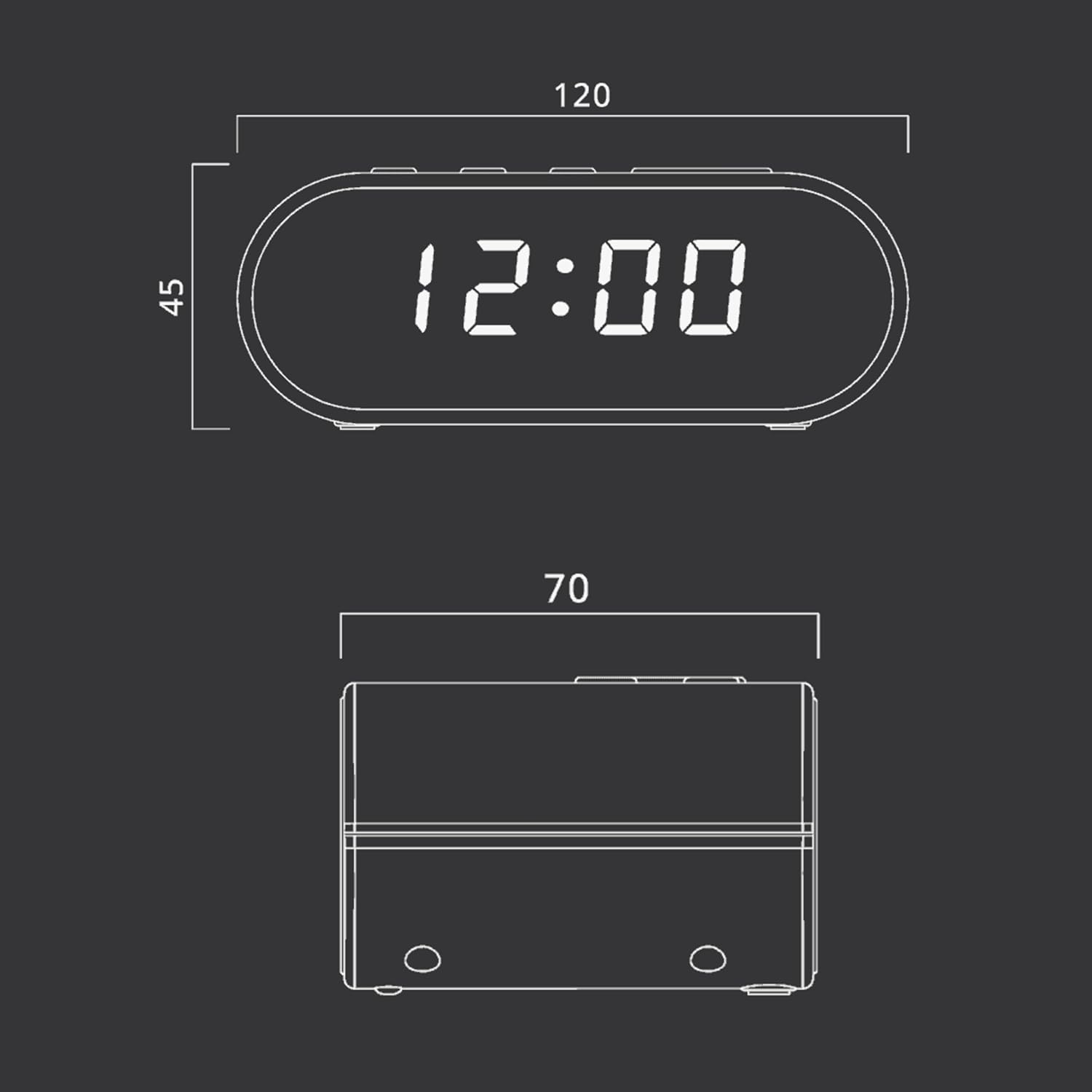
Figure 4: Dimensional drawing of the MUSE M-10 Red Radio Alarm Clock, showing its length (120mm), width (70mm), and height (45mm).
9. Warranty and Support
For warranty information or technical support, please refer to the warranty card included with your product or contact your local MUSE distributor. Keep your purchase receipt as proof of purchase.


