
Introduction
Thank you for choosing the De'Longhi 360° Pedestal Cooling Fan, model DEAPF40WH. This manual provides important information for the safe and efficient operation, maintenance, and troubleshooting of your fan. Please read these instructions carefully before using the appliance and keep them for future reference.
Important Safety Instructions
WARNING: To reduce the risk of fire, electric shock, or injury, observe the following:
- Always unplug the fan before cleaning or performing any maintenance.
- Do not operate the fan with a damaged cord or plug. If the cord is damaged, it must be replaced by the manufacturer, its service agent, or similarly qualified persons to avoid a hazard.
- This appliance is not intended for use by persons (including children) with reduced physical, sensory or mental capabilities, or lack of experience and knowledge, unless they have been given supervision or instruction concerning use of the appliance by a person responsible for their safety.
- Children should be supervised to ensure that they do not play with the appliance.
- Do not insert fingers or foreign objects into the grille or any openings.
- Do not use the fan near water or in damp locations.
- Ensure the fan is placed on a stable, level surface to prevent tipping.
- Do not cover the fan during operation.
Product Overview
Familiarize yourself with the components of your De'Longhi Pedestal Cooling Fan.

Image: Front view of the De'Longhi 360° Pedestal Cooling Fan DEAPF40WH, showing the fan grille, central De'Longhi logo, and the control panel on the pedestal.
Main Components:
- Fan Head: Contains the blades and protective grille.
- Control Panel: LED display and buttons for operation.
- Pedestal: Adjustable height stand.
- Base: Provides stability.
- Remote Control: For convenient operation from a distance.
Setup and Assembly
The fan requires some assembly before first use. Please follow these steps carefully.
- Unpack Components: Carefully remove all parts from the packaging. Ensure all components are present: fan head, front grille, rear grille, fan blade, motor shaft, pedestal pole, base, and remote control.
- Assemble the Base: Attach the pedestal pole to the base. Secure it firmly using the provided screws or locking mechanism.
- Install Rear Grille: Place the rear grille onto the motor shaft, ensuring it aligns with the positioning pins. Secure it with the provided nut.
- Attach Fan Blade: Slide the fan blade onto the motor shaft. Ensure it is seated correctly and secure it with the spinner cap, turning it counter-clockwise to tighten.
- Install Front Grille: Align the front grille with the rear grille and secure them together using the clips or screws provided around the circumference.
- Connect Power: Plug the power cord into a suitable electrical outlet.
Note: Assembly may vary slightly. Refer to the diagrams in your physical manual for precise steps.
Operating Instructions
Your De'Longhi fan can be operated using the control panel on the unit or the remote control.
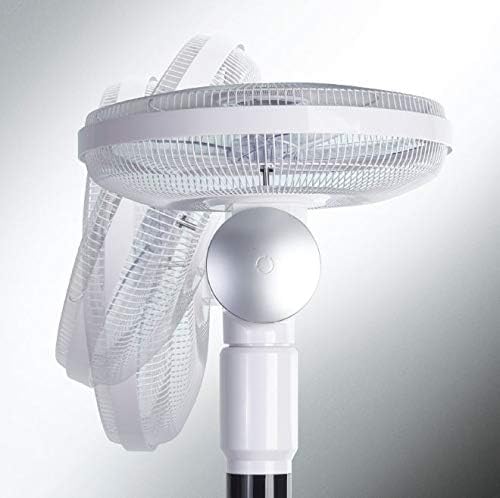
Image: Close-up of the control panel on the De'Longhi 360° Pedestal Cooling Fan DEAPF40WH, showing the LED display and various function buttons.
Control Panel and Remote Functions:
- Power Button (On/Off): Press to turn the fan ON or OFF.
- Speed Button: Press to cycle through 3 fan speeds: Low (1), Medium (2), High (3).
- Mode Button: Press to select wind modes: Normal, Nature, Sleep.
- Normal: Provides a constant airflow at the selected speed.
- Nature: Simulates a natural breeze by varying the fan speed.
- Sleep: Gradually reduces fan speed over time for quieter operation during sleep.
- Oscillation Button: Press to activate or deactivate the 360° automatic horizontal oscillation.

Image: Side view of the De'Longhi 360° Pedestal Cooling Fan DEAPF40WH, illustrating the manual vertical tilt capability of the fan head.
The fan also features 90° manual vertical oscillation. Adjust the fan head manually to direct airflow up or down as desired.
- Timer Button: Press to set the auto-off timer for 1, 2, 4, or 8 hours. The fan will automatically turn off after the selected duration.
Remote Control:
The remote control provides access to all functions available on the main control panel for convenient operation. Ensure batteries are correctly inserted into the remote control.
Care and Maintenance
Regular cleaning and proper maintenance will ensure the longevity and efficient operation of your fan.
- Cleaning the Exterior: Always unplug the fan before cleaning. Use a soft, damp cloth to wipe the exterior surfaces. Do not use abrasive cleaners or solvents, as these may damage the finish.
- Cleaning the Grille and Blades: Periodically, dust may accumulate on the grilles and fan blades. To clean, carefully remove the front grille (refer to assembly instructions in reverse). Wipe the blades and grilles with a soft, dry or slightly damp cloth. Ensure all parts are completely dry before reassembling and operating the fan.
- Storage: If the fan will not be used for an extended period, unplug it and store it in a cool, dry place, preferably in its original packaging, to protect it from dust.
- No Lubrication Required: The fan motor is permanently lubricated and requires no additional oiling.
Troubleshooting
Before contacting customer service, please refer to the following common issues and solutions.
| Problem | Possible Cause | Solution |
|---|---|---|
| Fan does not turn on. |
|
|
| Weak airflow. |
|
|
| Fan is noisy. |
|
|
| Remote control not working. |
|
|
Specifications
| Feature | Detail |
|---|---|
| Model Number | DEAPF40WH |
| Product Type | Pedestal Cooling Fan |
| Oscillation | 360° Automatic Horizontal, 90° Manual Vertical |
| Fan Speeds | 3 (Low, Medium, High) |
| Wind Modes | Normal, Nature, Sleep |
| Timer Settings | 1, 2, 4, 8 hours |
| Control Type | Control Panel, Remote Control |
| Power Source | Corded Electric |
| Item Weight | 9.1 Kilograms |
| Assembly Required | Yes |
| Included Components | Remote |
Warranty and Support
De'Longhi products are manufactured to the highest quality standards. For detailed warranty information, please refer to the warranty card included with your product or visit the official De'Longhi website.
If you experience any issues or have questions not covered in this manual, please contact De'Longhi customer support for assistance. Have your model number (DEAPF40WH) and purchase details ready when contacting support.
Online Support: www.delonghi.com
