
Introduction
This manual provides detailed instructions for the setup, operation, and maintenance of your Lazmin Human Body Sensor. This infrared induction device is designed to detect human movement and can function as a visitor alarm, door bell, or a component of a security system.
The sensor features strong sensitivity and is designed for effective real-time monitoring of human movement within its detection range, day or night.
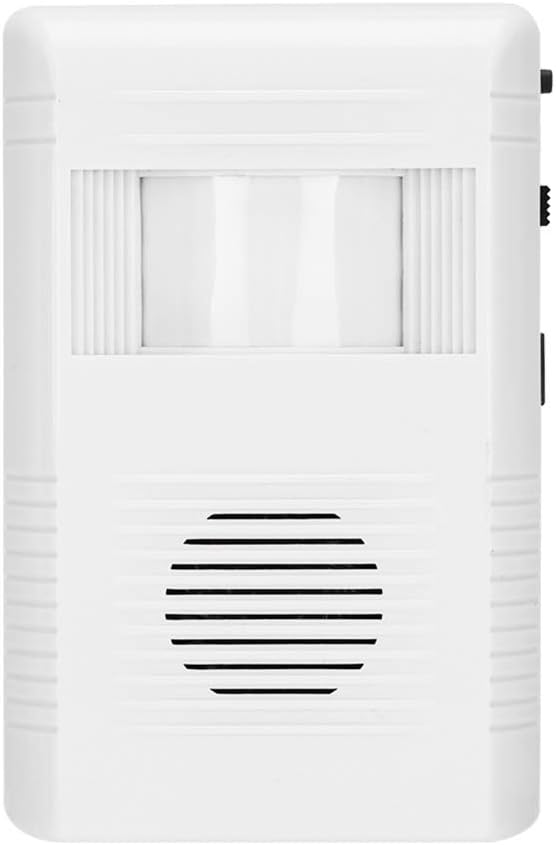
Figure 1: Front view of the Lazmin Human Body Sensor, showing the infrared sensor window and speaker grille.
Setup
1. Battery Installation
- Locate the battery compartment on the back of the sensor unit.
- Open the battery compartment cover.
- Insert three (3) AA batteries (not included), ensuring correct polarity (+/-).
- Close the battery compartment cover securely.
Alternatively, the device can be powered via a DC 12V power adapter (not included) using the DC 12V input port located on the side of the unit.

Figure 2: Side view of the sensor, highlighting the DC 12V power input and the mode selection switch.
2. Mounting the Sensor
The Lazmin Human Body Sensor is designed for wall mount installation. Choose a location where the sensor's detection angle (horizontal 110°) can cover the desired area effectively.
- Identify a suitable mounting location, such as a wall or ceiling, ensuring a clear line of sight for detection.
- Use the included mounting bracket and screws to securely attach the bracket to the chosen surface.
- Attach the sensor unit to the mounting bracket. The bracket allows for adjustment of the sensor's angle to optimize detection coverage.

Figure 3: Illustration of the sensor's 110° horizontal detection angle when mounted, showing coverage in a room and a hallway.
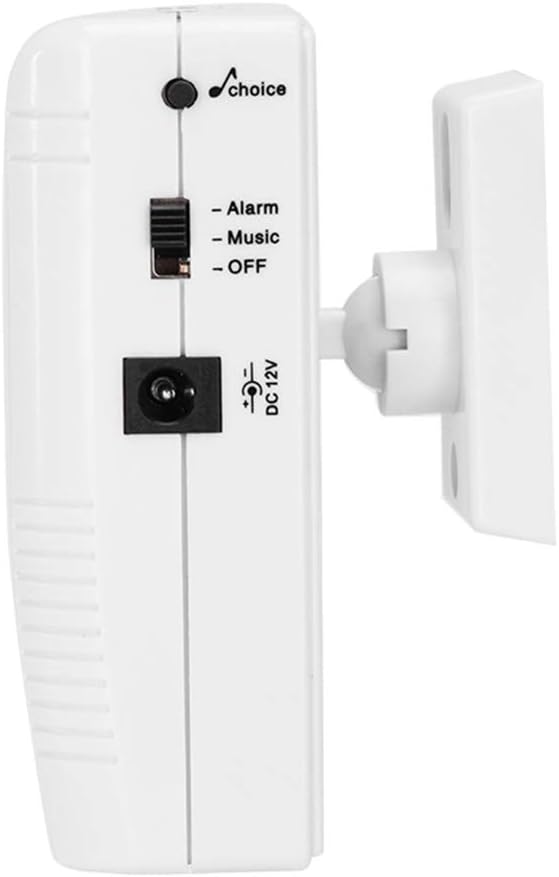
Figure 4: The sensor unit mounted on its adjustable bracket, ready for installation.
Operating Instructions
Mode Selection
The sensor features a mode selection switch on its side, allowing you to choose between three operational modes:
- Alarm Mode: When human movement is detected, the sensor will emit an alarm sound. This mode is suitable for security purposes.
- Music Mode: When human movement is detected, the sensor will play a welcoming melody. This mode is ideal for use as a visitor chime in stores or offices.
- OFF Mode: The sensor is powered off and will not detect movement or emit sounds.
To select a mode, slide the switch to the desired position (Alarm, Music, or OFF).

Figure 5: Detailed view of the mode switch, showing options for Alarm, Music, and OFF.
Detection Functionality
Once powered on and a mode is selected, the infrared sensor will actively monitor for human body heat and movement within its 110° horizontal detection angle and approximately 5-meter range.
- The sensor is designed to operate effectively both day and night, as its infrared detection is not affected by ambient light conditions.
- Upon detection, the device will respond according to the selected mode (alarm or music).

Figure 6: The sensor detecting a person's movement in a retail environment, triggering an alert or welcome sound.

Figure 7: The sensor in Music Mode, playing a melody as visitors enter a space.
Maintenance
Battery Replacement
When the sensor's performance degrades or it stops responding, it may be time to replace the batteries. Follow the battery installation steps outlined in the Setup section.
- Always use three new AA alkaline batteries for optimal performance.
- Ensure correct polarity during installation.
- Dispose of old batteries according to local regulations.
Cleaning
To maintain optimal detection performance, keep the sensor lens clean and free from dust or obstructions.
- Gently wipe the sensor lens and the device's exterior with a soft, dry cloth.
- Do not use abrasive cleaners, solvents, or excessive moisture, as these can damage the unit.
Troubleshooting
| Problem | Possible Cause | Solution |
|---|---|---|
| Sensor does not detect movement or respond. |
|
|
| Sensor triggers false alarms or detects non-human movement (e.g., pets). |
|
|
| Detection distance is shorter than expected. |
|
|
Specifications
| Feature | Detail |
|---|---|
| Brand | Lazmin |
| Model Number | Lazminu4t07ymggp |
| Material | ABS Plastic |
| Color | White |
| Detection Angle | Horizontal: 110° |
| Infrared Sensing Distance | Approx. 5 meters (Maximum Range) |
| Power Supply | 3 * AA Battery (not included) or DC 12V adapter (not included) |
| Mounting Type | Wall Mount |
| Item Weight | 3.52 ounces |
| Product Dimensions | 0.39 x 0.39 x 0.39 inches (Note: These dimensions may be generic and not reflect the actual product size.) |
| Recommended Uses | Home, Office, Stores |
Warranty Information
Specific warranty details for the Lazmin Human Body Sensor are typically provided at the point of purchase or within the product packaging. Please refer to your purchase documentation for information regarding warranty coverage, terms, and conditions.
Generally, products are covered against manufacturing defects for a limited period from the date of purchase. Keep your proof of purchase for any warranty claims.
Customer Support
If you encounter any issues or have questions regarding your Lazmin Human Body Sensor that are not addressed in this manual, please contact the retailer or manufacturer's customer support for assistance.
When contacting support, please have your product model number (Lazminu4t07ymggp) and purchase details readily available.