
1. Introduction
The BORUIT RJ-3000 LED Rechargeable Headlamp is designed for various outdoor activities, providing versatile illumination with its white and red LED lights. This manual provides essential information for the proper setup, operation, and maintenance of your headlamp.
- Ultra Bright White and Red Headlamp: Features a central white LED and two red side LEDs, offering strong and reliable lighting for camping, hiking, cycling, climbing, and other outdoor activities.
- LED Red Headlamp: The human eye is most sensitive to the red range of light. Red light helps navigate in remote areas and is less likely to spook animals, making it ideal for fishing and hunting.
- 3 Lighting Modes: Offers High White Light, Low White Light, and Red Light modes to meet diverse lighting requirements.
- Upgraded Rechargeable Design: Features a USB-C interface for convenient charging and can function as an emergency power bank. The adjustable view angle enhances comfort during prolonged use.
- Durable and Water-Resistant: Constructed from ABS and plastic, with an IPX4 water resistance level, ensuring reliability in various weather conditions.
2. Setup
2.1 Battery Installation
The BORUIT RJ-3000 headlamp comes with two rechargeable Lithium-Ion batteries. To install or replace batteries:
- Locate the battery compartment at the rear of the headlamp.
- Open the compartment cover.
- Insert the two 18650 Lithium-Ion batteries, ensuring correct polarity.
- Securely close the battery compartment cover.

2.2 Charging the Headlamp
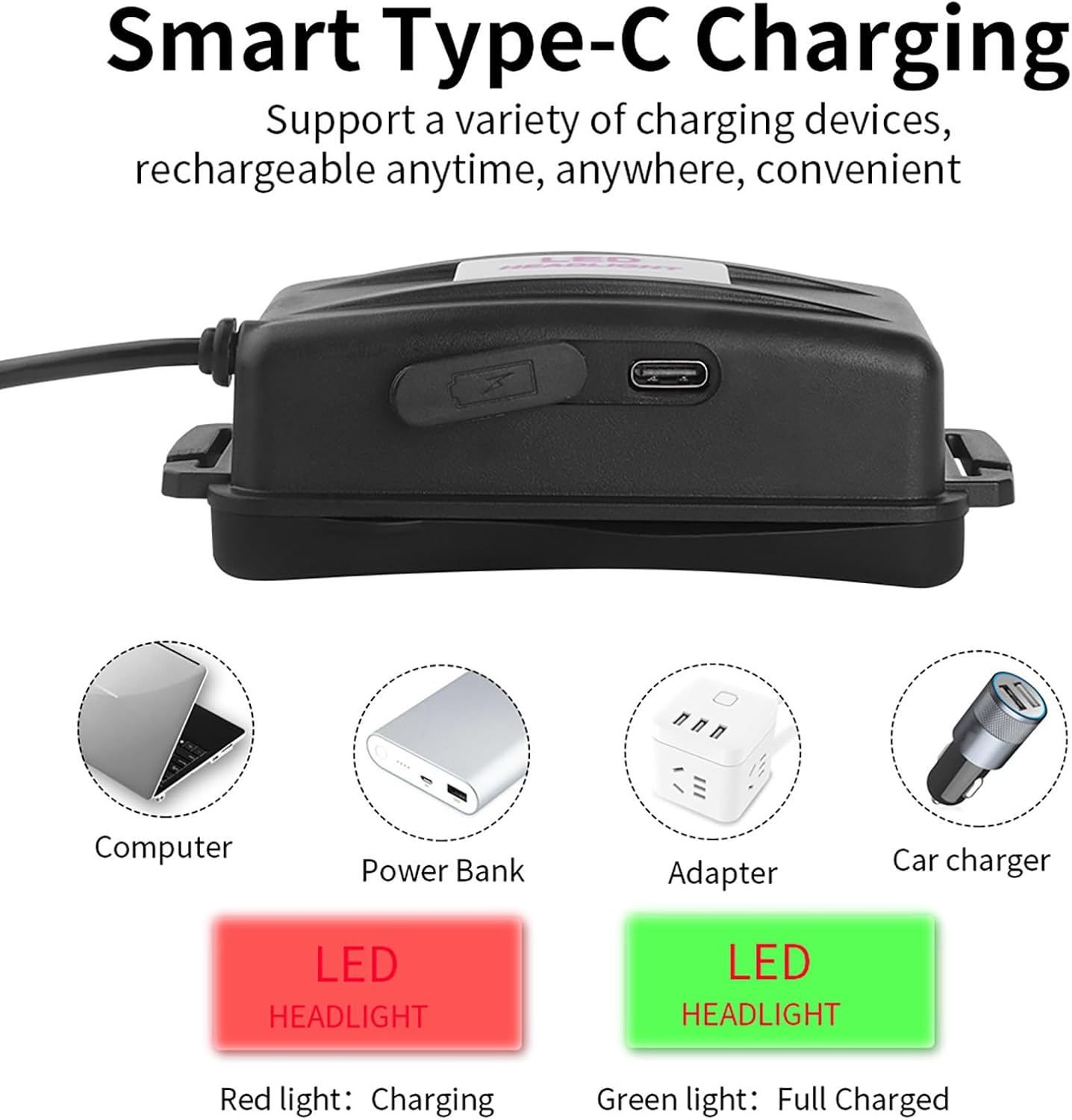
The headlamp features a USB-C charging port. Use the provided USB cable and US charger for optimal performance.
- Connect the USB-C cable to the charging port on the battery pack.
- Connect the other end of the USB cable to the US charger or any compatible USB power source (e.g., computer, power bank, car charger).
- The LED indicator on the battery pack will show red during charging and turn green when fully charged.
2.3 Adjusting the Headband
The elastic headband is adjustable to ensure a comfortable and secure fit for various head sizes.
- Place the headlamp on your head.
- Adjust the straps on the sides and top to achieve a snug fit without being too tight.
3. Operating Instructions
3.1 Power On/Off and Mode Selection
The headlamp features a single button for power control and mode cycling.
- Press the power button once to turn on the headlamp in High White Light mode.
- Press the button again to cycle to Low White Light mode.
- Press the button a third time to activate Red Light mode.
- Press the button a fourth time to turn off the headlamp.

3.2 Adjusting Beam Angle
The headlamp's light unit can be tilted up to 90 degrees to direct the beam precisely where needed.
- Gently hold the light unit.
- Tilt it up or down to adjust the illumination angle. The ratchet mechanism will hold it in place.

3.3 Red Light Functionality
The red light mode is particularly useful for maintaining night vision, as it causes less pupil constriction than white light. It is also effective for activities like fishing and hunting, as many animals are less disturbed by red light.

3.4 Rear Status Light
The battery pack at the rear of the headlamp includes a green LED status light. This light illuminates when the headlamp is active, providing visibility to individuals behind you, enhancing safety during nighttime activities.
4. Maintenance
4.1 Cleaning
To ensure optimal performance and longevity, regularly clean your headlamp. Use a soft, damp cloth to wipe down the exterior. Avoid abrasive cleaners or solvents.
4.2 Battery Care
For rechargeable Lithium-Ion batteries, follow these guidelines:
- Charge batteries fully before first use.
- Avoid overcharging or completely draining the batteries.
- Store the headlamp in a cool, dry place when not in use for extended periods.
4.3 Water Resistance
The headlamp has an IPX4 water resistance rating, meaning it is resistant to splashing water from any direction. It is not designed for submersion. Ensure the USB-C port cover is securely closed to maintain water resistance.

5. Troubleshooting
If you encounter issues with your BORUIT RJ-3000 headlamp, try the following:
- Light not turning on: Check if the batteries are correctly installed and charged.
- Dim light: Recharge the batteries. Battery performance may decrease in very cold temperatures.
- Inconsistent mode switching: Ensure the power button is clean and free from debris.
If problems persist, please contact customer support.
6. Specifications
| Feature | Specification |
|---|---|
| Model Number | RJ3000 |
| Brand | BORUIT |
| Light Source Type | LED |
| White Brightness | 5000 Lumens |
| Light Output Maximum | 5000 Lumens |
| Light Path Distance | 300 Meters |
| Number of Light Sources | 3 |
| Battery Type | Lithium Ion |
| Number of Batteries | 2 (included) |
| Power Source | 5V 1A |
| Runtime | 4 hours |
| Water Resistance Level | IPX4 |
| Material | ABS, Plastic |
| Item Weight | 0.36 Kilograms |
| Included Components | USB Cable |
7. Warranty & Support
7.1 Warranty
All BORUIT headlamps come with a one-year manufacturer's warranty from the date of purchase. This warranty covers defects in materials and workmanship under normal use. Please retain your proof of purchase for warranty claims.
7.2 Customer Support
For any questions, technical assistance, or warranty inquiries, please contact the manufacturer, FrideMok, or visit the official BORUIT store: