
JACKYLED B07W5RYDGP
JACKYLED Alarm Clock with USB Charger Power Strip User Manual
Model: B07W5RYDGP
1. Introduction
Thank you for purchasing the JACKYLED Alarm Clock with USB Charger Power Strip. This device combines a digital alarm clock with a versatile power strip, offering 3 AC outlets and 4 USB ports for charging multiple devices simultaneously. It features a large LED display with adjustable brightness, dual alarm functionality, and comprehensive safety protections.

Image: Front view of the JACKYLED Alarm Clock with USB Charger Power Strip, showing the digital display and top-mounted outlets and USB ports.
Key Features:
- LED Digital Full Screen: Large LED display for time and alarm, with 4 dimmer levels including a "no light" mode.
- Dual Alarm Clock & Nap Function: Set two independent alarms and utilize a 9-minute nap (snooze) function.
- Multiple Protection: Built-in surge protection (1700J), overload protection, over-voltage protection, over-current protection, short-circuit protection, and overheating protection.
- Fast Charging: 4 USB ports (2.4A max per port, 4.8A total) for intelligent identification and fast charging of phones, tablets, cameras, etc.
- Convenient Power Outlets: 3 surge-protected AC outlets.
- Battery Backup: Supports two AAA batteries (not included) to maintain timekeeping during power disconnection.
2. Setup
2.1 Unpacking and Placement
Carefully remove the alarm clock from its packaging. Place the unit on a stable, flat surface, such as a bedside table or desk, ensuring adequate ventilation around the device.
2.2 Power Connection
Plug the power cord into a standard AC outlet. The clock display will illuminate, indicating the unit is powered on.
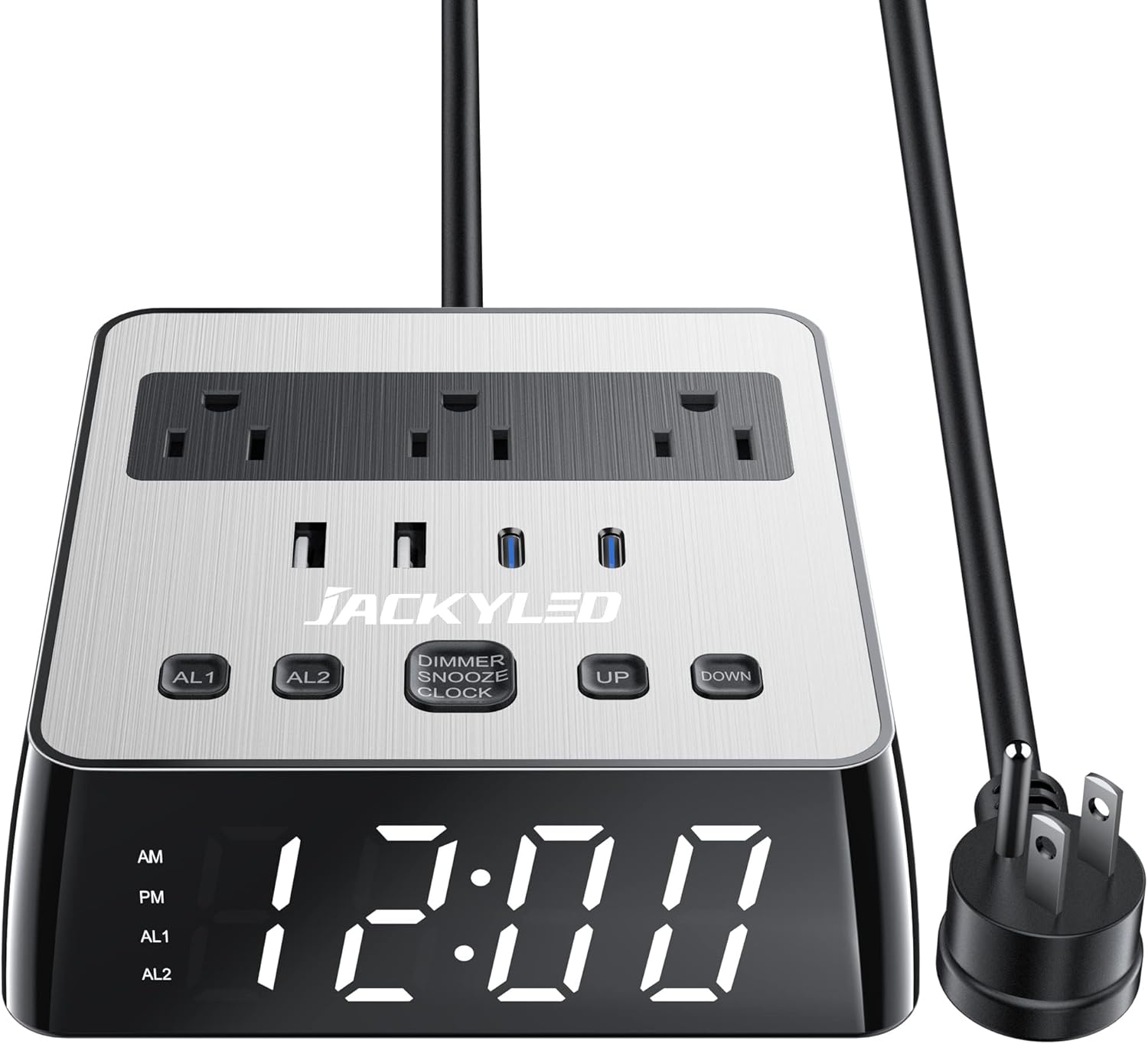
Image: The alarm clock with its power cord and plug, ready for connection to a wall outlet.
2.3 Battery Installation (Optional)
For accurate timekeeping during power outages or disconnections (without clock display), install two AAA batteries (not included) into the battery compartment located on the bottom of the unit. Ensure correct polarity (+/-) when inserting batteries.

Image: Underside of the alarm clock showing the battery compartment with two AAA batteries inserted.
3. Operating Instructions
3.1 Setting the Time
- Press and hold the DIMMER SNOOZE CLOCK button for 3 seconds to enter time setting mode. The hour digits will flash.
- Use the UP and DOWN buttons to adjust the hour.
- Press the DIMMER SNOOZE CLOCK button again to confirm the hour and move to minute setting. The minute digits will flash.
- Use the UP and DOWN buttons to adjust the minute.
- Press the DIMMER SNOOZE CLOCK button once more to save the time and exit setting mode.
3.2 Setting Alarms (AL1 & AL2)
This alarm clock supports two independent alarms.
- Press and hold the AL1 button for 3 seconds to set Alarm 1. The hour digits for AL1 will flash.
- Use the UP and DOWN buttons to adjust the alarm hour.
- Press AL1 again to confirm the hour and move to minute setting. The minute digits for AL1 will flash.
- Use the UP and DOWN buttons to adjust the alarm minute.
- Press AL1 once more to save Alarm 1 setting.
- Repeat steps 1-5 using the AL2 button to set Alarm 2.
To turn an alarm on or off, simply press the corresponding AL1 or AL2 button briefly. An indicator light on the display will show if the alarm is active.

Image: The alarm clock display showing two alarm settings, Alarm 1 at 06:00 and Alarm 2 at 12:00.
3.3 Nap (Snooze) Function
When an alarm sounds, press the DIMMER SNOOZE CLOCK button once to activate the 9-minute nap (snooze) mode. The alarm will temporarily stop and sound again after 9 minutes.
To exit nap mode and turn off the alarm completely, press the DIMMER SNOOZE CLOCK button twice while the alarm is still sounding.
3.4 Adjusting Display Brightness
Briefly press the DIMMER SNOOZE CLOCK button to cycle through the 4 available dimmer levels: High, Medium, Low, and Off. Select the brightness level that suits your preference.

Image: Visual representation of the four display brightness levels: High, Medium, Low, and Off.
3.5 Using USB Charging Ports and AC Outlets
The unit features 3 AC outlets and 4 USB ports (2 USB-A, 2 USB-C) for charging your electronic devices. Simply plug your devices into the appropriate ports.
- Each USB port provides up to 2.4A (max) output, with a total output of 4.8A.
- The AC outlets are surge-protected.

Image: Top-down view of the alarm clock showing various devices (tablet, phone, earbuds, Nintendo Switch) connected to its AC outlets and USB ports for charging.

Image: The alarm clock being used in various environments like a bedroom, study room, and office, demonstrating its versatility as a charging station.
3.6 Official Product Videos
JACKYLED Alarm Clocks with 4 USB Posts and 3 AC Outlets
Video: An official product video from JACKYLED demonstrating the features and functionality of the alarm clock, highlighting its USB ports and AC outlets.
Alarm Clock Power Strip with 4 USB Chargers and 3 AC Outlets
Video: An official product video from JACKYLED showcasing the alarm clock's power strip capabilities, including its USB charging ports and AC outlets.
4. Maintenance
- Keep the device clean by wiping it with a soft, dry cloth. Avoid using abrasive cleaners or solvents.
- Ensure the AC outlets and USB ports are free from dust and debris.
- Do not expose the unit to excessive moisture or extreme temperatures.
- If using battery backup, replace batteries annually or when the clock fails to maintain time during power interruptions.
5. Troubleshooting
| Problem | Possible Cause | Solution |
|---|---|---|
| Clock display is off or not working. | No power, power outage, or display set to "Off" dimmer level. | Ensure the power cord is securely plugged in. Check the power outlet. Briefly press the DIMMER SNOOZE CLOCK button to cycle through brightness levels. |
| Cannot set the time or alarm. | Incorrect button sequence or timing. | Refer to sections 3.1 and 3.2. Ensure you press and hold the respective buttons for 3 seconds to enter setting mode, and then briefly press to confirm steps. |
| Alarm does not sound. | Alarm is not activated or set incorrectly. | Ensure the alarm is turned on (check indicator light). Verify the alarm time is set correctly. |
| Devices not charging via USB or AC outlets. | Overload protection activated, faulty cable, or device issue. | Unplug all devices, then plug them back in one by one. Check if the surge protector indicator light is off (if present). Try a different charging cable or device to isolate the issue. |
| Clock loses time during power disconnection. | No backup batteries installed or batteries are dead. | Install two fresh AAA batteries (not included) as per section 2.3. |
6. Specifications
| Feature | Detail |
|---|---|
| Brand | JACKYLED |
| Model | B07W5RYDGP |
| Color | Black Silver |
| Display Type | Digital LED |
| Product Dimensions | 5.3 x 5.3 x 1.8 inches |
| Item Weight | 1.26 pounds |
| Power Source | AC (Cord: 18AWG, copper, 6.5ft) |
| AC Outlets | 3 ports, 10A (1000-2400W) |
| USB Outlets | 4 ports (5V/2.4A Max each, Total 4.8A) |
| Surge Protection | 1700 Joules |
| Battery Type (Backup) | 2 AAA batteries (NOT included) |
| Safety Certifications | UL Certified, Fireproof ABS + PC material |
7. Warranty & Support
JACKYLED products are designed for reliability and performance. For any product-related inquiries, technical assistance, or warranty claims, please contact our customer support team.
Customer Support:
Our US-based customer service is available 24/7 to provide quick, easy-to-follow solutions and professional assistance. Please refer to the product packaging or the official JACKYLED website for the most current contact information.
Protection Plans:
Extended protection plans may be available for your product. These plans offer additional coverage beyond the standard manufacturer's warranty. Please check with your retailer or the product listing for details on available 2-Year or 3-Year protection plans.
Return Policy:
This product typically comes with a 30-day return policy for refund or replacement. Please consult your purchase receipt or retailer's policy for specific terms and conditions.
Ask a question about this manual
Ask about setup, troubleshooting, compatibility, parts, safety, or missing instructions. Manuals+ will review the question and use this page’s manual context to help answer it.