
1. Introduction
The ELEPHAS BL128 Mini Projector is a compact and versatile device designed for home entertainment, gaming, and portable presentations. Featuring advanced projection technology, it delivers a high-quality visual and audio experience in a small, lightweight package.
This manual provides detailed instructions for setting up, operating, and maintaining your projector to ensure optimal performance and longevity.
2. Package Contents
Please check the box for the following items:
- ELEPHAS BL128 Mini Projector x1
- Remote Control x1
- Lens Cap x1
- AC Power Cable x1
- HDMI Cable x1
- 3-in-1 AV Cable x1
- User Manual (Japanese) x1
- Tripod x1
- Dedicated Carry Bag x1

Image: All items included in the ELEPHAS BL128 Mini Projector package.
3. Product Features
- Ultra-Compact & Lightweight Design: Measuring 15.4 x 12 x 6 cm and weighing only 420g, this projector is highly portable, offering a home theater experience in a palm-sized device.
- High-Quality 1080P Native Resolution: Equipped with German LED projection technology and the latest LCD display, it delivers native 1080P resolution with an 8000:1 contrast ratio and 24-bit color support for vivid, detailed images.
- Large Screen Projection & Zoom Function: Project images from 30 to 200 inches. The 50% to 100% zoom function allows for flexible screen size adjustment. Ceiling projection is also supported.
- Built-in HIFI Stereo Speaker: Enjoy immersive audio with the integrated HIFI stereo speaker, providing a surround sound effect for movies, games, and videos.
- Wide Compatibility: Features HDMI, USB, AV, and 3.5mm ports for connection to various devices including Fire Stick TV, Chromecast, PCs, laptops, external speakers, TV Boxes, DVD players, PS3, PS4, and USB memory.
- Advanced Cooling System: An upgraded cooling system with an innovative fan ensures low noise operation and excellent quietness, allowing for focused viewing.

Image: Internal components illustrating the advanced lens and display technology.
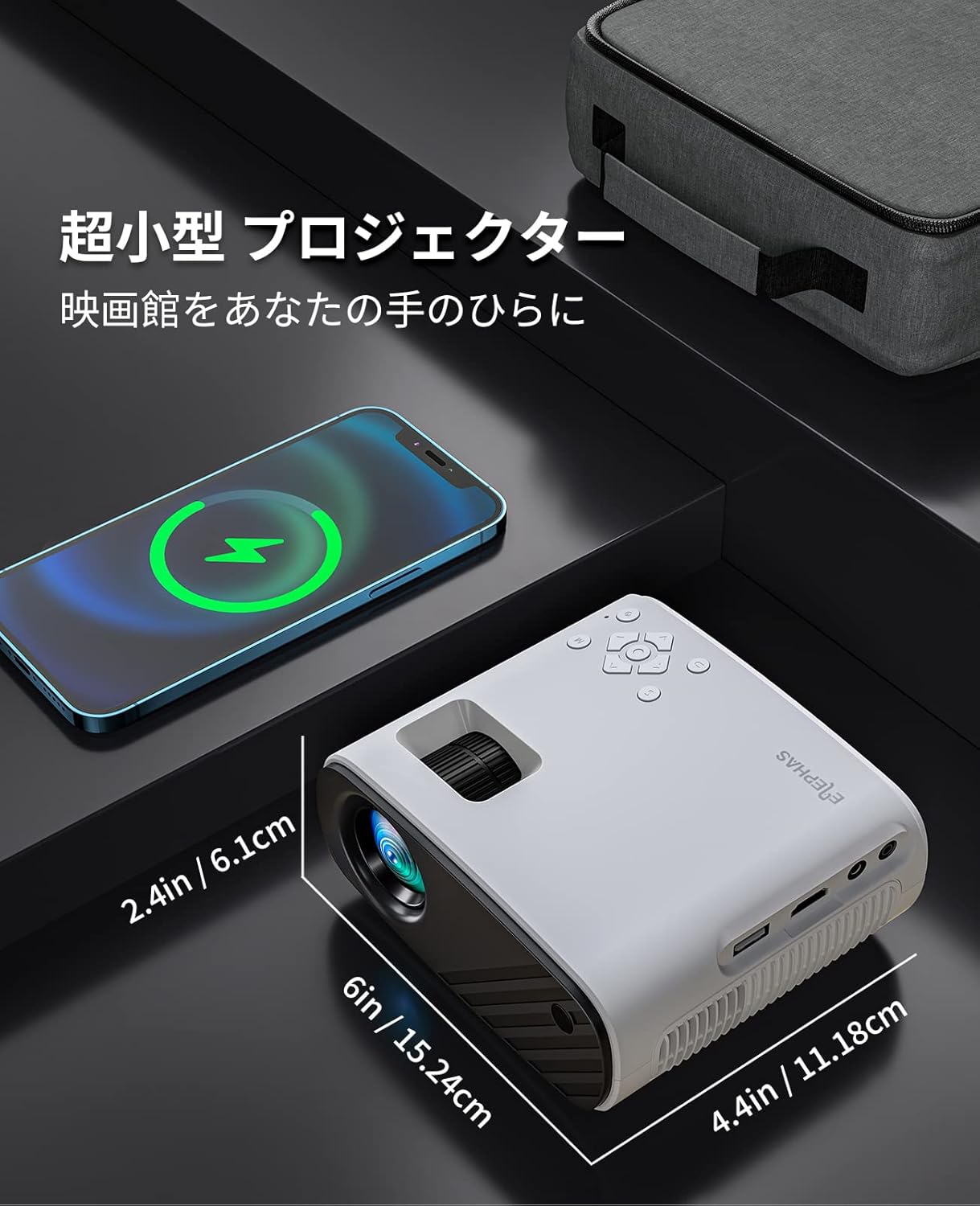
Image: The compact size of the ELEPHAS BL128 Mini Projector compared to a smartphone.

Image: Illustration of the projector's efficient heat dissipation system.
4. Setup
- Unpack the Projector: Carefully remove all components from the packaging.
- Power Connection: Connect the AC power cable to the projector and then to a power outlet.
- Placement:
- Place the projector on a stable, flat surface.
- For ceiling projection, use the included tripod or a compatible ceiling mount.
- Ensure the projector lens is facing the desired projection surface (wall or screen).
- Power On: Press the power button on the projector or remote control to turn it on.
- Focus Adjustment: Rotate the focus ring on the projector lens until the image is clear and sharp.
- Keystone Correction: Adjust the keystone setting (if available, typically in the menu) to correct any trapezoidal distortion of the image.

Image: Projector setup in a living room demonstrating large screen projection.

Image: Visual representation of the projector's 50-100% zoom function.
5. Operating Instructions
- Power On/Off: Press the power button on the projector or remote control.
- Input Source Selection: Use the 'Source' button on the remote or projector to cycle through available input options (HDMI, USB, AV).
- Menu Navigation: Use the arrow keys and 'OK' button on the remote or projector to navigate the on-screen menu for settings adjustments.
- Volume Control: Adjust the volume using the '+' and '-' buttons on the remote or projector.
- Zoom Function: Access the zoom function through the projector's menu to adjust the screen size from 50% to 100% without moving the projector.
Video: A demonstration of the KITELY M8 projector, showcasing its features and operation. This video is relevant for understanding general projector functionality.
Video: A product display for the HY300Ultra projector, illustrating its design and projection capabilities. This video provides a visual overview of a similar projector type.
Video: An actual product display video for the HY300 Pro+ projector, showing its physical aspects and projection quality. This video helps visualize the projector in use.
6. Connectivity
The ELEPHAS BL128 Mini Projector offers multiple connectivity options to suit various devices:
- HDMI Port: Connect to laptops, PCs, game consoles (PS3, PS4), streaming devices (Fire Stick TV, Chromecast), and TV Boxes using the included HDMI cable.
- USB Port: Insert a USB memory stick to play media files directly.
- AV Port: Use the 3-in-1 AV cable to connect to older devices like DVD players.
- 3.5mm Audio Jack: Connect external speakers or headphones for enhanced audio.
- Wireless Connectivity (Screen Mirroring): The projector supports screen mirroring via Miracast (Android) and AirPlay (iOS) for smartphones and tablets. Navigate to the 'My Apps' section and select the appropriate screen mirroring option.
Note:
- Due to HDCP copyright protection, direct playback of content from Netflix, Amazon Prime, and Hulu is not supported. Please connect a Fire TV Stick or similar streaming device to the HDMI port for viewing these services.
- For iOS/Android smartphone connection, an HDMI adapter (Lightning to HDMI or Micro USB/Type-C to HDMI) may be required and is sold separately.

Image: Overview of the projector's connectivity ports and compatible devices.

Image: Demonstrating compatibility with Fire TV Stick for streaming services.
Video: A guide on how to connect a projector to a PC, useful for beginners. This video demonstrates the connection process for external devices.
7. Maintenance
- Lens Cleaning: Use a soft, lint-free cloth or lens cleaning paper to gently wipe the projector lens. Avoid using abrasive cleaners or excessive force.
- Dust Filter Cleaning: Regularly check and clean the dust filter (if accessible) to prevent overheating and maintain optimal performance. Refer to the Japanese user manual for specific instructions on filter access.
- Storage: When not in use, store the projector in a cool, dry place, preferably in its dedicated carry bag, to protect it from dust and damage.
8. Troubleshooting
| Problem | Possible Cause | Solution |
|---|---|---|
| No image projected |
|
|
| Image is blurry |
|
|
| No sound |
|
|
| Remote control not working |
|
|
9. Specifications
| Feature | Detail |
|---|---|
| Brand | ELEPHAS |
| Model Number | BL128 |
| Display Type | LCD |
| Native Resolution | 1920 x 1080 (1080P Full HD) |
| Contrast Ratio | 8000:1 |
| Projection Size | 30 - 200 inches |
| Recommended Projection Distance | 0.8 - 2.2 meters |
| Zoom Function | 50% - 100% |
| Connectivity Technology | HDMI, USB, AV, 3.5mm Audio Jack, Wireless (Screen Mirroring) |
| HDMI Ports | 1 |
| USB Ports | 1 |
| Built-in Speaker | Yes (HIFI Stereo) |
| Product Dimensions (L x W x H) | 15.4 x 12 x 6 cm |
| Product Weight | 0.42 Kilograms |
| Refresh Rate | 60 Hz |
| Power Source | AC Power Cord |
10. Warranty and Support
The ELEPHAS BL128 Mini Projector comes with a 2-year warranty from the date of purchase.
During the warranty period, ELEPHAS provides dedicated customer service and technical support. In the event of repair difficulties, we offer a free exchange or refund.
For any inquiries, technical assistance, or warranty claims, please contact our customer support team through the following channels:
- Email: support@elephas.com (Example)
- Website: www.elephas.com/support (Example)
Please have your product model number (BL128) and purchase date ready when contacting support.


