
NVX XC4N1
NVX XC4N1 Universal 4-in-1 Rearview Backup Camera Instruction Manual
Model: XC4N1
Introduction
This manual provides detailed instructions for the installation, operation, and maintenance of your NVX XC4N1 Universal 4-in-1 Rearview Backup Camera. Please read this manual thoroughly before installation and use to ensure proper function and safety.

Image: The NVX XC4N1 camera shown with its various mounting configurations, highlighting its versatility.
Safety Information
- Always disconnect the vehicle's battery before performing any electrical work.
- Ensure all wiring is properly insulated and secured to prevent short circuits or damage.
- Do not obstruct the driver's view or interfere with vehicle controls during installation.
- This camera is an aid for reversing and parking; it does not replace the driver's responsibility to check surroundings.
- Consult a professional if you are unsure about any installation steps.
Package Contents
Verify that all components are present before beginning installation:
- NVX XC4N1 Backup Camera Unit
- Square Mount
- Angled Mount
- Flush Mount
- Rubber Mount
- License Plate Bar Mount
- Power Cable
- RCA Video Cable
- Mounting Hardware (screws, adhesive pad)
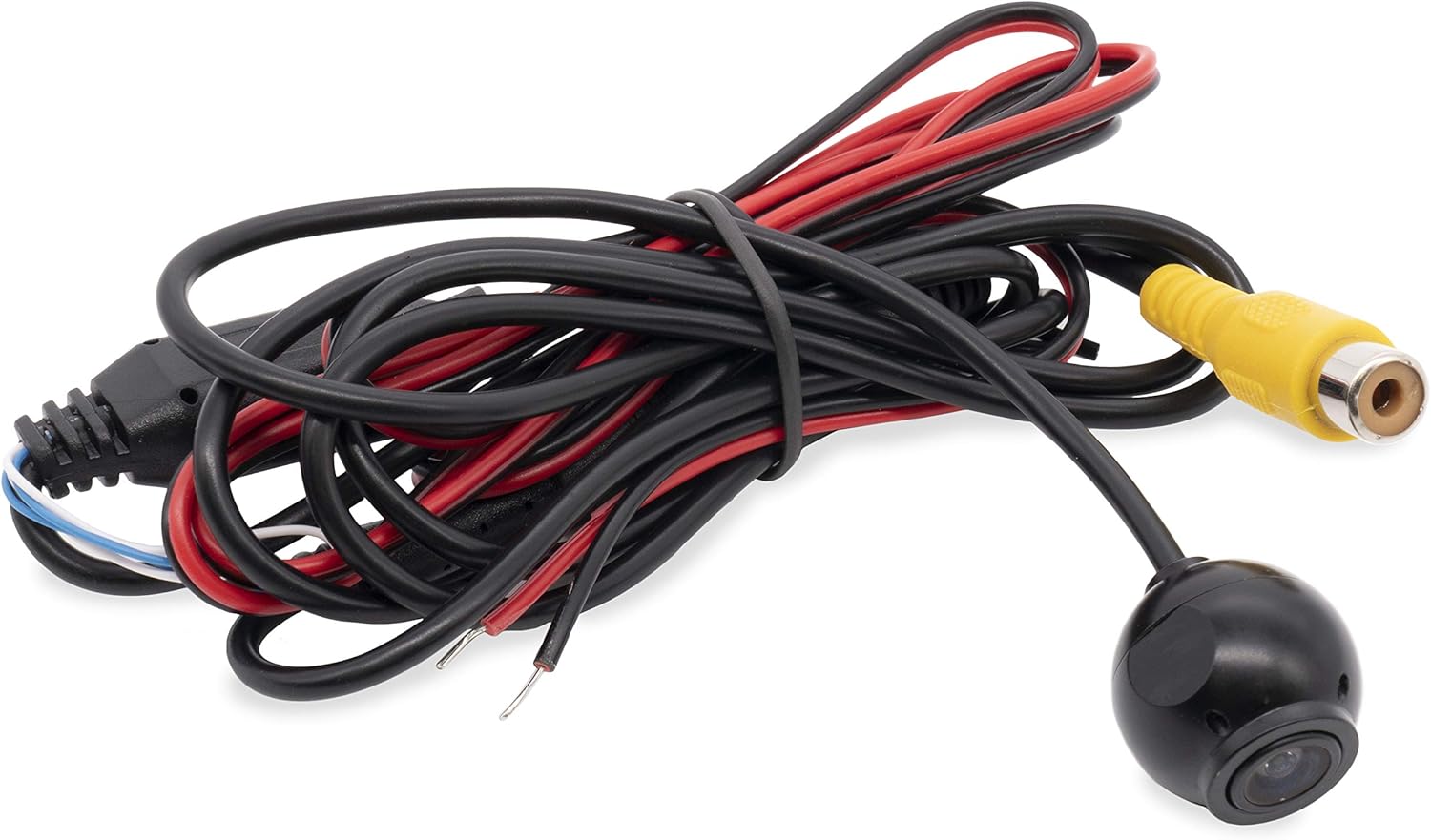
Image: The main camera unit with its attached power and RCA video cables.

Image: A collection of mounting brackets and screws included with the camera for different installation types.

Image: Supplementary mounting accessories, including a flush mount housing and adhesive pad.
Setup and Installation
The NVX XC4N1 offers four primary mounting options to suit various vehicle types and preferences.

Image: Visual representation of the four mounting styles: Flush, Square, Rubber (angled), and Bar (angled for license plate).
Mounting Options:
- Flush Mount: For a discreet, integrated look. Requires drilling a hole for the camera body.
- Square Mount: A surface-mount option, typically used on flat areas.
- Rubber Mount (Angled): Provides an angled view, often used for specific bumper or panel contours.
- License Plate Bar Mount (Angled): Designed to attach to the vehicle's license plate frame for easy installation.
General Installation Steps:
- Choose Mounting Location: Select the optimal mounting location based on visibility and vehicle aesthetics.
- Install Camera Mount: Secure the chosen mount using the provided screws or adhesive. Ensure the camera is oriented correctly.
- Route Cables: Carefully route the power and video cables from the camera to the vehicle's interior, avoiding moving parts, sharp edges, and heat sources.
- Connect Power:
- Connect the red wire of the power cable to a 12V reverse light power source (positive). This ensures the camera activates when the vehicle is in reverse.
- Connect the black wire of the power cable to a vehicle ground (negative).
- Connect Video:
- Connect the yellow RCA video cable from the camera to the video input of your display monitor or head unit.
- If your monitor requires a trigger wire for reverse activation, connect the small red wire integrated into the RCA cable to the reverse trigger input of your monitor.
- Test System: Reconnect the vehicle battery. Engage reverse gear (with the parking brake on and foot on the brake pedal) to verify the camera image appears on your display.
- Finalize Installation: Secure all cables and components, ensuring no loose wires or potential hazards.
Operating Instructions
The NVX XC4N1 camera automatically activates when the vehicle is shifted into reverse, displaying the rear view on your connected monitor.
Key Features:
- Ultra-Wide 170-Degree View: Provides an expansive field of view behind your vehicle, minimizing blind spots.

Image: A visual representation of the camera's 170-degree wide viewing angle, showing an extended area behind a vehicle.
- Parking Lines: Integrated color parking lines assist in judging distance and alignment. These lines are fixed and cannot be adjusted.

Image: A screenshot of the camera's output, showing green, yellow, and red parking guide lines overlaid on the rear view.
- Ultra-Low Lux Night Vision: The camera operates effectively in low-light conditions with a minimum illumination of 0.08 Lux, enhancing visibility at night.

Image: A split image comparing the night vision performance of a competitor's camera (left, darker) versus the NVX XC4N1 (right, brighter) in low light conditions.
- Penetrating Fog Function: Designed to improve visibility in foggy conditions.
Maintenance
The NVX XC4N1 camera is designed for durability and minimal maintenance.
- Waterproof Construction: The camera is IP68 certified, meaning it is fully dustproof and can withstand submersion in water. This protects it from rain, car washes, and other environmental elements.

Image: The camera lens partially submerged in water, illustrating its IP68 waterproof capability.
- Cleaning: Periodically clean the camera lens with a soft, damp cloth to ensure a clear image. Avoid abrasive cleaners or materials that could scratch the lens.
- Cable Inspection: Occasionally check the cables for any signs of wear, damage, or loose connections.
Troubleshooting
If you encounter issues with your NVX XC4N1 camera, refer to the following common problems and solutions:
| Problem | Possible Cause | Solution |
|---|---|---|
| No image on display when in reverse. |
|
|
| Image is blurry or distorted. |
|
|
| Parking lines are not visible. |
|
|
Specifications
| Feature | Detail |
|---|---|
| Model | XC4N1 |
| Brand | NVX |
| Resolution | 720 x 480 pixels |
| Viewing Angle | 170 Degrees (Real Angle of View) |
| Optical Sensor Technology | CMOS |
| Optical Sensor Size | 1/3 inch |
| Minimum Illumination | 0.08 Lux |
| Waterproof Rating | IP68 |
| Voltage | 12 Volts |
| Connector Type | RCA |
| Installation Type | Bracket Mount (4-in-1 Universal) |
| Item Weight | 1.5 pounds |
Warranty and Support
For warranty information or technical support, please refer to the documentation included with your purchase or visit the official NVX website. Contacting customer support with your product model (XC4N1) and purchase details will help expedite assistance.
Visit the NVX Store on Amazon for more information and products.
Ask a question about this manual
Ask about setup, troubleshooting, compatibility, parts, safety, or missing instructions. Manuals+ will review the question and use this page’s manual context to help answer it.