
Waykar PD253B
Waykar 5000 Sq. Ft Home Dehumidifier User Manual
Model: PD253B
Brand: Waykar
Introduction
This manual provides detailed instructions for the operation and maintenance of your Waykar 5000 Sq. Ft Home Dehumidifier. Designed with a modern aesthetic, this unit efficiently removes up to 70 pints of moisture per day (under 95°F, 85%RH conditions) from spaces up to 4,500 Sq. Ft, helping to maintain optimal humidity levels between 30% and 85%. Its powerful built-in compressor ensures effective dehumidification for basements, offices, homes, bathrooms, bedrooms, kitchens, stockrooms, living rooms, laundry rooms, cellars, and crawlspaces.

Image: The Waykar 5000 Sq. Ft Home Dehumidifier, a sleek white unit designed for efficient moisture removal.
Safety Information
For safe operation, please adhere to the following guidelines:
- Ensure the unit is placed on a stable, level surface.
- Do not block the air inlets or outlets. The unit features four air outlets for improved efficiency.
- The dehumidifier is equipped with a Safety Standby Mode to prevent overheating.
- Overflow Protection and Alarming Functions are available; the unit will automatically shut off when the water tank is full.
- Internal components are made of thermally resistant materials.
- Utilize the Child-lock Setting by pressing the "LOCK" button for 2 seconds to prevent unintended operation.
- Always unplug the unit before cleaning or performing maintenance.
Product Features and Components
The Waykar dehumidifier is designed for user convenience and effective performance. Key features include:
- Intelligent Touch Control Panel: An intuitive display for easy operation and setting adjustments.
- Four Air Outlets: Unlike many dehumidifiers, this model features four air outlets in four directions to enhance air circulation and dehumidification efficiency.
- 360° Universal Wheels: For easy movement across different floor types without causing damage.
- Removable Water Tank: A 1.19-gallon water tank for manual drainage.
- Continuous Drain Hose: Includes a 6.56ft long drain hose for continuous drainage.
- Washable Air Filter: Easy to remove and clean for consistent performance.

Image: The Waykar dehumidifier positioned in a living room, demonstrating its compact size and modern design within a home environment.

Image: The Waykar dehumidifier in a room with a child, highlighting its four air outlets that expel fresh air in multiple directions for a healthy environment.
Setup and Placement
To ensure optimal performance and safety, follow these setup instructions:
- Unpacking: Carefully remove the dehumidifier from its packaging. Retain packaging for future storage or transport.
- Placement: Place the unit on a firm, level surface. Ensure there is at least 8 inches (20 cm) of space around the unit for proper air circulation, especially around the four air outlets.
- Mobility: The unit is equipped with 360° universal wheels at the bottom, allowing for easy movement in all directions without damaging your floor.
- Power Connection: Plug the power cord into a grounded electrical outlet. The wire length is 6.56ft (2M).

Image: An overhead view of the Waykar dehumidifier, showing its top control panel, the power cord, and the removable water tank and air filter for maintenance.
Operating Instructions
The intelligent touch control panel allows for easy and precise control of your dehumidifier.

Image: A detailed view of the intelligent touch control panel, illustrating the various buttons and their functions for operating the dehumidifier.
Control Panel Functions:
- Power Button: Turns the dehumidifier on or off.
- Humidity Auto Control: Adjust your ideal moisture setting. The unit will smartly sense room humidity and control dehumidification to maintain pre-set levels.
- When the humidity level overtakes or drops to the level you set, the dehumidifier compressor will automatically begin working or stop.
- The unit powers on automatically when the ambient humidity is above the setting humidity.
- The unit powers off automatically when the ambient humidity is below the setting humidity.
- 24-hour Timer: Program the unit for preset operation and reduced energy consumption.
- Fan Speed: Select between regular and turbo fan speeds for optimal comfort and dehumidification rate.
- Child-Lock Setting: Press the "LOCK" button for 2 seconds to lock the control panel, preventing accidental changes.
- Lighting: Control the status of the indicator lights.
Video: A demonstration of the Waykar dehumidifier's intelligent touch control panel, showing how to set humidity levels, use the timer, and adjust fan speeds for customized operation.
Drainage Options
Your Waykar dehumidifier offers two convenient drainage methods:
- Manual Drain (1.19 Gallon Water Tank):
When the water bucket is full, the indicator will display, and the dehumidifier will automatically power off. Simply remove the removable and washable bucket, empty it, and put it back in place. The dehumidifier can then be turned on again.
- Continuous Drain (Via 6.56ft Drain Hose):
For continuous operation without needing to empty the bucket, connect the included 6.56ft (2M) long drain hose to the continuous drainage outlet on the unit. This allows water to drain directly to a floor drain or suitable receptacle.

Image: Visual guide demonstrating both the manual drainage method by removing and emptying the water bucket, and the continuous drainage option using the included drain hose.
Maintenance
Regular maintenance ensures the longevity and efficiency of your dehumidifier.
Air Filter Cleaning:
The air filter is easy to remove and washable. Simple clean it in regular water and then recycle. Please clean it once a month to maintain optimal air quality and unit performance.

Image: The back of the dehumidifier with the air filter removed, illustrating the washable filter and the internal components for air purification.
Troubleshooting
If you encounter issues with your Waykar dehumidifier, refer to the common problems and solutions below:
| Problem | Possible Cause | Solution |
|---|---|---|
| Dehumidifier does not turn on. | No power, power cord not plugged in, or power outage. | Check power connection, ensure outlet is functional. |
| Unit not collecting water. | Humidity setting too high, air filter clogged, or room temperature too low. | Lower humidity setting, clean air filter, ensure room temperature is within operating range. |
| Water tank is full, but unit is still running. | Sensor malfunction or tank not properly seated. | Ensure tank is correctly inserted. If problem persists, contact customer support. |
| Unit is noisy. | Unit not on a level surface, or internal components vibrating. | Place on a level surface. If noise is excessive, contact customer support. |
For further assistance, please refer to the Warranty and Support section.
Specifications
| Attribute | Value |
|---|---|
| Brand | Waykar |
| Model Name | 1.18 Gallons Water Tank and Four Air Outlets |
| Item Model Number | PD253B |
| Floor Area Coverage | 5000 Square Feet |
| Dehumidification Capacity | 70 Pints per Day |
| Tank Volume | 1.19 Gallons |
| Product Dimensions | 11.4"D x 11.4"W x 25.19"H |
| Item Weight | 30 Pounds |
| Color | White |
| Material | Plastic |
| Number of Speeds | 2 |
| Wattage | 400 watts |
| Included Components | 70 Pints Dehumidifier, Water Tank, Drain Hose, Manual |
| Recommended Uses | Indoor Places |
| UPC | 787894574175, 787894574113, 787894574090 |
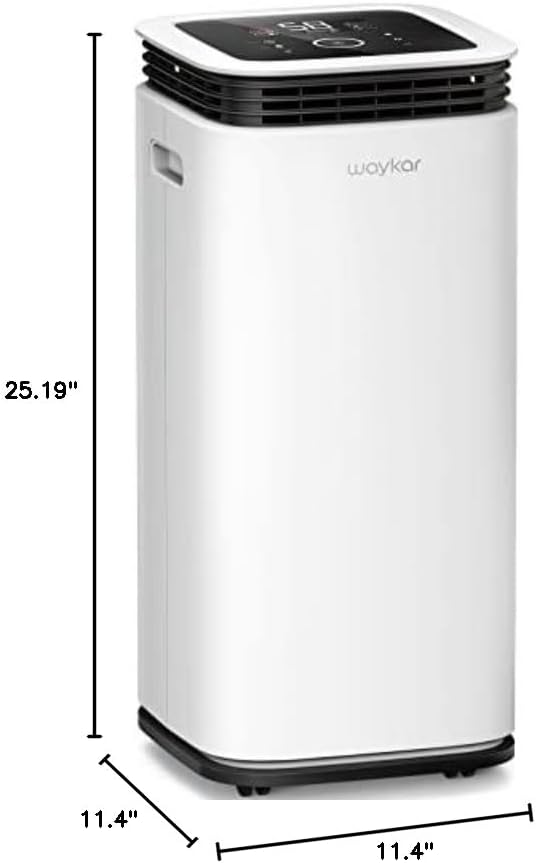
Image: A diagram illustrating the dimensions of the Waykar dehumidifier: 11.4 inches deep, 11.4 inches wide, and 25.19 inches high.
Warranty and Support
All Waykar Dehumidifiers are covered with a 30-Days Money Back Guarantee if you are not satisfied with the product. Additionally, a 1-year warranty is provided, with an option for a 2nd-year warranty extension. Lifetime expert tech support is also available.
Please do not hesitate to contact Waykar customer support if you have any questions or require assistance. We aim to reply within 27 hours and help you solve any problems.
For more information, visit the official Waykar Store: Waykar Store on Amazon
Related documentsPD253B


Ask a question about this manual
Ask about setup, troubleshooting, compatibility, parts, safety, or missing instructions. Manuals+ will review the question and use this page’s manual context to help answer it.