1. Introduction
This manual provides detailed instructions for the setup, operation, and maintenance of your La Crosse Technology V40A-PRO-INT Wi-Fi Professional Weather Center. This system offers accurate, hyper-local weather data and enhanced features when connected to the La Crosse View App. Please read this manual thoroughly before use to ensure optimal performance and longevity of your device.

Figure 1: Overview of the La Crosse Technology V40A-PRO-INT Weather Center, including the main display, outdoor multi-sensor, remote temperature/humidity sensor, and a smartphone displaying the La Crosse View App.
2. What's in the Box
Verify that all components are present in your package:
- Indoor Display Unit: The main console for viewing weather data.
- Outdoor Multi-Sensor: Measures wind speed, wind direction, and rainfall.
- Remote Temperature/Humidity Sensor: Measures outdoor temperature and humidity.
- AC Power Adapter: For the indoor display unit.
- Quick Setup Guide: Provides initial setup instructions.
3. Setup
3.1. Initial Power-Up
- Insert 8 AA batteries (not included) into the outdoor multi-sensor and remote temperature/humidity sensor. Ensure correct polarity.
- Plug the AC power adapter into the indoor display unit and a power outlet. Optional: Insert 3 AA batteries for backup power.
- The display will power on and begin searching for sensor signals.
3.2. Sensor Placement
Proper placement of your sensors is crucial for accurate readings:
- Outdoor Multi-Sensor: Mount the multi-sensor in an open area, away from obstructions, to ensure accurate wind and rain measurements. The solar panel should face south for optimal charging.
- Remote Temperature/Humidity Sensor: Place this sensor in a shaded, well-ventilated location to avoid direct sunlight, which can cause inaccurate temperature readings.
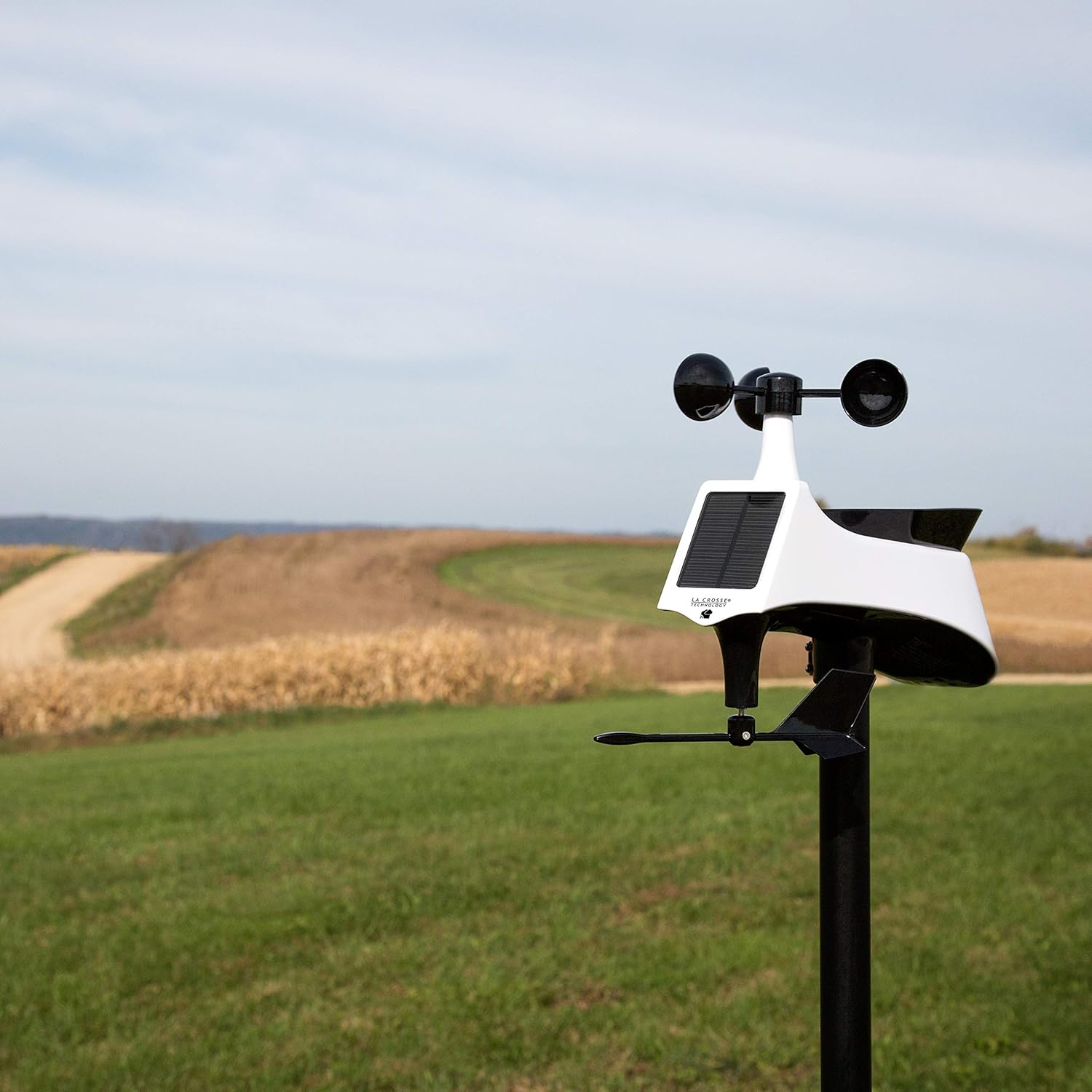
Figure 2: Proper placement of the outdoor multi-sensor in an unobstructed location.

Figure 3: Remote temperature/humidity sensor mounted on a shaded outdoor wall.
3.3. Wi-Fi Connection (La Crosse View App)
Connecting your weather center to Wi-Fi unlocks enhanced features, including NWS forecasts, internet time/date, and remote monitoring via the La Crosse View App. Ensure your mobile device is connected to a 2.4 GHz Wi-Fi network during setup.
- Download the La Crosse View App from your device's app store.
- Follow the on-screen instructions within the app to connect your weather station.
- The app will prompt you to scan the barcode located on the side of your display unit.

Figure 4: Back of the display unit with Wi-Fi connection instructions and barcode for app pairing.
4. Operating the Weather Center
4.1. Display Overview
The illuminated color display provides a comprehensive overview of current and forecasted weather conditions. Key information includes:
- Time & Date: Automatically set via Wi-Fi connection.
- Indoor/Outdoor Temperature & Humidity: Current readings from the sensors.
- Wind Data: Speed, direction, and history.
- Rainfall: Current to total rainfall.
- Dynamic Forecast Icons: Visual representation of upcoming weather.
- Heat Index & Dew Point: Calculated values for comfort.

Figure 5: Detailed view of the weather center's color display.
4.2. La Crosse View App Features
The La Crosse View App enhances your weather monitoring experience:
- Remote Monitoring: View your weather data from anywhere via your smartphone.
- Customizable Alerts: Set alerts for specific temperature, humidity, or wind conditions.
- Add-on Sensors: Expand your system with additional sensors (e.g., water leak, thermo-hygro) and monitor them through the app.
- Data Stream: Access historical data, charts, and graphs for detailed analysis.

Figure 6: La Crosse View App demonstrating add-on sensor integration.

Figure 7: La Crosse View App showing detailed data streams and historical records.
4.3. Official Product Video
Video 1: An official overview of the La Crosse Technology V40A-PRO-INT Wi-Fi Professional Weather Center, highlighting its features and benefits.
5. Maintenance
- Battery Replacement: Replace batteries in the outdoor sensors and indoor display annually or when the low battery indicator appears. Use high-quality alkaline or lithium batteries for optimal performance, especially in cold climates.
- Sensor Cleaning: Periodically clean the outdoor multi-sensor (especially the rain collector) to remove debris, leaves, or insects that may affect accuracy.
- Display Care: Clean the display with a soft, damp cloth. Avoid abrasive cleaners.
6. Troubleshooting
- No Sensor Data: Ensure batteries are fresh and correctly installed in sensors. Check sensor placement for obstructions or excessive distance from the display. Press the SENSOR button on the display to manually search for sensor signals.
- Inaccurate Readings: Verify sensor placement (e.g., shaded area for temperature, unobstructed for wind/rain). Ensure sensors are clean.
- Wi-Fi Connectivity Issues: Confirm your mobile device is on a 2.4 GHz Wi-Fi network during app setup. Ensure the weather center is within range of your Wi-Fi router. Restart your router and the weather center if issues persist.
- App Not Displaying Data: Ensure the weather center is connected to Wi-Fi and the app is updated to the latest version.
7. Specifications
| Brand | La Crosse Technology |
| Model Number | V40A-PRO-INT |
| Display Type | LCD |
| Connectivity Technology | Wi-Fi |
| Power Source (Display) | Corded Electric (with optional 3 AA battery backup) |
| Power Source (Sensors) | 8 AA batteries required (not included) |
| Outdoor Temperature Range | -40°F to 140°F (-40°C to 60°C) |
| Indoor Temperature Range | 32°F to 122°F (0°C to 50°C) |
| Humidity Range | 10% to 99% RH |
| Transmission Range | Up to 400 feet (121 meters) line of sight |
| Dimensions (Display) | 1.18"D x 8.05"W x 5.7"H |

Figure 8: Physical dimensions of the indoor display unit.
8. Warranty & Support
Warranty: La Crosse Technology, Ltd. provides a 1-year limited time warranty from date of purchase on this product relating to manufacturing defects in materials & workmanship.
For full warranty details, please visit the La Crosse Technology website or refer to the included warranty card.
Support: For additional support, resources, and video tutorials, please visit the La Crosse Technology website or contact their USA-based support team.
- Online Support: lacrossetechnology.com/support
- Phone Support: Available Monday-Friday, 8AM-6PM CST.


