
1. Product Overview
The Baseus D02 Bluetooth Headphones (Model NGD02-01) offer a versatile audio experience with both wireless Bluetooth and wired 3.5mm jack connectivity. Designed for comfort and portability, these over-ear headphones provide clear sound for music playback.
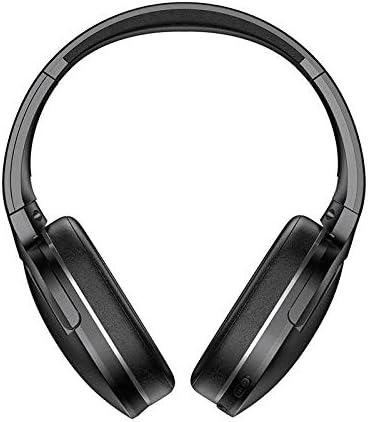
Image 1.1: Front view of the Baseus D02 Bluetooth Headphones, showcasing their over-ear design.
2. Package Contents
Please check the package for the following items:
- Baseus D02 Bluetooth Headphones
- USB Charging Cable
- 3.5mm Audio Cable
- User Manual (this document)
- Ear Cushions (pre-installed or as spares)
- Headband (part of the headphone structure)
3. Setup and Connection
3.1 Charging the Headphones
Before first use, fully charge the headphones. Connect the provided USB charging cable to the Micro USB charging port on the headphones and the other end to a USB power adapter (not included) or a computer's USB port.
- The indicator light will typically be red during charging.
- The indicator light will turn blue or off when charging is complete.
A full charge usually takes approximately 2 hours.
3.2 Bluetooth Pairing
- Ensure the headphones are turned off.
- Press and hold the Power/Multi-Function Button (MFB) for approximately 3-5 seconds until the indicator light flashes red and blue alternately. This indicates pairing mode.
- On your device (smartphone, tablet, computer), enable Bluetooth and search for available devices.
- Select "Baseus D02" from the list of found devices.
- Once connected, the indicator light will typically flash blue slowly or remain solid blue.
- If prompted for a password, enter "0000".
The headphones will automatically attempt to reconnect to the last paired device when powered on.
3.3 Wired Connection (3.5mm Audio Jack)
To use the headphones in wired mode, connect one end of the 3.5mm audio cable to the 3.5mm audio port on the headphones and the other end to your audio source's 3.5mm jack. The headphones can be used in wired mode even if the battery is depleted.

Image 3.1: Detailed view of the headphone's controls, including the power switch, 3.5mm audio port, Micro USB charging port, and volume/MFB buttons.
4. Operating Instructions
4.1 Power On/Off
- Power On: Slide the power switch to the "ON" position. The indicator light will flash blue.
- Power Off: Slide the power switch to the "OFF" position. The indicator light will turn off.
4.2 Music Playback
- Play/Pause: Short press the Multi-Function Button (MFB).
- Next Track: Long press the "Volume +" button.
- Previous Track: Long press the "Volume -" button.
4.3 Volume Control
- Volume Up: Short press the "Volume +" button.
- Volume Down: Short press the "Volume -" button.
Note: As per product specifications, these headphones do not include a microphone. Therefore, call management features are not available directly through the headphones.
5. Maintenance and Care
Proper maintenance ensures the longevity and optimal performance of your headphones.
- Cleaning: Use a soft, dry, lint-free cloth to clean the headphones. Do not use abrasive cleaners, alcohol, or chemical solvents.
- Storage: When not in use, store the headphones in a cool, dry place, away from direct sunlight and extreme temperatures. The headphones are foldable for compact storage.
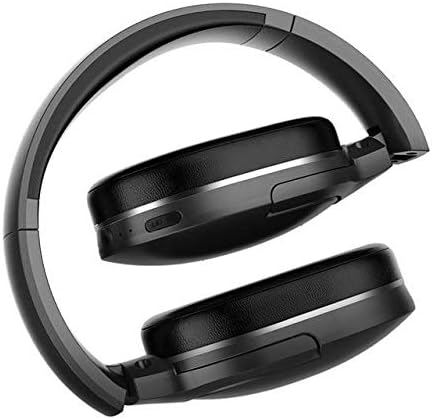
Image 5.1: The Baseus D02 Bluetooth Headphones shown in their folded configuration, ideal for travel and compact storage.
- Battery Care: To preserve battery life, avoid fully discharging the headphones frequently. Charge them regularly, even if not in constant use.
- Avoid Water: These headphones are not waterproof. Avoid exposure to water or excessive moisture.
6. Troubleshooting
| Problem | Possible Cause | Solution |
|---|---|---|
| Cannot power on | Low battery | Charge the headphones fully. |
| Cannot pair via Bluetooth | Headphones not in pairing mode; Bluetooth disabled on device; too far from device. | Ensure headphones are in pairing mode (flashing red/blue). Enable Bluetooth on your device. Move headphones closer to the device (within 10 meters). Try restarting both devices. |
| No sound | Volume too low; incorrect audio source selected; headphones not connected properly (wired or wireless). | Increase volume on both headphones and connected device. Check Bluetooth connection or 3.5mm cable connection. Ensure the correct audio output is selected on your device. |
| Poor sound quality | Weak Bluetooth signal; interference; low-quality audio source. | Move closer to the Bluetooth device. Avoid obstacles between headphones and device. Try a different audio source. |
7. Specifications
| Feature | Detail |
|---|---|
| Brand | Baseus |
| Model Number | NGD02-01 |
| Type | Over-Ear Headphones |
| Connectivity | Bluetooth (Wireless), 3.5mm Jack (Wired) |
| Wireless Communication Technologies | Bluetooth |
| Headphone Jack | 3.5 mm Jack |
| Control Type | Volume Control, Multi-Function Button (MFB) |
| Microphone Included | No |
| Noise Cancelling | No |
| Color | Black |
| Material | Plastic |
| Power Source | Battery Powered |
| Package Dimensions | 19.8 x 13.6 x 9 cm |
| Item Weight | 180.98 g |
8. Warranty and Support
For warranty information, please refer to the documentation provided with your purchase or contact your retailer. For further support or inquiries, please visit the official Baseus website or contact their customer service.
You can find more information about Baseus products at the Baseus Store on Amazon.


