
1. Product Overview
The SATLINK WS-6903 is a high-quality digital display satellite meter designed to assist in quickly and accurately aligning satellite dishes. It is particularly useful for systems without automatic satellite tuning, enabling installers to efficiently capture signals and adjust the antenna to its optimal position.
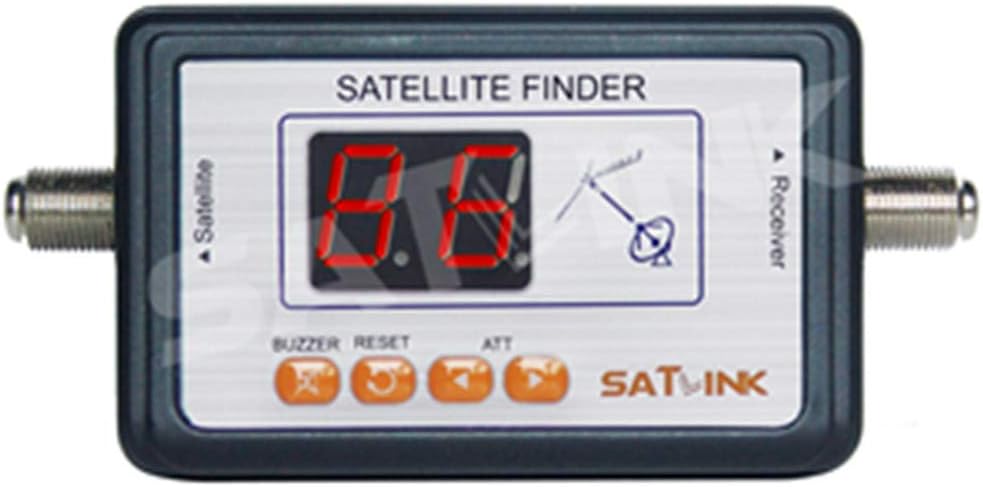
Figure 1: Front view of the SATLINK WS-6903 Digital Satellite Meter, showing the digital display and control buttons.
- High-Quality Meter: Ideal for systems without automatic satellite tuning, allowing for quick and precise signal acquisition.
- Easy Connection: Connects between your LNBF and receiver to track the clearest signal.
- LED Display: Provides clear indication of signal strength.
- Audio Tone: An audible tone assists in aligning the satellite antenna, becoming stronger as the signal improves.
- Adjustable Gain: Features four gain steps to increase or decrease the meter's sensitivity for optimal signal detection.
2. Package Contents
Please ensure all items are present in the package:
- 1 x SATLINK WS-6903 Satellite Detector

Figure 2: The SATLINK WS-6903 product packaging, typically containing the satellite detector.
3. Setup and Connection
Follow these steps to connect and set up your SATLINK WS-6903 satellite meter:
- Connect a jumper cable from the LNB (Low Noise Block) to the "Satellite" port on the satellite finder.
- Connect the "Receiver" port of the satellite finder to your satellite receiver.
- Ensure the satellite detector is correctly connected. Plug in the AC adapter and power on your satellite receiver.

Figure 3: Connection diagram illustrating how to connect the LNB and Receiver to the satellite finder, highlighting the screen and key buttons.

Figure 4: Diagram detailing the receiver connection point and the location of the internal speaker on the satellite finder.
4. Operating Instructions
Once connected, follow these steps to operate the satellite meter and align your dish:
- Adjust the dB level to 1 or 2 using the ATT button. The LED signal display should show a value between 15 and 30.
- Begin adjusting the position of your satellite dish. As you approach the satellite signal, you will hear an audible alert, and the signal strength value on the display will increase.
- Once you have a preliminary signal, adjust the dB level to 3 or 4. Continue fine-tuning the dish position until the signal strength value reaches its maximum.
- At this point, the "LOCK" light on your satellite receiver should illuminate. If the LOCK light is on, it indicates that you have successfully found the desired satellite. If not, you need to readjust the dish.
The audio tone will become stronger as you achieve better alignment, helping you to precisely position the antenna.
5. Important Notes
- Do not place the satellite detector directly in front of the satellite dish.
- When using a high-gain LNB (gain greater than 60 dB), insert a 5 dB attenuator between the LNB and the satellite detector, or replace the GR-59U jumper cable.
- The maximum cable length between the satellite dish and the satellite detector should not exceed 5 meters.
6. Maintenance
No specific maintenance procedures are required for this device beyond keeping it clean and dry. Avoid exposing the device to extreme temperatures or moisture.
7. Troubleshooting
This manual does not include a dedicated troubleshooting section. If you encounter issues, please re-verify all connections and ensure you are following the operating instructions carefully. Refer to the "Important Notes" section for common considerations.
8. Specifications
| Feature | Specification |
|---|---|
| Brand | SATLINK |
| Model Number | WS-6903 |
| Frequency Range | 950-2150 MHz |
| Input Level Range | -40 dBm ~ 10 dBm |
| Impedance | 75 Ohm |
| Supply Voltage | 13-18 V DC |
| Operating Temperature | 0 ~ 40 degrees Celsius |
| Dimensions (L x W x H) | 12.7 x 8.5 x 3.3 cm (approx. 5 x 3.3 x 1.3 inches) |
| Weight | 73 g (approx. 2.57 oz) |
9. Warranty and Support
Information regarding product warranty and customer support is not available in this manual. Please refer to the product packaging or the retailer's website for details on warranty coverage and how to obtain support.


