
Lock'er Down LD2070EX
Lock'er Down Extreme Console Safe Instruction Manual
Model: LD2070EX
Compatible with 2018-2019 Jeep Wrangler JL and 2020 Gladiator Models (Includes Rubicon)
1. Introduction
This manual provides detailed instructions for the installation, operation, and maintenance of your Lock'er Down Extreme Console Safe, Model LD2070EX. Designed to secure personal items within your vehicle's center console, this safe offers enhanced security and organization. Please read this manual thoroughly before installation and use to ensure proper function and safety.

Image 1.1: The Lock'er Down Extreme Console Safe in its closed position, showcasing its robust construction and integrated combination lock.
2. Safety Information
- Always ensure the vehicle is parked on a level surface and the engine is off before beginning installation.
- Use appropriate tools and wear safety glasses during installation to prevent injury.
- Do not store hazardous materials, flammable liquids, or illegal substances inside the safe.
- Keep the combination confidential and do not share it with unauthorized individuals.
- Verify that the safe is securely fastened after installation to prevent movement during vehicle operation.
3. Package Contents
Verify that all components are present before beginning installation:
- Lock'er Down Extreme Console Safe Unit (LD2070EX)
- Mounting Hardware (nuts, bolts, washers as required)
- Small LED Light (may be included for interior illumination)
- Instruction Manual (this document)
Note: Keys are listed as included components in product specifications, but this model uses a combination lock. Please disregard "Keys" if your model is LD2070EX with a combination lock.
4. Setup and Installation
Installation of the Lock'er Down Extreme Console Safe is designed to be a straightforward process, typically requiring a 3/16" socket. The safe is secured to your vehicle's factory console bolt holes, making it virtually immovable once installed.
4.1 Tools Required
- 3/16" Socket Wrench
- Safety Glasses
4.2 Installation Steps
- Prepare the Console: Open your vehicle's center console lid. Remove any existing liners or contents to expose the console's interior base.
- Position the Safe: Carefully place the Lock'er Down safe unit into the console opening. Ensure it aligns with the factory bolt holes at the bottom of the console.
- Secure the Safe: From inside the safe, locate the pre-drilled holes that align with the console's mounting points. Use the provided nuts and the 3/16" socket wrench to securely fasten the safe to the console. There are typically 8 nuts to attach to the tacked-on studs. Tighten them firmly but do not overtighten.
- Check Fitment: After securing, gently attempt to move the safe to ensure it is rock solid and does not shift. Close the console lid to verify proper clearance. If the console lid hits the combination knob, ensure the safe is seated correctly and all fasteners are tight.
- Install LED Light (Optional): If an LED light is included, attach it to the underside of the console lid or inside the safe for improved visibility, especially in low-light conditions.

Image 4.1: The console safe securely installed within the vehicle's center console, demonstrating its seamless integration.

Image 4.2: The console safe with its lid open, showing the internal storage area and how it fits within the vehicle's console.
5. Operating Instructions
Your Lock'er Down Extreme Console Safe features a programmable combination lock for secure access.
5.1 Setting Your Combination
Refer to the specific instructions provided with the combination lock mechanism for initial setup and changing the combination. Typically, this involves:
- With the safe door open and the lock in the unlocked position, locate the reset button or lever on the back or side of the lock mechanism.
- Using a pen or small pointed object, press and hold the reset button/lever.
- While holding the reset, set your desired 4-digit combination by rotating the dials.
- Release the reset button/lever. Your new combination is now set.
- Test the new combination several times with the door open before closing and locking the safe.
Important: Write down your combination and store it in a secure, memorable location outside of your vehicle. Do not store it inside the safe.
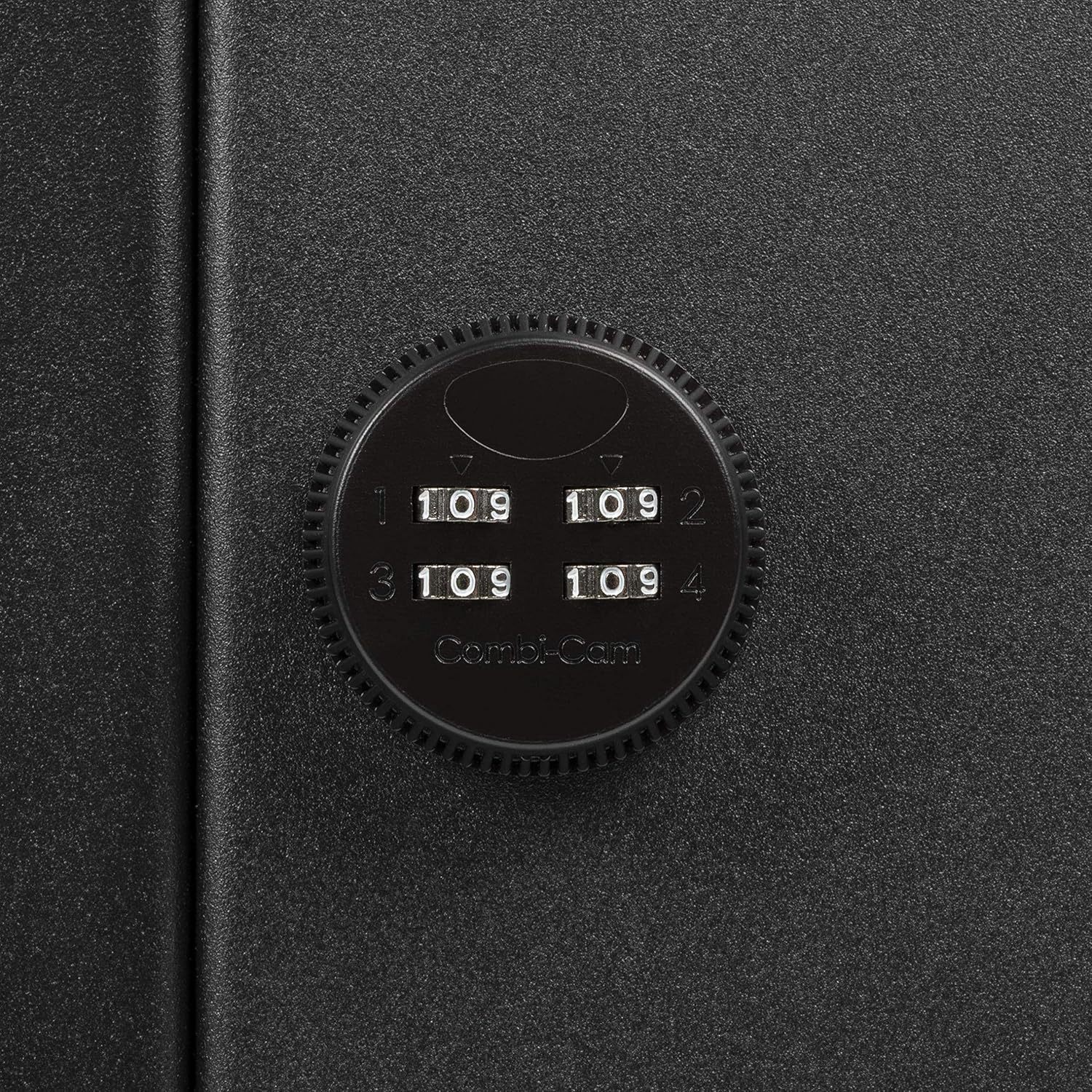
Image 5.1: A detailed view of the Combi-Cam combination lock, showing the four numerical dials for setting and entering the code.
5.2 Opening and Closing the Safe
- To Open: Rotate the combination dials to your set 4-digit code. Once the correct combination is entered, the lock mechanism will disengage, allowing you to lift the safe lid.
- To Close and Lock: Lower the safe lid until it is fully closed. Scramble the combination dials to secure the lock. Ensure the dials are not on your combination to prevent unauthorized access.
6. Maintenance
The Lock'er Down Extreme Console Safe requires minimal maintenance to ensure long-lasting performance.
- Cleaning: Wipe the exterior and interior surfaces with a soft, damp cloth. Avoid abrasive cleaners or solvents that could damage the finish.
- Lubrication: Periodically, a small amount of silicone-based lubricant can be applied to the hinge points and the lock mechanism (avoiding the combination dials directly) to ensure smooth operation.
- Fastener Check: Annually, or if you notice any looseness, re-check the tightness of the mounting nuts to ensure the safe remains securely attached to the console.
7. Troubleshooting
| Problem | Possible Cause | Solution |
|---|---|---|
| Console lid hits combination knob when closing. | Safe not fully seated or mounting nuts not tightened evenly. | Ensure the safe is pushed down completely into the console. Re-tighten all mounting nuts evenly. Some vehicles may require minor adjustment or the console light to be removed for optimal fit. |
| Mounting nuts become loose over time. | Vibration during vehicle operation. | Re-tighten nuts. For persistent loosening, consider applying a thread-locking fluid (e.g., Loctite) to the nut threads before re-installation. |
| Difficulty seeing combination in the dark. | Insufficient ambient light or console's built-in light does not illuminate the area. | Utilize the included LED light (if applicable) or install an additional small, battery-operated LED light inside the console or near the lock for better visibility. |
| Safe door opening feels small or edges are sharp. | Design characteristic. | This is a design feature for security. Exercise caution when retrieving items. The opening is designed to be secure, which may limit access for larger items. |
8. Specifications
| Feature | Detail |
|---|---|
| Brand | Lock'er Down |
| Model Number | LD2070EX |
| Lock Type | Combination |
| Material | Alloy Steel (Domestic 12 gauge cold-rolled steel) |
| Mounting Type | Freestanding (secured to console) |
| Item Weight | 9.38 pounds |
| Package Dimensions | 12.7 x 12.5 x 12.2 inches |
| Water Resistance Level | Not Water Resistant |
| UPC | 851363004460 |
| Compatibility | 2018-2019 Jeep Wrangler JL, 2020 Gladiator Model (Includes Rubicon) |

Image 8.1: Dimensional diagram of the console safe, illustrating its height, width, and depth measurements.
9. Warranty and Support
Specific warranty details for the Lock'er Down Extreme Console Safe are typically provided at the point of purchase or on the manufacturer's official website. It is recommended to retain your proof of purchase for warranty claims.
For technical support, installation assistance, or warranty inquiries, please contact Lock'er Down customer service directly. Contact information can usually be found on the product packaging or their official website.
Note: This manual does not constitute a warranty. Please refer to the official Lock'er Down warranty policy for complete terms and conditions.
Ask a question about this manual
Ask about setup, troubleshooting, compatibility, parts, safety, or missing instructions. Manuals+ will review the question and use this page’s manual context to help answer it.