
Product Overview
The Eliminator LP 42 RGBW is a lightweight LED Par fixture designed for various lighting applications. It features forty-two 1-watt RGBW LEDs, providing a 25-degree beam angle for vibrant color mixing and illumination. This fixture supports multiple operating modes and DMX control for versatile performance.
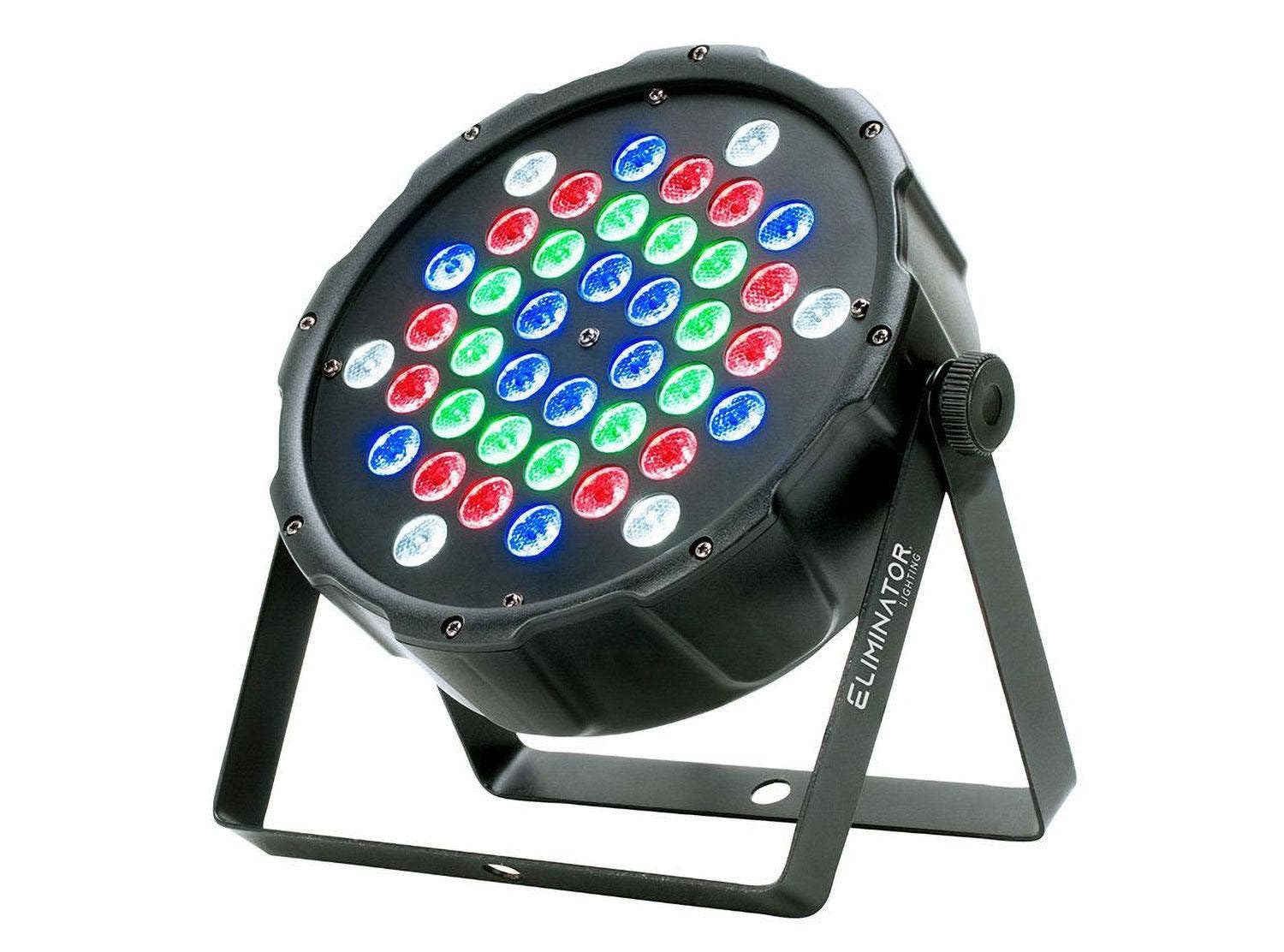
Image: Front view of the Eliminator LP 42 RGBW LED Fixture, showcasing the arrangement of its 42 Red, Green, Blue, and White LEDs.
Key Features
- LEDs: 42x 1-Watt LEDs (12x Red, 12x Green, 12x Blue & 6x White LEDs)
- Beam Angle: 25-degrees
- Lux: 3600 @ 2M
- DMX Channels: 4 or 8 selectable
- Operating Modes: Static Color, Color Change, Fade, Auto, Sound Active, Master/Slave modes
- Dimming & Strobe: 0-100% Dimming and Variable Strobe
- Control Interface: 4 push button menu with LED display
- Mounting: Scissor yoke included for multiple rigging or floor standing applications
- Connectivity: 3-Pin DMX In/Out, IEC In/Out connections for daisy chain power
- Cooling: Fan cooled
- Power Consumption: 42W max
- Multi-voltage Power: 100~240V, 50/60Hz
Setup Instructions
- Unpacking: Carefully remove the fixture from its packaging. Ensure all components, including the scissor yoke, are present and undamaged.
- Mounting:
- The included scissor yoke allows for versatile mounting. It can be used to hang the fixture from a truss or lighting stand, or as a floor stand.
- Ensure the mounting surface or structure can safely support the weight of the fixture (approximately 3.7 lbs / 1.7 kg).
- Always use appropriate safety cables when suspending the fixture.
- Power Connection:
- Connect the provided IEC power cable to the IEC IN socket on the rear of the fixture.
- Plug the other end into a compatible power outlet (100~240V, 50/60Hz).
- Multiple fixtures can be daisy-chained using the IEC OUT socket to connect to the IEC IN of another fixture, up to the maximum power draw capacity.
- DMX Connection (Optional):
- For DMX control, connect a 3-pin DMX cable from your DMX controller's output to the DMX IN socket on the fixture.
- To daisy-chain multiple DMX fixtures, connect a DMX cable from the DMX OUT socket of the first fixture to the DMX IN of the next fixture in the chain.
- Ensure the last fixture in the DMX chain has a DMX terminator connected to its DMX OUT socket for stable signal transmission.

Image: Rear panel of the LP 42 RGBW, highlighting the LED display, control buttons, 3-pin DMX In/Out, and IEC power In/Out connections.
Operating Modes
The LP 42 RGBW offers several operating modes, accessible via the 4-push button menu and LED display on the rear panel. Use the "MENU" button to cycle through options, "UP/DOWN" to adjust values, and "ENTER" to confirm.
- Static Color Mode: Select a fixed color from a predefined palette.
- Color Change Mode: The fixture automatically cycles through various colors.
- Fade Mode: Colors smoothly transition from one to another.
- Auto Mode: Pre-programmed light shows run automatically.
- Sound Active Mode: The light reacts to ambient sound via a built-in microphone.
- Master/Slave Mode: Link multiple fixtures where one acts as the master, controlling the others (slaves) for synchronized effects.
- DMX Mode: Control the fixture using an external DMX controller. Select either 4 or 8 DMX channels for control over color, dimming, and strobe functions.
All modes support 0-100% dimming and variable strobe effects, allowing for dynamic lighting adjustments.
Operational Demonstration Video
Video: An official demonstration of the ADJ 42x1W LED Fixture (LP 42 RGBW), showcasing its various color outputs and operational modes. This video highlights the fixture's capabilities in different lighting scenarios.
Maintenance
Regular maintenance ensures optimal performance and longevity of your LP 42 RGBW fixture.
- Cleaning: Periodically clean the exterior of the fixture, especially the lens, with a soft, lint-free cloth. Do not use abrasive cleaners or solvents.
- Fan Vents: Ensure the fan vents are clear of dust and debris to maintain proper cooling. Blocked vents can lead to overheating and reduced lifespan.
- Cable Inspection: Regularly inspect power and DMX cables for any signs of wear, cuts, or damage. Replace damaged cables immediately.
- Storage: When not in use, store the fixture in a dry, dust-free environment, preferably in its original packaging or a protective case.
Troubleshooting
If you encounter issues with your LP 42 RGBW fixture, refer to the following common troubleshooting steps:
- No Power:
- Check if the power cable is securely connected to both the fixture and the power outlet.
- Verify the power outlet is functional.
- Check the fuse (F2A 250V) on the fixture's rear panel and replace if blown.
- No Light Output:
- Ensure the fixture is receiving power.
- Check the selected operating mode. In DMX mode, ensure the DMX signal is present and the DMX address is correctly set.
- Verify dimming levels are not set to 0%.
- Incorrect DMX Control:
- Confirm the DMX address on the fixture matches the address set on your DMX controller.
- Check DMX cable connections for proper seating and damage.
- Ensure a DMX terminator is used at the end of the DMX chain.
- Verify the DMX channel mode (4 or 8 channels) selected on the fixture matches your controller's settings.
- Overheating:
- Ensure adequate ventilation around the fixture.
- Clean any dust or obstructions from the fan vents.
- Avoid operating the fixture in excessively hot environments.
Technical Specifications
| Item Weight | 3.54 pounds (1.6 kg) |
| Product Dimensions (LxWxH) | 9.9" x 9.9" x 3.5" (250 x 250 x 90mm) |
| Model Number | LP 42 RGBW |
| Body Material | Plastic |
| Color Name | Black |
| Connector Type | DMX, IEC |
| Material Type | Plastic, Metal |
| Voltage | 100~240 Volts |
| Wattage | 42 Watts (max) |
| Fuse | F2A 250V |
Warranty and Support
This Eliminator Lighting product is designed for reliability and performance. For specific warranty details, please refer to the warranty card included with your purchase or visit the official Eliminator Lighting website. For technical support, service, or parts, please contact Eliminator Lighting customer service directly.
Always ensure you have your product model number (LP 42 RGBW) and purchase information available when contacting support.


