
1. Safety Information
Please read all safety instructions carefully before using the television. Keep this manual for future reference.
- Power Supply: Ensure the TV is connected to a power source with the correct voltage as indicated on the product label.
- Ventilation: Do not block ventilation openings. Allow adequate space around the TV for proper airflow.
- Water and Moisture: Do not expose the TV to rain or moisture. Do not place objects filled with liquids, such as vases, on the TV.
- Cleaning: Unplug the TV before cleaning. Use a soft, dry cloth. Avoid liquid cleaners or aerosol sprays.
- Placement: Place the TV on a stable, level surface. Avoid placing it in direct sunlight or near heat sources.
- Children: Supervise children to prevent them from climbing on the TV or stand.
2. Package Contents
Verify that all items are present in the package:
- KMC 43-inch Smart LED TV
- Remote Control
- TV Stand (2 pieces)
- Screws for Stand Installation
- Power Cable
- User Manual
3. Setup
3.1. Stand Installation
- Carefully place the TV screen-down on a soft, flat surface to prevent damage.
- Align each stand piece with the corresponding slots on the bottom of the TV.
- Secure the stand pieces using the provided screws. Ensure they are tightened firmly.
3.2. Connecting Peripherals
The KMC 43-inch Smart LED TV offers various connection options. Refer to the image below for port locations.
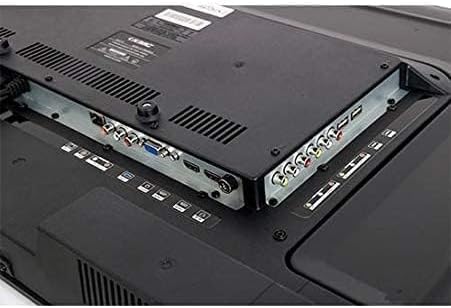
Image: Rear panel of the KMC 43-inch Smart LED TV, displaying various input and output ports including HDMI, USB, VGA, and AV connections.
- HDMI Ports: Connect Blu-ray players, game consoles, or set-top boxes using HDMI cables for high-definition audio and video.
- USB Ports: Insert USB drives to view photos, play music, or watch videos.
- VGA Port: Connect a computer for use as a monitor.
- AV Input: Connect older devices using composite video and stereo audio cables.
- Antenna/Cable Input: Connect an antenna or cable TV signal for broadcast channels.
- Power Input: Connect the power cable to the TV and then to a wall outlet.
3.3. Initial Power On and First-Time Setup
- Plug the power cable into a wall outlet.
- Press the Power button on the remote control or on the TV.
- Follow the on-screen instructions to select your language, country, and time zone.
- Connect to your Wi-Fi network by selecting your network and entering the password.
- Scan for available channels if you have an antenna or cable connected.
4. Operating the TV
4.1. Remote Control Functions
Familiarize yourself with the remote control buttons for easy navigation:
- Power: Turns the TV on or off.
- Source/Input: Selects the input source (HDMI, AV, USB, TV).
- Volume +/-: Adjusts the volume level.
- Channel +/-: Changes TV channels.
- Navigation Buttons (Up/Down/Left/Right) & OK: Navigates menus and confirms selections.
- Back/Exit: Returns to the previous menu or exits the current menu.
- Home: Accesses the Smart TV home screen.
- Netflix, YouTube, Amazon Prime Video: Dedicated buttons for quick access to these streaming services.
4.2. Smart TV Features
Your KMC Smart LED TV allows you to access a variety of online content:
- Connecting to Wi-Fi: From the Home screen, navigate to Settings > Network > Wi-Fi. Select your network and enter the password.
- Accessing Apps: From the Home screen, select the desired application icon (e.g., Netflix, YouTube, Amazon Prime Video) to launch it. Ensure you have an active internet connection.
- Browsing Content: Use the remote control's navigation buttons to browse content within applications.
4.3. Picture and Sound Settings
Customize your viewing and listening experience:
- Picture Mode: Adjust brightness, contrast, color, and sharpness. Pre-set modes like Standard, Dynamic, Movie, and User are available.
- Sound Mode: Select from pre-set sound modes such as Standard, Music, Movie, or User to optimize audio output.
- Aspect Ratio: Change the screen aspect ratio to fit different content formats.
5. Maintenance
5.1. Cleaning the TV
- Screen: Gently wipe the screen with a soft, lint-free cloth. For stubborn marks, slightly dampen the cloth with water or a specialized screen cleaner (apply to cloth, not directly to screen).
- Body: Wipe the TV body and remote control with a soft, dry cloth.
- Caution: Do not use abrasive cleaners, waxes, or solvents as they can damage the finish.
5.2. Software Updates
Periodically check for software updates to ensure optimal performance and access to the latest features. Navigate to Settings > System > Software Update and follow the on-screen prompts.
6. Troubleshooting
If you encounter issues, refer to the following common solutions:
| Problem | Possible Solution |
|---|---|
| No power | Check if the power cable is securely connected to both the TV and the wall outlet. Try a different outlet. |
| No picture, but sound is present | Ensure the correct input source is selected. Check cable connections (HDMI, AV). |
| No sound, but picture is present | Check the volume level and ensure the TV is not muted. Verify audio cable connections. |
| Remote control not working | Replace the batteries. Ensure there are no obstructions between the remote and the TV's IR sensor. |
| Cannot connect to Wi-Fi | Check your Wi-Fi password. Restart your router and the TV. Ensure the TV is within range of your Wi-Fi signal. |
| Slow performance / Apps freezing | Close unused applications. Restart the TV. Check for software updates. |
6.1. Factory Reset
If problems persist, a factory reset may resolve them. Warning: This will erase all your settings and installed apps. Navigate to Settings > System > Reset > Factory Reset and confirm.
7. Specifications
| Feature | Detail |
|---|---|
| Brand | KMC |
| Model Number | K18M43262SMART |
| Screen Size | 43 inches |
| Display Technology | LED |
| Resolution | 1920x1080 (Full HD) |
| Refresh Rate | 60 Hz |
| Aspect Ratio | 16:9 |
| Connectivity Technology | USB, HDMI, VGA, AV (Composite) |
| Supported Internet Services | Amazon Instant Video, Netflix, YouTube |
| Included Components | Television, Remote Control, Stand |
| Shipping Dimensions (Approx.) | 100 x 61 x 13.5 cm |
| Shipping Weight (Approx.) | 10 kg |
8. Warranty and Support
This KMC Smart LED TV comes with a manufacturer's warranty. Please refer to the warranty card included in your package for specific terms and conditions, including warranty period and coverage details.
For technical support, service, or warranty claims, please contact KMC customer service through the contact information provided on your warranty card or the official KMC website.
