
1. Product Overview
The E-flite Carbon-Z Cessna 150 2.1M BNF Basic is a large-scale remote control aircraft designed for sport flying. This model offers a wide flight envelope, suitable for various flying styles. It incorporates scale details and features for an enhanced experience.
Key Features:
- Large sport-scale model suitable for diverse flight maneuvers.
- Wide flight envelope, accommodating both gentle and aggressive flying.
- Scale details including LED lights, functional flaps, and wheel pants.
- Designed for field assembly without requiring tools.
- Innovative hands-free servo connection system for simplified setup.

Figure 1.1: Front view of the E-flite Carbon-Z Cessna 150 2.1M RC Airplane.
2. Safety Information
WARNING: Read the ENTIRE instruction manual to become familiar with the features of the product before operating. Failure to operate the product correctly can result in damage to the product, personal property and cause serious injury. This is a sophisticated hobby product. It must be operated with caution and common sense and requires some basic mechanical ability. Failure to operate this Product in a safe and responsible manner could result in injury or damage to the product or other property. This product is not intended for use by children without direct adult supervision. Do not use with incompatible components or alter this product in any way outside of the instructions provided by Horizon Hobby, LLC. This manual contains instructions for safety, operation and maintenance. It is essential to read and follow all the instructions and warnings in the manual, prior to assembly, setup or use, in order to operate correctly and avoid damage or serious injury.
3. What's in the Box
- Carbon-Z Cessna 150 BNF Basic RC Airplane
Note: Additional components such as a compatible Spektrum DSMX/DSM2 transmitter, flight battery, and charger are required and sold separately.
4. Setup and Assembly
4.1 Wing Assembly
- Carefully slide each wing panel onto the wing tube until it is fully seated against the fuselage.
- Ensure the hands-free servo connections engage properly.
- Secure each wing panel using the provided fasteners or pins, as indicated in the manual.

Figure 4.1: Detail of component assembly, showing a pin being inserted.
4.2 Landing Gear Installation
Attach the main landing gear and tail wheel assembly according to the diagrams. Ensure all connections are secure. The model features wheel pants for scale appearance.
4.3 Servo Connections
The Carbon-Z Cessna 150 utilizes an innovative hands-free servo connection system. When assembling the wings, ensure the servo connectors align and engage automatically. Verify all control surfaces move freely and correctly after assembly.

Figure 4.2: Detail of the hands-free servo connection system.
4.4 Battery Installation and Binding
- Install the recommended flight battery (sold separately) into the designated battery compartment. Secure it to prevent movement during flight.
- Follow the instructions for your Spektrum DSMX/DSM2 compatible transmitter to bind it with the aircraft's receiver. Refer to your transmitter's manual for specific binding procedures.
- After binding, perform a control surface test to ensure all controls (ailerons, elevator, rudder, throttle) respond correctly to transmitter inputs.
5. Operating Instructions
5.1 Pre-Flight Checks
- Ensure the flight battery is fully charged and securely installed.
- Verify all control surfaces move freely and in the correct direction relative to transmitter inputs.
- Check propeller for any damage or looseness.
- Confirm the transmitter battery is adequately charged.
- Perform a range check of your radio system before the first flight of the day.
5.2 Takeoff
Place the aircraft on a smooth surface facing into the wind. Gradually advance the throttle. Apply slight up-elevator as speed increases to lift off. Maintain a steady climb rate.
5.3 Flight
The Carbon-Z Cessna 150 is designed for stable flight characteristics. Use the ailerons for roll control, elevator for pitch, and rudder for yaw. Adjust throttle to control speed. Utilize flaps for slower flight and improved lift during takeoff and landing, if desired.

Figure 5.1: The Carbon-Z Cessna 150 in stable flight.
5.4 Landing
Approach the landing strip into the wind. Reduce throttle and gradually deploy flaps if using them. Maintain sufficient airspeed for control. Flare gently by applying up-elevator just before touchdown to achieve a smooth landing.
6. Maintenance
6.1 Post-Flight Inspection
- Inspect the airframe for any damage, cracks, or loose components.
- Check all control linkages and hinges for wear or looseness.
- Examine the propeller and spinner for damage. Replace if necessary.
- Ensure landing gear is secure and undamaged.
6.2 Cleaning and Storage
Clean the aircraft with a soft, damp cloth. Avoid using harsh chemicals. Store the model in a cool, dry place, away from direct sunlight and extreme temperatures, to preserve its materials and electronics.
7. Troubleshooting
| Problem | Possible Cause | Solution |
|---|---|---|
| Aircraft does not respond to controls. | Unbound receiver, low transmitter/receiver battery, incorrect wiring. | Re-bind transmitter and receiver. Charge/replace batteries. Check all wiring connections. |
| Motor does not start or runs intermittently. | Low flight battery, loose motor connection, damaged propeller. | Charge flight battery. Check motor and ESC connections. Inspect and replace propeller if damaged. |
| Aircraft flies erratically or is difficult to control. | Incorrect control surface trim, damaged control surface, improper center of gravity. | Adjust trims on transmitter. Inspect control surfaces for damage. Verify correct center of gravity. |
8. Specifications
| Feature | Detail |
|---|---|
| Product Dimensions | 58 x 24.8 x 10.7 inches |
| Item Weight | 19.36 pounds |
| Manufacturer | Horizon Hobby |
| ASIN | B072537CBP |
| Item Model Number | EFL1450 |
| Batteries Required | 1 Lithium Polymer battery (sold separately) |
| Date First Available | April 25, 2017 |
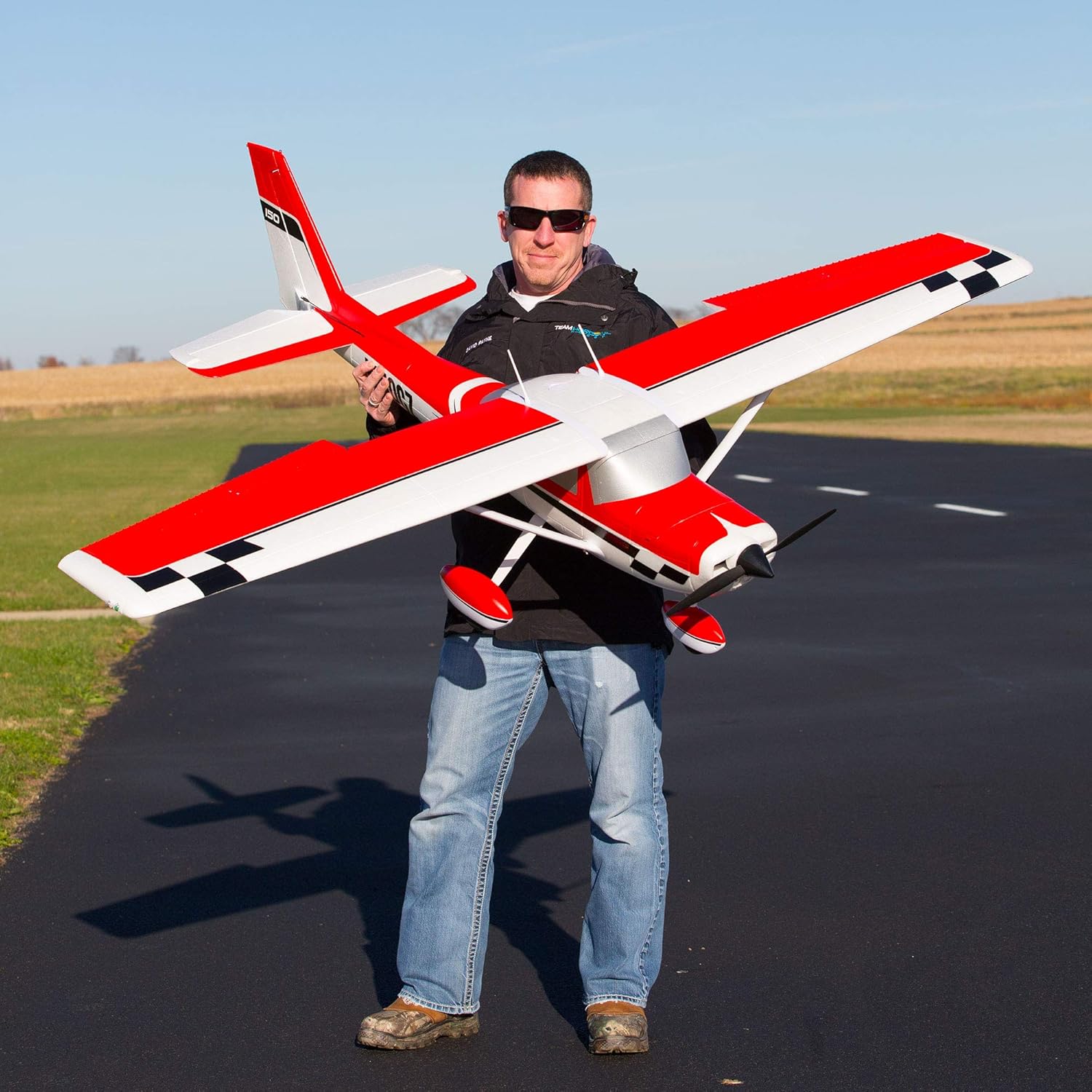
Figure 8.1: The Carbon-Z Cessna 150 demonstrating its substantial size.
9. Warranty Information
This product is covered by a limited warranty provided by Horizon Hobby, LLC. For detailed warranty terms and conditions, please refer to the official Horizon Hobby website or contact their customer support. Proof of purchase may be required for warranty claims.
10. Customer Support
For technical assistance, spare parts, or further information regarding your E-flite Carbon-Z Cessna 150, please visit the official E-flite or Horizon Hobby website. You can also contact their customer service department directly for support.
E-flite Store: Visit the E-flite Store on Amazon


