
Deerma DX700
Deerma DX700 2-in-1 Handheld Vacuum Cleaner User Manual
Model: DX700
1. Important Safety Instructions
Please read all instructions carefully before using the appliance and retain them for future reference. Failure to follow these instructions may result in electric shock, fire, or serious injury.
- Always disconnect the vacuum cleaner from the power supply before cleaning or performing maintenance.
- Do not use the appliance outdoors or on wet surfaces.
- Do not allow children to operate the vacuum cleaner. Close supervision is necessary when used near children.
- Do not pick up flammable or combustible liquids, such as gasoline, or use in areas where they may be present.
- Do not pick up anything that is burning or smoking, such as cigarettes, matches, or hot ashes.
- Check the power cord and plug for any damage before each use. Do not use if damaged.
- Ensure all filters are correctly installed before operation.
- Use only as described in this manual. Use only manufacturer's recommended attachments.
2. Product Overview
The Deerma DX700 is a versatile 2-in-1 vacuum cleaner designed for both vertical and handheld use, offering efficient cleaning for various surfaces.
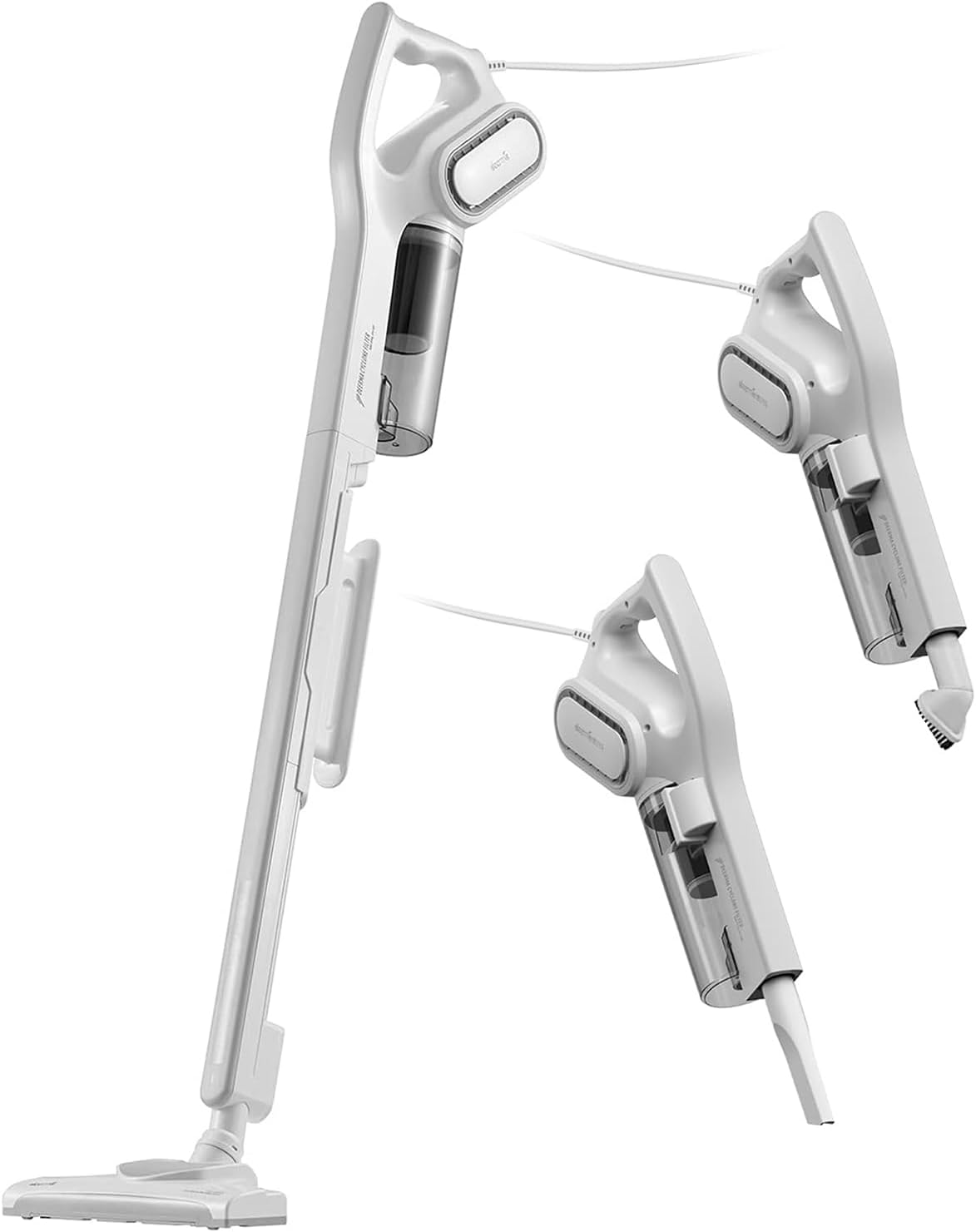
Figure 2.1: The Deerma DX700 vacuum cleaner showcasing its vertical and handheld configurations, highlighting its adaptability for different cleaning needs.

Figure 2.2: A side view of the Deerma DX700 vacuum cleaner, illustrating its sleek design and the transition between vertical and handheld modes.

Figure 2.3: Diagram showing the precise dimensions of the Deerma DX700 vacuum cleaner, including its length (1123mm) and height (288mm), useful for storage and understanding its compact design.

Figure 2.4: The Deerma DX700 vacuum cleaner displayed with its included accessories, such as the brush nozzle, flat nozzle, and filter components, ready for various cleaning tasks.
Components:
- Main Motor Unit (with dust box)
- Extension Tube (for vertical mode)
- Floor Brush
- Crevice Nozzle
- Small Brush Nozzle
- HEPA Filter
- Filter Cotton
- Power Cord
3. Assembly and Setup
The Deerma DX700 is designed for easy assembly. Follow these steps to set up your vacuum cleaner.
3.1 Vertical Mode Assembly:
- Insert the extension tube into the main motor unit until it clicks into place.
- Attach the floor brush to the bottom of the extension tube, ensuring it is securely fastened.
- Ensure the dust box and filters are correctly installed in the main motor unit.
3.2 Handheld Mode Setup:
- Detach the extension tube and floor brush from the main motor unit.
- Directly attach the desired accessory (crevice nozzle or small brush nozzle) to the main motor unit.
The ergonomic handle provides comfortable grip for both configurations.
4. Operating Instructions
The Deerma DX700 offers powerful suction for various cleaning tasks. Its 600W motor and 15KPa suction power ensure effective cleaning of dust, crumbs, hair, cat litter, and pet food.

Figure 4.1: The Deerma DX700 in action, demonstrating its versatility for cleaning different areas such as under beds, high ceilings, tight corners, and general floor cleaning.

Figure 4.2: A user operating the Deerma DX700 in a living room setting, illustrating its ease of use and maneuverability for everyday cleaning tasks.

Figure 4.3: An illustration of the Deerma DX700's powerful suction, showing its effectiveness on various debris types including dust, crumbs, hair, cat litter, and pet food on a hard floor surface.
4.1 Powering On/Off:
- Plug the power cord into a suitable electrical outlet.
- Press the power button located on the handle to turn the vacuum cleaner ON.
- Press the power button again to turn the vacuum cleaner OFF.
4.2 Using in Vertical Mode:
- Ensure the extension tube and floor brush are assembled.
- Push the vacuum cleaner forward and backward over the surface to be cleaned. The brush wheels ensure smooth movement.
- This mode is ideal for hard floors and carpets.
4.3 Using in Handheld Mode:
- Detach the extension tube and floor brush.
- Attach the crevice nozzle for narrow spaces like corners, sofa gaps, or car interiors.
- Attach the small brush nozzle for upholstery, curtains, or delicate surfaces.
The vacuum operates with a low noise level of 75 dB for a quieter cleaning experience.
5. Maintenance and Cleaning
Regular maintenance ensures optimal performance and extends the lifespan of your Deerma DX700 vacuum cleaner.
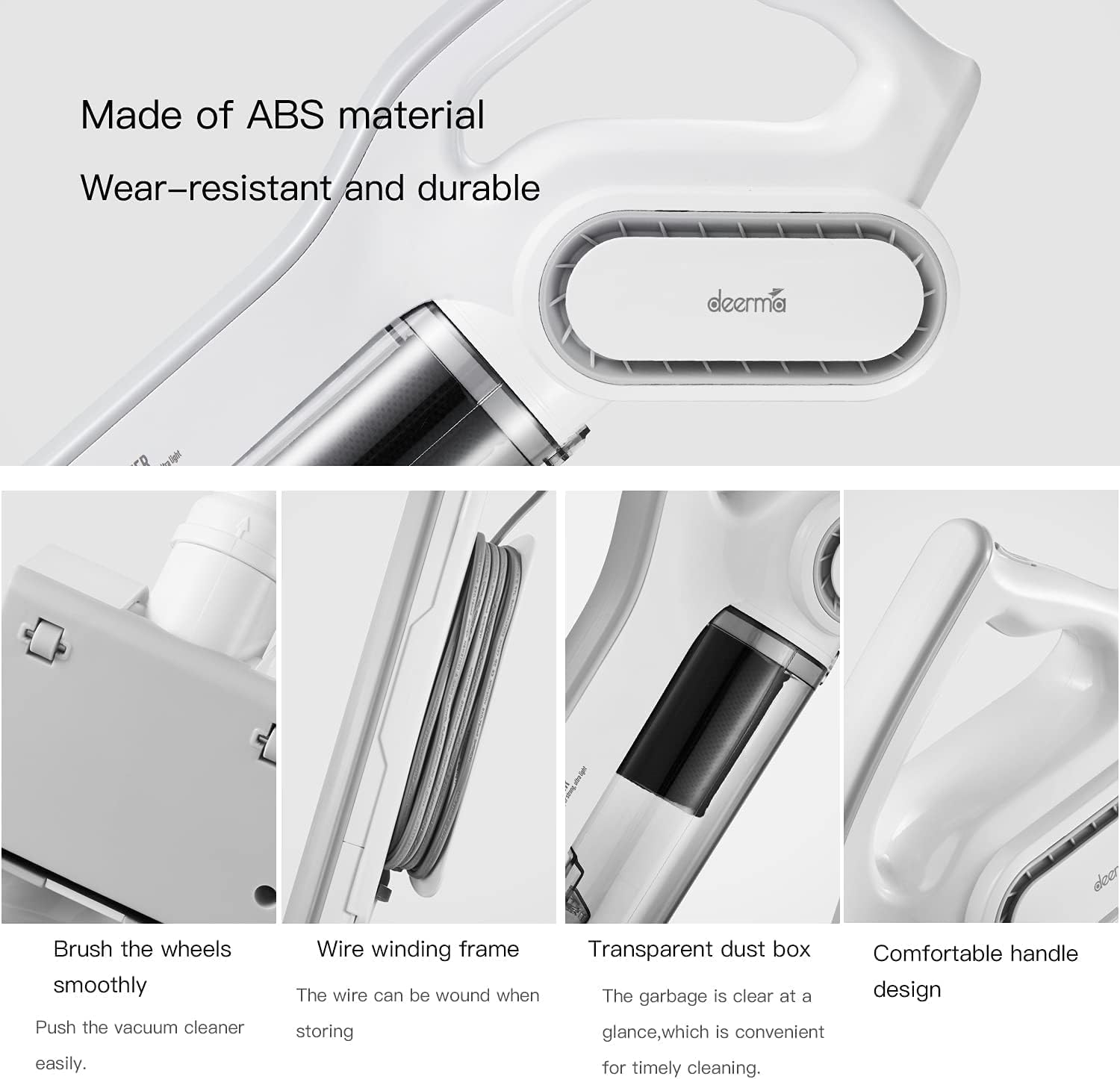
Figure 5.1: Close-up views of the Deerma DX700, highlighting its durable ABS material construction, smooth brush wheels for easy movement, a wire winding frame for neat storage, the transparent dust box for easy monitoring, and the comfortable handle design.

Figure 5.2: A detailed diagram illustrating the triple filtration system of the Deerma DX700, which includes a side cyclone for initial dust separation, filter cotton to prevent dust and noise, and a HEPA filter (0.3 micron) to capture fine dust and expel fresh air, preventing secondary pollution.
5.1 Emptying the Dust Box:
- The transparent dust box allows you to see when it needs emptying.
- Press the release button to detach the dust box from the main motor unit.
- Open the dust box and empty its contents into a waste bin.
- Close the dust box and reattach it to the main motor unit until it clicks securely.
5.2 Cleaning the Filters:
- The Deerma DX700 features a triple filtration system including a HEPA filter and filter cotton.
- Remove the HEPA filter and filter cotton from the dust box.
- The filter cotton is hand washable. Rinse it under running water until clean.
- Allow all filter components to air dry completely before reassembling. Do not use the vacuum with wet filters.
- Regular cleaning of filters is crucial to maintain suction power and prevent secondary pollution.
5.3 General Cleaning:
- Wipe the exterior of the vacuum cleaner with a soft, damp cloth.
- Remove any tangled hair or debris from the floor brush.
- The wire winding frame allows for neat storage of the power cord when not in use.
6. Troubleshooting
If you encounter any issues with your Deerma DX700, please refer to the following common problems and solutions.
| Problem | Possible Cause | Solution |
|---|---|---|
| Vacuum cleaner does not turn on. | No power supply; Power button not pressed; Damaged power cord. | Check if the plug is securely inserted into the outlet. Ensure the power button is pressed. Inspect the power cord for damage. |
| Low suction power. | Dust box full; Filters clogged; Obstruction in nozzle/tube. | Empty the dust box. Clean or replace the filters. Check for and remove any blockages in the floor brush, extension tube, or nozzles. |
| Unusual noise during operation. | Obstruction in brush/fan; Loose part. | Turn off and unplug the vacuum. Check the floor brush and main unit for any foreign objects. Ensure all parts are securely assembled. |
| Dust escaping from the vacuum. | Dust box not properly closed; Filters not installed correctly or damaged. | Ensure the dust box is securely closed. Reinstall filters correctly or replace if damaged. |
7. Specifications
Detailed technical specifications for the Deerma DX700 vacuum cleaner.
| Feature | Detail |
|---|---|
| Brand | Deerma |
| Model Number | DX700 |
| Color | White |
| Product Dimensions | 26 x 26 x 112.3 cm |
| Item Weight | 2.68 Kilograms |
| Capacity (Dust Box) | Large Capacity |
| Power / Wattage | 160 watts |
| Voltage | 25 Volts |
| Material | ABS (body), Cotton (filter) |
| Noise Level | 75 dB |
| Special Features | Corded, 2-in-1 (Handheld & Vertical) |
| Filter Type | Cartridge, HEPA, Filter Cotton |
| Surface Recommendation | Hard Floor |
| Power Source | Corded Electric |
8. Warranty and Support
Your Deerma DX700 vacuum cleaner comes with a manufacturer's warranty and dedicated support.
- Manufacturer Warranty: This product includes a minimum 1-year manufacturer warranty. Please retain your proof of purchase for warranty claims.
- Customer Support: For any questions, technical assistance, or warranty inquiries, please visit the official Deerma Store on Amazon: Deerma Official Store.
Related documentsDX700


Ask a question about this manual
Ask about setup, troubleshooting, compatibility, parts, safety, or missing instructions. Manuals+ will review the question and use this page’s manual context to help answer it.