Introduction
The NUX JTC PRO Drum Loop PRO Dual Switch Looper Pedal is an advanced looper pedal designed for musicians seeking powerful looping and drum machine capabilities. It offers high-quality audio recording, extensive memory, and versatile output options, making it an ideal tool for practice, songwriting, and live performance.

Figure 1: Front view of the NUX JTC PRO Looper Pedal, showcasing its controls and display.
Key Features
- 24-bit Audio Quality: Ensures pristine sound reproduction for your loops.
- 6 Hours Recording Time: Ample space for extensive looping sessions.
- 256 Memories: Store a large library of your recorded loops.
- Integrated Drum Machine: Features 25 4/4 beats, 10 3/4 drum beats, and 5 shuffle beats with adjustable tempo (40-240 BPM).
- Multiple Start/Stop Modes: Includes 2 start modes and 3 stop modes for flexible performance control.
- One-Shot Player: Play back loops once for specific effects.
- 2 Loop Switch Modes: Record-Play and Record-Overdub for seamless workflow.
- Versatile Output Options:
- Guitar to Left and Drums to Right
- Guitar and Drums to Right/Left
- Guitar and Drums to Right and Drums to Left
- Optional Drum Sound Enhancement: Fine-tune your drum sounds.
Setup
Before operating your NUX JTC PRO pedal, ensure proper connections to your audio equipment. Refer to the diagram below for typical setup configurations.

Figure 2: Rear panel of the NUX JTC PRO, showing Input, Output (L/R), Mixer, External Switch, USB, and DC 9V power connections.
- Power Connection: Connect a 9V DC power adapter (center negative) to the DC 9V input jack.
- Instrument Input: Connect your guitar or other instrument to the INPUT jack.
- Audio Output: Connect the LOUT AMP and/or ROUT MIXER jacks to your amplifier, mixer, or audio interface. Refer to the "Output Options" section for detailed routing.
- External Switch (Optional): For extended control, connect an external footswitch to the EXT.SW jack.
- USB Connection: Use the USB port for firmware updates and managing loops via computer.
Operating Instructions
The NUX JTC PRO offers intuitive controls for seamless looping and rhythm integration. This section details the primary functions.
Basic Looping
The pedal features two main footswitches: Smart TAP (left) and RHYTHM (right).
- Recording a Loop: Press the Smart TAP footswitch once to start recording. The LOOP indicator will turn red.
- Stopping/Resuming Loop: Press the Smart TAP footswitch twice quickly to stop the loop. Press it once again to resume playback.
- Overdubbing: While a loop is playing, press the Smart TAP footswitch once to enter overdub mode. The LOOP indicator will blink red. Press again to exit overdub mode and continue playback.
Drum Patterns
The JTC PRO includes 40 drum patterns and fills across various genres like Pop, Rock, Blues, and Metal. Use the RHY./TEMPO SELECT knob to browse and select drum patterns.
- Activating Drums: Press the RHYTHM footswitch once to start the selected drum pattern. The RHYTHM indicator will turn green.
- Drum Fill: While drums are playing, press the RHYTHM footswitch once to trigger a drum fill.
- Stopping Drums: Double-tap the RHYTHM footswitch to stop the drums.
Undo/Redo
To undo the last recorded segment (overdub), press and hold the SAVE/DELETE button. The display will show "UND". To redo, press and hold the SAVE/DELETE button again. The display will show "RED".
Stop Modes
The JTC PRO offers various stop modes, selectable via the STOP MODES button. The active mode is indicated by LEDs.
- INST. STOP: Stops the loop immediately when the footswitch is double-tapped.
- ONE SHOT: Plays the loop once and then stops.
- FINE: The loop will play until its end, then stop.
- FADE OUT: The loop will gradually fade out and then stop.
Tap Tempo
You can set the tempo of the drum machine by tapping the Smart TAP footswitch multiple times before recording. This ensures your loops and drums are perfectly synchronized.
Auto-Recording
The JTC PRO can be set to auto-record. In this mode, the pedal will stand by until you hit your guitar strings, automatically starting the recording process without any delay on the first notes.
Output Options
The pedal provides flexible output routing. For example, you can send the guitar signal directly to a PA system using the built-in speaker cabinet simulation, while routing drums to a separate output.
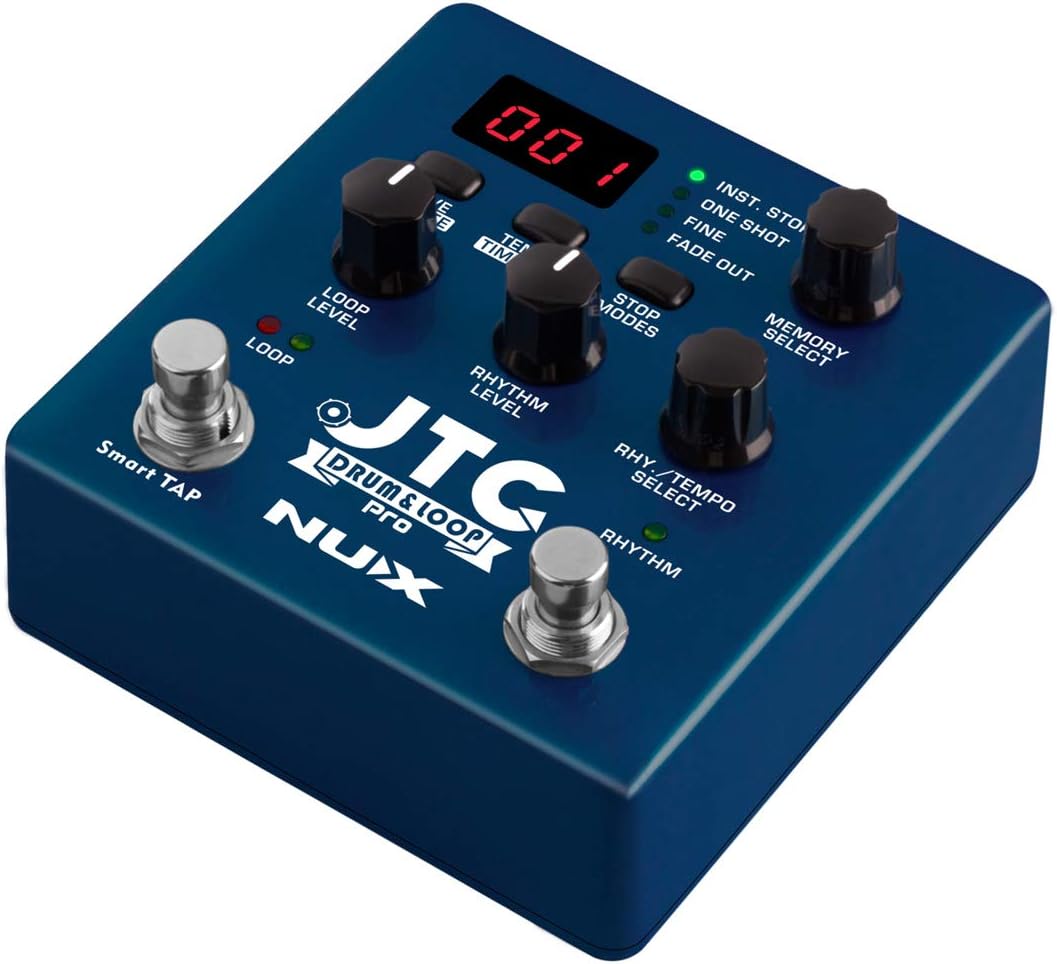
Figure 3: Angled view of the NUX JTC PRO, highlighting the loop and rhythm level controls.
Demonstration Video
Watch the official demonstration video to see the NUX JTC PRO in action and understand its various features and functionalities.
Video 1: Official NUX JTC PRO Guitar Looper demonstration. This video showcases the pedal's looping, overdubbing, drum machine, and various stop modes, providing a comprehensive overview of its capabilities.
Specifications
| Attribute | Value |
|---|---|
| Brand | NUX |
| Style | Looper, Advanced |
| Color | Silver, Blue, Black |
| Item Weight | 1.3 Pounds |
| Voltage | 9 Volts |
| Audio Quality | 24-bit |
| Recording Time | 6 hours |
| Memories | 256 |
| Drum Tempo Range | 40-240 BPM |
Maintenance
To ensure the longevity and optimal performance of your NUX JTC PRO pedal, follow these maintenance guidelines:
- Cleaning: Use a soft, dry cloth to clean the pedal's exterior. Avoid abrasive cleaners or solvents.
- Storage: Store the pedal in a cool, dry place away from direct sunlight and extreme temperatures.
- Power: Always use the specified 9V DC (center negative) power adapter. Disconnect power when not in use for extended periods.
- Handling: Avoid dropping the pedal or subjecting it to strong impacts.
Troubleshooting
If you encounter issues with your NUX JTC PRO pedal, refer to the common problems and solutions below:
| Problem | Possible Solution |
|---|---|
| No power | Ensure the 9V DC power adapter is correctly connected and functioning. Check the power outlet. |
| No sound output | Verify all audio cables are securely connected. Check amplifier/mixer volume and settings. Ensure the loop level is not set to zero. |
| Loop not recording/playing | Check if the pedal is in the correct mode (Record/Play/Overdub). Ensure input signal is present. |
| Drums not playing | Ensure the RHYTHM footswitch has been pressed to activate drums. Check the rhythm level knob. |
| Unwanted noise/static | Check for faulty cables. Ensure proper grounding. Try a different power supply. Consider a firmware update if available. |
Warranty & Support
For warranty information and technical support, please refer to the official NUX website or contact your local distributor. Keep your purchase receipt as proof of purchase for warranty claims.
Official NUX Website: www.nuxefx.com


