
1. Introduction
This instruction manual provides detailed guidance for the proper use and care of your Fringer EF-FX PRO II Auto Focus Mount Adapter. This adapter allows you to mount Canon EOS EF series lenses onto Fujifilm X-Mount mirrorless cameras, enabling electronic communication for features such as autofocus, electronic aperture control, and EXIF data recording.
Please read this manual thoroughly before using the adapter to ensure optimal performance and to prevent damage to your equipment.
2. Product Overview
The Fringer EF-FX PRO II is the second generation of Fringer's EF to Fuji X-mount adapters, featuring enhanced design and functionality.
Key Features:
- Electronic Aperture Ring: For PRO version only, similar to XF lenses, offering 1/3 stop increments and an 'Auto' position.
- Advanced Autofocus: Supports Phase Detection Auto Focus (PDAF) for faster and more accurate focusing on compatible Fujifilm X-Trans II, III, IV, and V CMOS cameras.
- EXIF Data Recording: Records comprehensive lens information including model, focal length, and aperture settings.
- Image Stabilization Support: Supports Image Stabilizer functions of EF mount lenses.
- Durable Construction: Lens bayonet and camera bayonet are constructed from brass for enhanced durability.
- Improved Design: Features a redesigned aperture ring for convenient operation and better light absorbing design.
- New MCU: Equipped with a more powerful Microcontroller Unit (MCU) for improved performance and future firmware updates.

Figure 2.1: The Fringer EF-FX PRO II Auto Focus Mount Adapter.

Figure 2.2: Close-up view of the Fringer EF-FX PRO II adapter, highlighting the electronic aperture ring and markings.
3. Setup
3.1 Attaching the Adapter to the Camera
- Ensure both your camera and the adapter are clean and free of dust.
- Align the white index mark on the adapter with the corresponding white index mark on your Fujifilm X-Mount camera body.
- Gently insert the adapter into the camera mount.
- Rotate the adapter clockwise until it clicks into place, indicating it is securely locked.
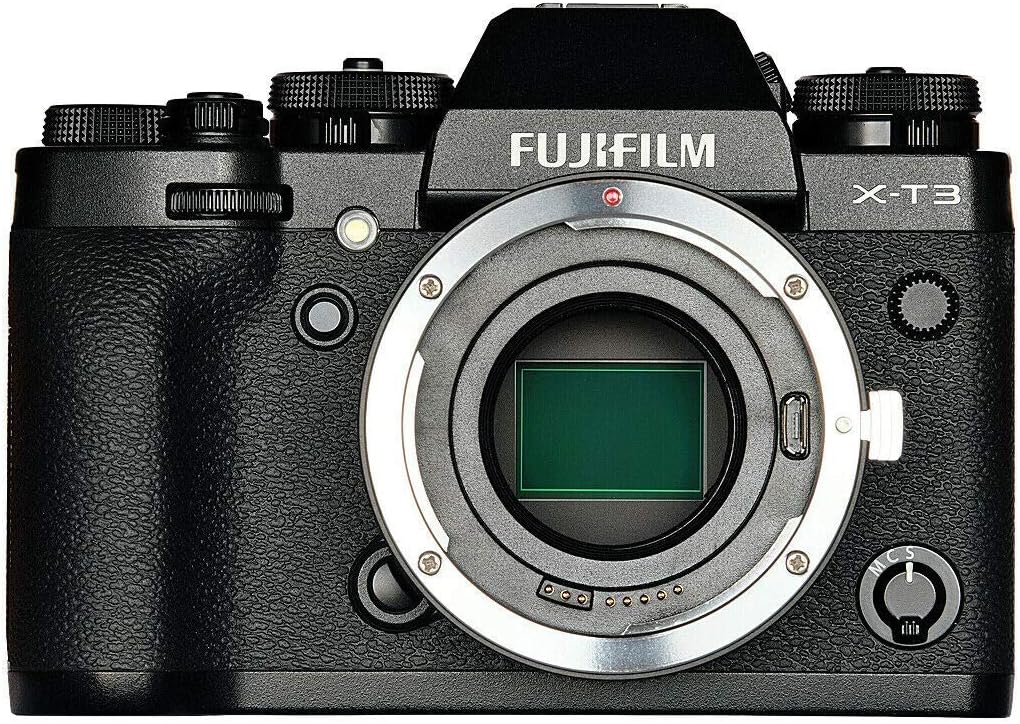
Figure 3.1: A Fujifilm X-T3 camera body, ready for adapter attachment.
3.2 Attaching an EF Lens to the Adapter
- Align the red index mark on your Canon EF lens with the red index mark on the Fringer EF-FX PRO II adapter.
- Gently insert the lens into the adapter mount.
- Rotate the lens clockwise until it clicks into place, ensuring a secure connection.

Figure 3.2: Top view of a Fujifilm camera with the Fringer EF-FX PRO II adapter and a Canon 40mm lens mounted.

Figure 3.3: Top view of a Fujifilm camera with the Fringer EF-FX PRO II adapter and a Sigma 30mm lens mounted.
3.3 Firmware Updates
Fringer regularly releases firmware updates to improve lens compatibility and performance. To update the firmware:
- Visit the official Fringer website for the latest firmware.
- Connect the adapter to your computer via a USB cable.
- Follow the specific instructions provided on the Fringer website for the firmware update process.
4. Operating Instructions
4.1 Autofocus Functionality
The Fringer EF-FX PRO II adapter supports Phase Detection Auto Focus (PDAF) mode, offering fast and accurate focusing. This functionality is optimized for Fujifilm cameras equipped with X-Trans II, III, IV, and V CMOS sensors. Performance may vary with different camera models and lenses.

Figure 4.1: Illustration of phase focusing support, showing shorter focus time and faster focusing speed.
Compatible Cameras:
- X-Trans V CMOS (PDAF, better performance): X-H2S, X-H2, X-T5, X-T50
- X-Trans IV CMOS (full sensor covered PDAF, better performance): X-T30II, X-E4, X-T4, X-S10, X-Pro3, X-T30, X-T3
- X-Trans III CMOS (PDAF, good performance): X-H1, X-T20, X-E3, X-Pro2, X-T2
- X-Trans II CMOS (PDAF enabled): X-E2, X-T1, X-T10
Optimized Lenses:
For optimal autofocus performance, use lenses that have been specifically optimized for the Fringer EF-FX PRO II adapter. Refer to the following lists for tested and optimized Canon EF, EF-S, Sigma, and Tamron lenses.

Figure 4.2: List of tested Canon EF and EF-S lenses.

Figure 4.3: List of tested Sigma and Tamron lenses.
Autofocus Demonstration:
Video 4.1: Demonstration of fast phase focus (PDAF) with center, side, and area focus modes using the Fringer EF-FX PRO II adapter.
Video 4.2: Demonstration of fast and accurate focusing, supporting AF-S and AF-C modes with the Fringer EF-FX PRO II adapter.
4.2 Electronic Aperture Ring
The PRO version of the adapter features an electronic aperture ring, providing tactile control over the lens aperture. Each click of the ring adjusts the aperture by 1/3 stop. The final position after the smallest aperture setting is 'Auto', allowing the camera to control the aperture automatically.
4.3 EXIF Data Recording
The adapter ensures that all relevant lens information, including the lens model, focal length, and aperture setting, is accurately recorded in the EXIF data of your images. This is crucial for post-processing and cataloging your photographs.
4.4 Image Stabilizer Functions
The Fringer EF-FX PRO II adapter supports the Image Stabilizer (IS) functions of compatible Canon EF mount lenses, helping to reduce camera shake and produce sharper images, especially in low light or with longer focal lengths.
5. Maintenance
5.1 Cleaning
- Adapter Body: Use a soft, dry cloth to wipe the exterior of the adapter. Do not use solvents or abrasive cleaners.
- Electronic Contacts: If necessary, gently clean the electronic contacts on both the adapter and your lenses/camera with a clean, dry cotton swab. Avoid touching the contacts with your fingers.
5.2 Storage
When not in use, store the adapter in a dry, dust-free environment. It is recommended to attach both front and rear caps to prevent dust and debris from entering the adapter and to protect the electronic contacts.
6. Troubleshooting
Common Issues and Solutions:
- Autofocus Hunting or Inaccuracy:
- Ensure your camera's firmware and the adapter's firmware are up to date.
- Verify that your lens is on the list of optimized lenses (refer to Figures 4.2 and 4.3). Some lenses, especially with teleconverters, may exhibit reduced AF performance.
- Check your camera's AF settings (e.g., AF mode, AF area).
- Adapter Not Functioning (No AF, Aperture Control):
- Ensure the adapter and lens are securely mounted and clicked into place.
- Clean the electronic contacts on both the adapter and the camera/lens.
- Perform a firmware update for the adapter.
- Test with a different compatible lens or camera body if available to isolate the issue.
- Inaccurate F-stop Numbers:
- This can occur with certain unsupported lenses. Check the compatibility list. Firmware updates may address this for some lenses.
- Tight Fit when Mounting Lens:
- A slightly tight fit can be normal for new adapters due to manufacturing tolerances. Ensure proper alignment and apply gentle, firm rotation. Do not force the lens.
If issues persist after following these steps, please contact Fringer customer support for further assistance.
7. Specifications
| Feature | Specification |
|---|---|
| Model Number | EF-FX PRO II |
| Product Dimensions | 10 x 3 x 3 inches |
| Item Weight | 9.6 ounces |
| Compatible Mountings | Fujifilm X-Mount (Camera Side) |
| Compatible Lens Types | Canon EOS EF, Sigma, Tamron (Lens Side) |
| Focal Length Description | 12-800 millimeters (dependent on lens) |
| Autofocus Support | PDAF (Phase Detection Auto Focus) |
| Aperture Control | Electronic, 1/3 stop increments, 'Auto' mode |
| EXIF Data | Full lens information recorded |
| Image Stabilization | Supports EF mount lens IS functions |
| Bayonet Material | Brass |
8. Warranty and Support
For warranty information, please refer to the documentation included with your purchase or visit the official Fringer website. Fringer provides ongoing support through firmware updates to enhance compatibility and performance.
For technical assistance or inquiries, please contact Fringer customer support directly through their official channels.


