
1. Introduction
Thank you for choosing the Ozeri 360 Duo Tower Fan. This manual provides essential information for the safe and efficient operation of your new fan. Please read these instructions thoroughly before use and retain them for future reference.
The Ozeri 360 Duo Tower Fan features a unique dual oscillation system and advanced airflow patterns designed to circulate air effectively throughout your room.
2. Important Safety Instructions
- Read all instructions before using this fan.
- Ensure the power supply matches the voltage specified on the fan's rating label.
- Do not operate any fan with a damaged cord or plug. Discard fan or return to an authorized service facility for examination and/or repair.
- Do not run cord under carpeting. Do not cover cord with throw rugs, runners, or similar coverings. Arrange cord away from traffic area and where it will not be tripped over.
- To disconnect the fan, turn controls to OFF, then remove plug from outlet.
- Do not insert or allow foreign objects to enter any ventilation or exhaust opening as this may cause an electric shock or fire, or damage the fan.
- Do not block air openings or operate near curtains or other materials that may block airflow.
- This fan is not intended for use in wet or damp locations.
- Always place the fan on a stable, flat surface during operation.
- Close supervision is necessary when any appliance is used by or near children.
3. Package Contents
Carefully unpack your Ozeri 360 Duo Tower Fan and ensure all items are present:
- Ozeri 360 Duo Tower Fan Unit
- Fan Base (consisting of two halves)
- Remote Control
- Instruction Manual (this document)
4. Product Overview
Familiarize yourself with the components of your Ozeri 360 Duo Tower Fan.
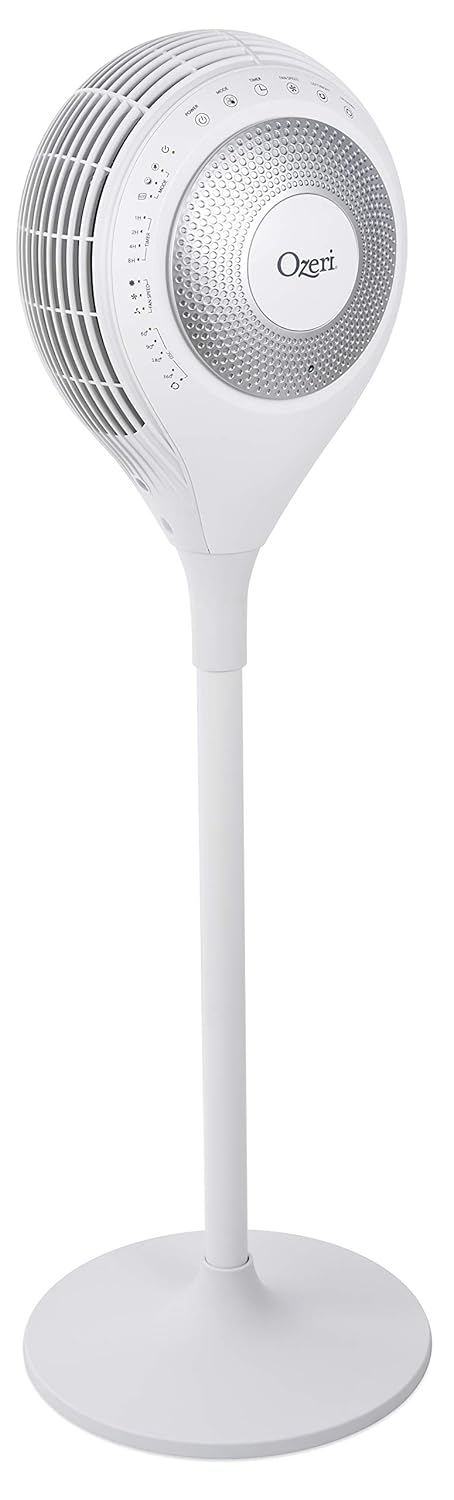


5. Setup
The Ozeri 360 Duo Tower Fan is designed for easy assembly without special tools.
- Assemble the Base: Connect the two halves of the fan base together. Ensure they snap securely into place.
- Attach Fan Unit to Base: Carefully align the main fan unit with the assembled base. Push down firmly until it is securely seated.
- Position the Fan: Place the fan on a firm, level surface, ensuring there are no obstructions to airflow.
- Connect to Power: Plug the power cord into a standard AC electrical outlet.
6. Operating Instructions
Your Ozeri 360 Duo Tower Fan can be operated using the touch control panel on the unit or the included remote control.

6.1. Control Panel and Remote Functions
| Button/Function | Description |
|---|---|
| Power (⏻) | Turns the fan ON or OFF. |
| Mode (☸) | Cycles through Normal, Natural, Sleeping, and Eco modes. |
| Fan Speed (☠) | Adjusts fan speed (Low, Medium, High) in Normal mode. Speed adjusts automatically in other modes. |
| Left/Right Oscillation (↻) | Activates or deactivates horizontal oscillation (60°, 90°, 180°, 360°). Press repeatedly to cycle through options. |
| Up/Down Oscillation (⇅) | Activates or deactivates vertical oscillation. |
| Timer (⏲) | Sets the auto-off timer for 1, 2, 4, or 8 hours. |

6.2. Operating Modes
- Normal Mode: Provides continuous airflow at a selected speed (Low, Medium, High).
- Natural Mode: Simulates natural breezes by alternating between low, medium, and high airflow speeds.
- Sleeping Mode: Provides soothing, patterned airflow. The fan speed gradually reduces after 30 minutes to promote restful sleep. The LED display dims automatically.
- Eco Mode: Adjusts fan speed automatically based on ambient temperature to maintain comfort and optimize energy use.
6.3. Dual Oscillation
The Ozeri 360 Duo Tower Fan features both horizontal (Left/Right) and vertical (Up/Down) oscillation. These can be used independently or simultaneously to create helical wind currents, ensuring comprehensive air circulation throughout the room.
- Horizontal Oscillation: Press the Left/Right Oscillation button to cycle through 60°, 90°, 180°, or 360° rotation angles.
- Vertical Oscillation: Press the Up/Down Oscillation button to activate or deactivate vertical movement of the fan head.
7. Maintenance
Regular cleaning will help maintain your fan's performance and extend its lifespan.
- Before Cleaning: Always unplug the fan from the power outlet before cleaning.
- Exterior Cleaning: Use a soft, damp cloth to wipe the exterior surfaces of the fan. Do not use abrasive cleaners or solvents.
- Air Intake/Output Vents: Use a vacuum cleaner with a brush attachment to gently remove dust from the air intake and output vents. Do not attempt to disassemble the fan for cleaning.
- Storage: If storing the fan for an extended period, cover it to protect it from dust and store it in a cool, dry place.
8. Troubleshooting
If you experience issues with your Ozeri 360 Duo Tower Fan, please refer to the following common problems and solutions:
| Problem | Possible Cause | Solution |
|---|---|---|
| Fan does not turn on. | Not plugged in; power outlet not active; power button not pressed. | Ensure the fan is securely plugged into a working outlet. Press the Power button on the unit or remote. |
| Weak airflow. | Fan speed set too low; vents obstructed; dust accumulation. | Increase fan speed. Ensure vents are clear. Clean dust from vents as per Maintenance section. |
| Oscillation not working. | Oscillation function not activated. | Press the Left/Right or Up/Down Oscillation button to activate. |
| Remote control not working. | Batteries depleted; remote not aimed at sensor. | Replace remote control batteries. Ensure the remote is aimed at the fan's control panel sensor. |
9. Specifications
| Feature | Detail |
|---|---|
| Brand | Ozeri |
| Model Name | Ozeri 360 Duo Tower Fan, with Dual Oscillation |
| Item Model Number | OZF7 |
| Color | White |
| Electric Fan Design | Floor Fan |
| Power Source | AC |
| Product Dimensions | 14.5"D x 14.5"W x 45.5"H |
| Item Weight | 14.96 pounds (6.8 Kilograms) |
| Special Feature | Oscillating (Dual Oscillation: Horizontal and Vertical) |
| Control Method | Touch, Remote |
| Specification Met | Energy Star, FCC |
| UPC | 815817012654 |
10. Warranty and Support
Ozeri products are manufactured to high-quality standards. For specific warranty information, please refer to the warranty card included with your purchase or visit the official Ozeri website.
For technical support, replacement parts, or customer service inquiries, please contact Ozeri customer support through their official channels.
Online Support: Visit the Ozeri Store on Amazon for more product information and support resources.


