1. Introduction
This manual provides comprehensive instructions for the setup, operation, and maintenance of your TCL 55EP640 Smart TV. Please read this manual thoroughly before using your television to ensure proper and safe operation.
The TCL 55EP640 is a 55-inch 4K UHD Smart TV featuring HDR 10, a Triple Tuner, Android TV, Micro Dimming, and integrated voice assistants like Alexa and Google Assistant. It offers a superior viewing experience with brilliant colors and first-class sound.
2. Important Safety Instructions
Always follow basic safety precautions when using this product to reduce the risk of fire, electric shock, and injury to persons.
- Do not block any ventilation openings.
- Do not install near any heat sources.
- Protect the power cord from being walked on or pinched.
- Only use attachments/accessories specified by the manufacturer.
- Unplug this apparatus during lightning storms or when unused for long periods.
- Refer all servicing to qualified service personnel.
3. What's in the Box
Verify that all components are present:
- TCL 55EP640 Smart TV
- Remote Control (with batteries)
- Power Cord
- TV Stand (2 pieces)
- Screws for TV Stand
- Quick Start Guide
- Warranty Card
4. Setup
4.1 Attaching the TV Stand
To attach the TV stand, place the TV face down on a soft, flat surface to prevent scratches. Align each stand piece with the corresponding slots on the bottom of the TV and secure them with the provided screws.

Figure 4.1: Front view of the TCL 55EP640 Smart TV. This image shows the television with its stand attached, displaying a dynamic ocean scene on the screen. Prominently featured are logos for popular streaming services, indicating the TV's smart capabilities.
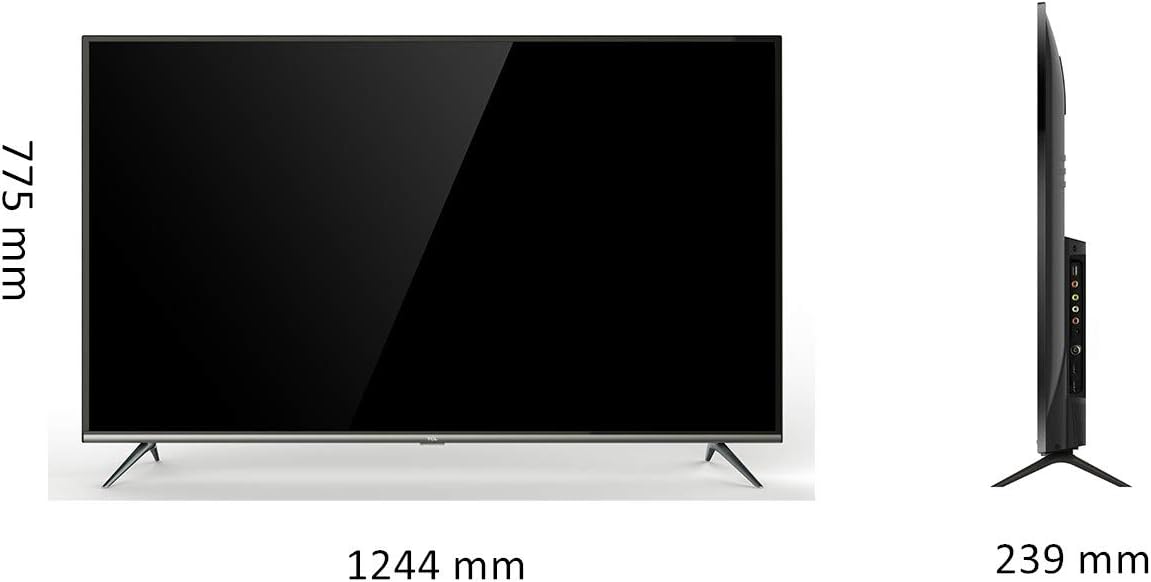
Figure 4.2: TCL 55EP640 Smart TV dimensions. This image provides a front and side view of the TV with measurements: 1244 mm width (front), 775 mm height (side), and 239 mm depth (side, including stand).
4.2 Connecting External Devices
The TCL 55EP640 offers various connectivity options. Ensure the TV is powered off before connecting any devices.
- HDMI: Connect Blu-ray players, game consoles, or set-top boxes to the HDMI ports. This model features 3 HDMI 2.0 ports.
- USB: Use the 2 USB 2.0 ports for connecting USB drives for media playback or software updates.
- LAN: For a stable internet connection, connect an Ethernet cable to the LAN port.
- Antenna/Cable: Connect your antenna or cable TV signal to the CABLE input.
- AV Input: For older devices, use the AV input.
- Headphone: Connect headphones for private listening.

Figure 4.3: Connectivity ports of the TCL 55EP640 Smart TV. This diagram illustrates the available input/output ports on the television, including 3 HDMI ports, 2 USB ports, a LAN port, a Cable input, an AV input, and a Headphone jack.
4.3 Initial Power On and Network Setup
After connecting all necessary cables, plug the power cord into an electrical outlet. The TV will guide you through the initial setup process, including language selection, country, and network connection (Wi-Fi or Ethernet).
For Wi-Fi, select your network from the list and enter the password. For Ethernet, the connection should be established automatically.
5. Operating Your TCL Smart TV
5.1 Remote Control Functions
Familiarize yourself with the remote control. Key functions include power on/off, volume control, channel selection, input source selection, and navigation buttons for the Smart TV interface.
5.2 Smart TV Features (Android TV)
Your TCL 55EP640 runs on Android TV 9.0, providing access to a vast array of applications and services.
- Google Play Store: Download and install your favorite apps, games, and streaming services.
- Built-in Chromecast: Cast content directly from your smartphone, tablet, or computer to the TV.
- Voice Control: Utilize the integrated Google Assistant or connect with Alexa-enabled devices for voice commands.
- Pre-installed Apps: Access popular streaming services like Netflix, Prime Video, YouTube, Disney+, DAZN, and Rakuten TV directly.

Figure 5.1: Extensive streaming content available on TCL Smart TV. This image shows a TV screen filled with logos of numerous streaming platforms, highlighting the wide range of entertainment options accessible on the device.

Figure 5.2: Google Play Store and Chromecast functionality. This image displays the Google Play Store interface on the TV, showcasing a variety of apps. It also illustrates a smartphone casting content to the TV, emphasizing the built-in Chromecast feature.
5.3 Picture and Sound Settings
Navigate to the settings menu to customize your viewing and listening experience. Adjust settings such as:
- Picture Mode: Standard, Dynamic, Movie, Sport, etc.
- Brightness, Contrast, Color: Fine-tune image quality.
- HDR Settings: Optimize for HDR10 content.
- Sound Mode: Standard, Music, Movie, Clear Voice, etc.
- Equalizer: Customize audio frequencies.
6. Maintenance
Regular maintenance ensures the longevity and optimal performance of your TV.
- Cleaning the Screen: Use a soft, lint-free cloth specifically designed for electronics. Do not use abrasive cleaners or sprays directly on the screen.
- Cleaning the Cabinet: Wipe the TV cabinet with a soft, dry cloth.
- Ventilation: Ensure the ventilation openings are clear of dust and obstructions.
- Software Updates: Periodically check for and install software updates to improve performance and add new features.
7. Troubleshooting
Before contacting customer support, try these common solutions:
| Problem | Possible Cause | Solution |
|---|---|---|
| No Power | Power cord not connected; outlet not working. | Check power cord connection; test outlet with another device. |
| No Picture/Sound | Incorrect input source; loose cable connection. | Select correct input source; check all cable connections. |
| Remote Not Working | Batteries dead/incorrectly inserted; obstruction. | Replace batteries; ensure no obstruction between remote and TV. |
| Wi-Fi Disconnection | Router issue; TV too far from router. | Restart router; move TV closer or use Ethernet. |
| Slow Performance (Android TV) | Too many apps running; low storage. | Close unused apps; clear cache; perform a factory reset if necessary (data will be lost). |
8. Specifications
| Feature | Detail |
|---|---|
| Model | TCL 55EP640 |
| Screen Size | 55 Inches (139 cm) |
| Resolution | 3840 x 2160 (4K UHD) |
| Display Technology | LCD, LED Backlight |
| HDR Support | HDR10, HLG, Smart HDR |
| Operating System | Android TV 9.0 |
| Refresh Rate | 60 Hz |
| Connectivity | 3 x HDMI 2.0, 2 x USB 2.0, 1 x LAN, Wi-Fi, Bluetooth |
| Tuners | DVB-C/S2/T2 HD (Triple Tuner) |
| Voice Assistant | Integrated Google Assistant, Alexa compatible |
| Dimensions (with stand) | 124.2 x 78.1 x 22 cm |
| Weight (with stand) | 12.2 kg |
| Power Consumption | 85 Watts (typical) |
9. Warranty and Support
Your TCL 55EP640 Smart TV comes with a standard manufacturer's warranty. Please refer to the warranty card included in the box for specific terms and conditions, including warranty period and coverage details.
For technical support, troubleshooting assistance beyond this manual, or warranty claims, please contact TCL Customer Service. Contact information can typically be found on the TCL official website or on your warranty card.
It is recommended to register your product online to facilitate support and warranty services.