
iLiving ILG8SF16V-T
iLiving Wall-Mount Shutter Exhaust Fan User Manual
Model: ILG8SF16V-T
Product Overview
The iLiving Wall-Mounted Shutter Exhaust Fan with Thermostat Control is designed to improve air circulation and reduce cooling costs in various spaces. Constructed with heavy-duty galvanized steel and weather-resistant aluminum shutters, this fan offers superior ventilation and durability. Its thermally protected and permanently lubricated motor ensures long-lasting, quiet operation.
- Cut Cooling Costs: Reduces expensive cooling bills by efficiently moving air.
- Multipurpose Use: Ideal for homes, attics, garages, sheds, and other areas requiring improved ventilation.
- Thermostat Control: Features 3-speeds and a built-in thermostat to regulate room temperature between 32-130 °F.
- Weather Resistant Shutters: Durable aluminum shutters withstand moisture and heat, contributing to the fan's longevity.
- Easy Installation: Simple, electrician-free installation with a standard 3-prong plug and 6 ft cord.

Figure 1: Front view of the iLiving 16-inch Wall-Mount Shutter Exhaust Fan, showing the fan unit, thermostat, and power cord.
Setup and Installation
The iLiving Wall-Mount Shutter Exhaust Fan is designed for straightforward installation. Ensure you have the necessary tools and a suitable location before beginning.
Site Preparation
- Identify a suitable wall location for mounting.
- Ensure the chosen location allows for proper air intake and exhaust.
- Verify that the electrical outlet is approved and within reach of the 6 ft power cord.
Mounting Instructions
- Measure and mark a square opening of approximately 17 inches on the wall. Refer to the product dimensions for precise measurements.
- Carefully cut the marked opening in the wall.
- Position the fan unit within the opening, ensuring it is level and securely seated.
- Secure the fan to the wall using appropriate fasteners (not included, but typically bolts with lock washers are recommended based on user reviews).
- Plug the fan into a standard 3-prong electrical outlet.
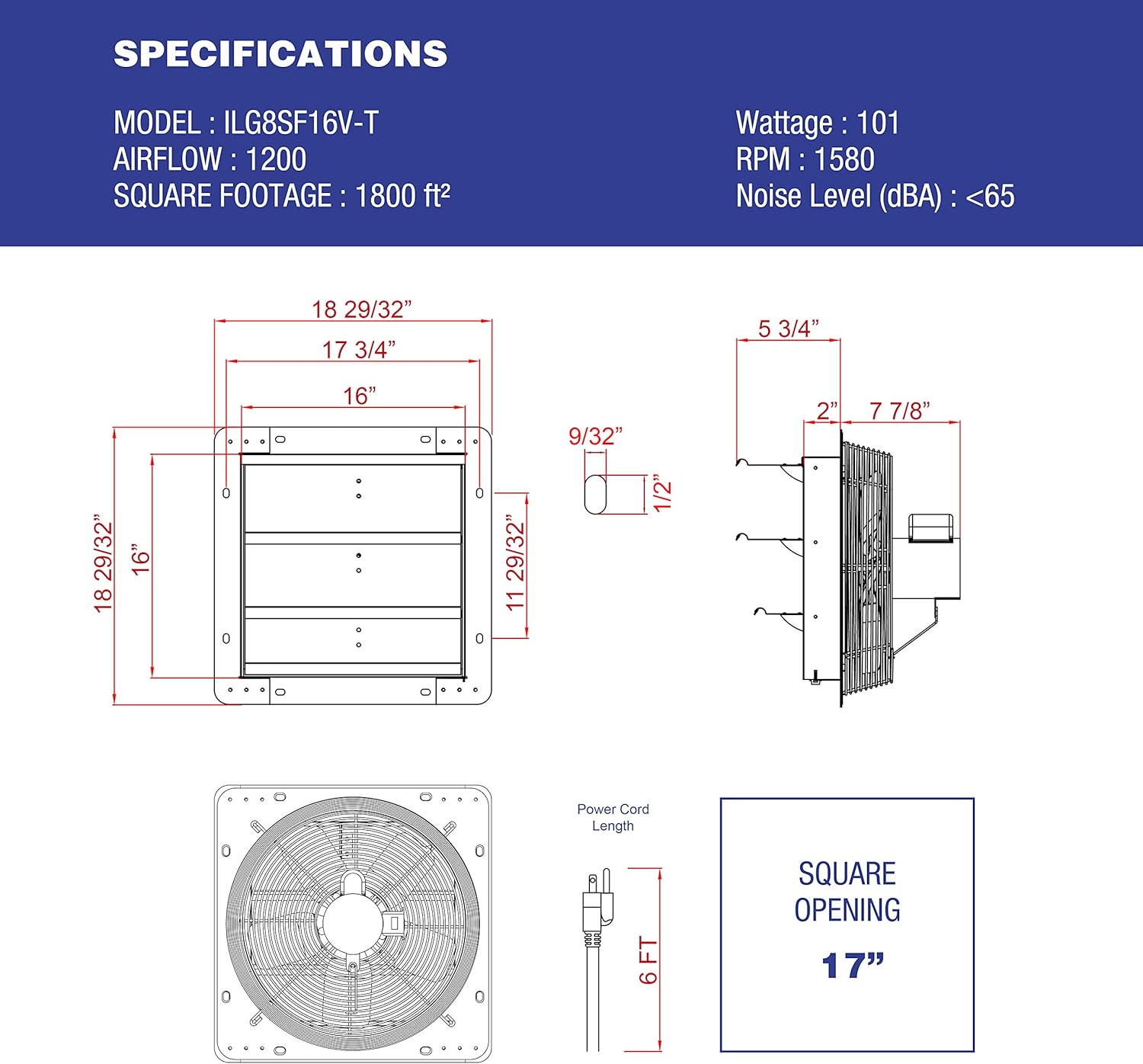
Figure 2: Detailed dimensions and specifications for the iLiving 16-inch Wall-Mount Shutter Exhaust Fan, including the recommended 17-inch square opening for installation.
Installation Overview Video
Video 1: An animated overview demonstrating the function and installation benefits of iLiving shutter fans. This video illustrates how the fan helps regulate temperature by exhausting hot air and drawing in cool air, and highlights its ease of installation and various applications.
Operating Instructions
The iLiving Wall-Mount Shutter Exhaust Fan features variable speed control and an integrated thermostat for optimal performance.
Thermostat Control
- The built-in thermostat allows you to set a desired temperature range (32-130 °F).
- The fan will automatically activate when the ambient temperature exceeds the set threshold and deactivate when the temperature falls below it.
- To bypass the thermostat control and operate the fan continuously, turn the temperature control knob all the way counter-clockwise.
Speed Control
- The fan offers 3-speed settings to adjust airflow as needed.
- Use the speed control knob to select the desired fan speed. Higher speeds provide greater air circulation.
- When the fan is turned on, the powerful airflow will automatically open the aluminum shutters. When turned off, the shutters will close for a tight seal, preventing unwanted air or pests from entering.
Maintenance
Regular maintenance ensures the longevity and efficient operation of your iLiving exhaust fan.
- Cleaning: Periodically clean the fan blades and shutters to prevent dust and debris buildup, which can impede airflow. Use a dry cloth for cleaning.
- Motor: The fan motor is permanently lubricated and thermally protected, requiring no additional lubrication.
- Shutter Operation: Occasionally check the shutters to ensure they open and close smoothly without obstruction.
Troubleshooting
If you encounter issues with your iLiving Wall-Mount Shutter Exhaust Fan, refer to the following common troubleshooting steps:
| Problem | Possible Cause | Solution |
|---|---|---|
| Fan does not turn on. | No power to the unit; Thermostat setting too low. | Check power connection and circuit breaker. Adjust thermostat to a higher temperature or bypass it. |
| Reduced airflow. | Dirty fan blades or obstructed shutters. | Clean fan blades and ensure shutters are free from obstructions. |
| Shutters not opening/closing properly. | Obstruction or mechanism issue. | Inspect shutters for any physical obstructions. Ensure fan is operating at sufficient speed to open shutters. |
| Unusual noise or vibration. | Loose mounting, debris in fan, or motor issue. | Check mounting for tightness. Inspect fan for foreign objects. If noise persists, contact customer support. |
Specifications
| Feature | Detail |
|---|---|
| Brand | iLiving |
| Model Name | ILG8SF16V-T |
| Style | Fan With Thermostat |
| Size | 16" - Variable Speed |
| Product Dimensions | 21 x 5.75 x 21 inches |
| Item Weight | 17.5 pounds |
| Color | Silver |
| Power Source | Electric |
| Wattage | 60 watts |
| Voltage | 120 Volts (AC) |
| Air Flow Capacity | 1200 Cubic Feet Per Minute |
| Number of Blades | 5 |
| Blade Material | Aluminium |
| Control Method | Touch (Thermostat/Speed Control) |
| Main Power Connector Type | Standard North American 3-prong electrical plug |
| Recommended Uses | Home, warehouse, workshop, garage, bathroom |
| UL Listed | Yes |
Warranty and Support
Warranty Information
The iLiving Wall-Mount Shutter Exhaust Fan comes with a 1-year limited manufacturer's warranty. Please retain your proof of purchase for warranty claims.
Customer Support
For technical assistance, troubleshooting beyond this manual, or warranty inquiries, please contact iLiving USA customer service. You can find contact information and additional resources on the official iLiving website:
Related documentsILG8SF16V-T


Ask a question about this manual
Ask about setup, troubleshooting, compatibility, parts, safety, or missing instructions. Manuals+ will review the question and use this page’s manual context to help answer it.