
Product Overview
The MASO 12V Unidirectional Silent Exhaust Port Fan is designed to provide efficient ventilation for various vehicles, including cars, RVs, trailers, and vans. This fan features a durable, weather-resistant, and wear-resistant plastic construction, ensuring longevity and reliable performance. Its dust-proof design helps maintain a fresh air environment.
Key Features:
- High-quality durable plastic construction, weather-resistant and wear-resistant.
- Dust-proof design for a fresh air environment.
- Unidirectional airflow for effective exhaust.
- Low noise operation.
- Easy installation with included accessories.
- Suitable for a wide range of vehicles.

Figure 1: Front view of the MASO 12V Exhaust Port Fan.
Package Contents
Upon opening the package, verify that all components are present and undamaged. The package should contain:
- 1x Black Exhaust Fan (unidirectional slide)
- 3x Short Screws
- 8x Long Screws
- 2x Clips

Figure 2: Included components: exhaust fan, various screws, and clips.
Specifications
| Attribute | Value |
|---|---|
| Brand | MASO |
| Model | MTX 7.0 |
| Color | Black |
| Voltage | 12 Volts |
| Wattage | 3 Watts |
| Product Dimensions | 13.5 x 4.5 x 14.5 cm |
| Cut-out Hole | Approx. 97 x 97 mm |
| Wire Length | Approx. 160 mm |
| Special Features | Portable |

Figure 3: Detailed dimensions of the MASO Exhaust Port Fan.
Setup and Installation
This exhaust fan is designed for easy installation on the side of your vehicle. Follow these steps for proper setup:
- Choose Installation Location: Select a suitable flat surface on the side of your car, RV, trailer, or van. Ensure there is enough space for the fan and proper airflow. Refer to Figure 4 for typical installation locations.
- Prepare the Opening: Based on the fan's dimensions (approximately 145 x 135 x 45 mm) and the cut-out hole size (approximately 97 x 97 mm), carefully mark and cut an opening in the vehicle's wall.
- Orient the Fan: The fan is a one-way air outlet. Install the shell of the outlet downward to prevent water leakage.
- Secure the Fan: Place the fan into the prepared opening. Use the provided screws (3 short, 8 long) and clips to securely fasten the fan to the vehicle's body. The panel can be fixed with screws.
- Electrical Connection: Connect the fan to a 12V power source. The red wire is for the positive (+) connection, and the black wire is for the negative (-) connection. Ensure connections are secure and properly insulated.
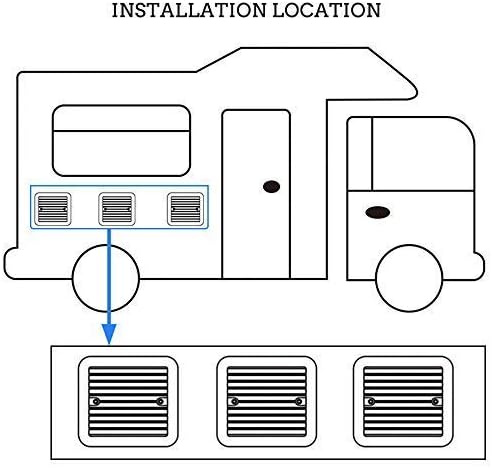
Figure 4: Example of installation locations on a recreational vehicle.

Figure 5: Detail of the fan's mesh and mounting points.
Operating Instructions
Once properly installed and connected to a 12V power source, the MASO Exhaust Port Fan operates to provide ventilation. The fan is designed for continuous operation to maintain air circulation.
- Power On/Off: The fan will activate when power is supplied to the 12V connection. To turn off, disconnect the power supply or use an inline switch (not included).
- Airflow Direction: This is a unidirectional exhaust fan, meaning it draws air from inside the vehicle and expels it outside.
- Quiet Operation: The fan is designed for silent operation, minimizing noise disturbance.
- Dust Protection: The integrated dust cover helps prevent dust and debris from entering the vehicle while allowing air to exhaust.

Figure 6: The fan providing ventilation for an RV, emphasizing low noise and strong airflow.
Maintenance
Regular maintenance ensures the longevity and optimal performance of your MASO Exhaust Port Fan.
- Cleaning: Periodically inspect the fan's exterior and the exhaust port for any accumulated dust or debris. Use a soft, damp cloth to wipe down the surfaces. Avoid using harsh chemicals or abrasive cleaners.
- Dust Cover: The fan features a dust-proof design. Ensure the dust cover remains clear of obstructions to maintain effective ventilation.
- Electrical Connections: Occasionally check the electrical connections for any signs of corrosion or loosening. Ensure they remain secure and properly insulated.
- Structural Integrity: Inspect the fan's mounting for any signs of damage or loosening. Re-tighten screws if necessary.
Troubleshooting
If you encounter issues with your MASO Exhaust Port Fan, refer to the following troubleshooting guide:
- Fan Not Operating:
- Check the 12V power supply. Ensure it is connected and providing power.
- Verify electrical connections (red wire to positive, black wire to negative) are secure and not corroded.
- Inspect for any loose wiring or damaged components.
- Reduced Airflow:
- Check the exhaust port and fan blades for obstructions (e.g., leaves, debris). Clean as necessary.
- Ensure the dust cover is not blocked.
- Unusual Noise:
- Inspect the fan blades for any foreign objects or damage.
- Ensure the fan is securely mounted and not vibrating against the vehicle's surface.
If the issue persists after following these steps, please contact customer support.
Warranty and Support
MASO products are inspected before shipment to ensure quality. We offer a 100% satisfaction guarantee. If the product is damaged or cannot be used due to a manufacturing defect, please contact us for a satisfactory solution.
Extended warranty plans may be available for purchase:
- 12-month Extended Warranty against failures and defects.
- 24-month Extended Warranty against failures and defects.
For further assistance, technical support, or warranty claims, please refer to the contact information provided with your purchase or visit the official MASO website.