
1. Introduction
This manual provides essential information for the safe and efficient installation, operation, and maintenance of the IFM IF-2002-ABOW-IF0295 Inductive Sensor. Please read this manual thoroughly before using the product and retain it for future reference.
2. Product Overview
The IFM IF-2002-ABOW-IF0295 is a robust inductive proximity sensor designed for reliable, non-contact detection of metallic objects. Its compact M12 design and flush mountable configuration make it suitable for various industrial automation applications.
Key Features:
- Type: Inductive Sensor
- Housing: M12 x 1 thread, Length 71.5 mm
- Sensing Range: 2 mm, flush mountable
- Output Function: Normally Open (NO)
- Operating Voltage: AC (20-250VAC, 45-65Hz)
- Connection: 2-meter PVC-cable, 2-wire
- Protection Rating: IP 67
- Ambient Temperature: -25 to 80 °C
- Switching Frequency: 25 Hz
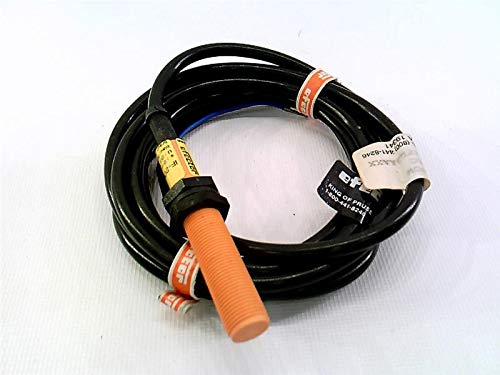
Figure 1: The IFM IF-2002-ABOW-IF0295 inductive sensor. It features a cylindrical M12 threaded housing, typically orange or brass-colored, connected to a black 2-meter PVC cable. The sensor is designed for flush mounting and includes a label with product details.
3. Safety Instructions
Observe the following safety instructions to prevent personal injury and damage to the product or connected equipment.
- Installation and maintenance must be performed by qualified personnel only.
- Disconnect power before performing any installation, wiring, or maintenance tasks.
- Ensure that the operating voltage and current ratings match the sensor's specifications.
- Do not exceed the specified ambient temperature range.
- Protect the cable from mechanical stress and sharp edges.
- The sensor is not intended for safety-related applications unless explicitly stated and certified.
4. Setup
4.1 Mounting
- Select a mounting location where the sensor can detect the target object reliably within its 2 mm sensing range.
- The sensor is flush mountable, meaning it can be installed with its active face level with the surrounding metal surface without affecting its performance.
- Drill a hole of appropriate diameter (M12) in the mounting surface.
- Insert the sensor into the hole and secure it using the provided nuts, ensuring it is firmly fixed.
- Ensure there is no metallic material within the specified clearance distances around the active face to avoid interference.
4.2 Wiring
The IF-2002-ABOW-IF0295 is a 2-wire AC sensor. Connect it in series with the load to the AC power supply.
- Connect one wire of the sensor to one side of the AC power supply.
- Connect the other wire of the sensor to one terminal of the load (e.g., relay, PLC input).
- Connect the other terminal of the load to the other side of the AC power supply.
- Ensure all connections are secure and insulated.
Note: Refer to local electrical codes and standards for proper wiring practices.
5. Operating Instructions
Once properly installed and wired, the sensor operates automatically.
- Power On: Apply the specified AC voltage (20-250VAC) to the sensor circuit.
- Detection: When a metallic object enters the sensor's 2 mm sensing range, the sensor's output will switch to its ON state (closed circuit), allowing current to flow through the connected load.
- Normally Open (NO): This sensor has a Normally Open output. This means the output is OFF (open circuit) when no object is detected, and it switches ON (closed circuit) when an object is detected.
- Switching Frequency: The sensor can detect objects moving at a rate of up to 25 times per second (25 Hz).
6. Maintenance
The IFM IF-2002-ABOW-IF0295 sensor is designed for minimal maintenance. Regular inspection can help ensure long-term reliable operation.
- Cleaning: Periodically clean the active face of the sensor to remove any accumulation of dust, dirt, or debris that could affect sensing performance. Use a soft, damp cloth. Do not use abrasive cleaners or solvents.
- Cable Inspection: Check the PVC cable for any signs of damage, such as cuts, abrasions, or kinks. Replace the sensor if the cable insulation is compromised.
- Mounting Security: Verify that the sensor remains securely mounted and that the nuts are tight.
- Environmental Protection: The IP67 rating ensures protection against dust ingress and temporary immersion in water. However, avoid prolonged exposure to harsh chemicals or extreme conditions beyond the specified operating range.
7. Troubleshooting
If the sensor is not functioning as expected, perform the following basic checks:
| Problem | Possible Cause | Solution |
|---|---|---|
| Sensor does not detect objects |
|
|
| Intermittent detection |
|
|
| Sensor always ON or OFF |
|
|
8. Specifications
| Parameter | Value |
|---|---|
| Model Number | IF-2002-ABOW-IF0295 |
| Sensing Range | 2 mm |
| Mounting Type | Flush Mountable |
| Output Function | Normally Open (NO) |
| Operating Voltage | 20-250 VAC, 45-65 Hz |
| Connection | 2-wire, 2 m PVC-cable |
| Protection Rating | IP 67 |
| Ambient Temperature | -25 to 80 °C |
| Switching Frequency | 25 Hz |
| Product Dimensions | 6 x 10 x 6 inches; 1 Pounds (shipping dimensions) |
| Manufacturer | EFECTOR (IFM) |
9. Warranty and Support
IFM products are manufactured to high quality standards. For specific warranty information, please refer to the terms and conditions provided at the time of purchase or contact your local IFM distributor.
Technical Support:
For technical assistance or inquiries regarding the IFM IF-2002-ABOW-IF0295 Inductive Sensor, please contact IFM customer support or your authorized IFM dealer. Contact details can typically be found on the official IFM website.


