
1. Introduction
This instruction manual provides comprehensive guidance for the installation, operation, and maintenance of your eMylo RF 433MHz DC 5-24V Motor Controller Module. This module is designed for controlling the forward, reverse, and stop functions of DC motors in various applications such as rolling doors, electric curtains, and water pumps. Please read this manual carefully before use to ensure safe and efficient operation.
2. Safety Information
- Ensure the power supply voltage is within the specified range of DC 5-24V. Incorrect voltage can damage the device.
- Do not exceed the maximum current rating of 10A or power rating of 200W.
- All wiring should be performed by a qualified individual to prevent electrical hazards.
- Disconnect power before performing any installation, wiring, or maintenance.
- Keep the device away from water, moisture, and extreme temperatures.
- This device is equipped with overvoltage protection; however, proper installation is crucial for safety.
3. Product Overview
The eMylo RF Motor Controller Module is a compact and efficient solution for remote control of DC motors. It features a 433MHz RF technology for stable signal transmission and comes with two remote controls for convenient operation.

Image: Overview of the eMylo RF Motor Controller Module highlighting its key features including remote control capability, FCC certification, safety, multiple protection, stable performance, and high sensitivity.
Key Features:
- Dedicated Motor Control: Specifically designed for DC motors, enabling forward, reverse, and stop commands.
- Stable RF Signal: Utilizes 433MHz technology with non-directional encoding, offering a range of 20-50 meters indoors, capable of penetrating walls, floors, and doors.
- Tool-Free Installation: Equipped with insulated push-in terminals for quick and secure wiring without the need for screwdrivers. Pre-soldered cabling ensures a firm connection.
- Enhanced Safety and Durability: Features integrated overvoltage protection and high-quality copper contacts for extended lifespan and reliable operation.
- Wide Compatibility: Supports all DC motors from 5V to 24V, up to 10A/200W.
4. Specifications
| Feature | Specification |
|---|---|
| Brand | eMylo |
| Model | RF 433MHz DC 5-24V Motor Controller Module |
| Input Voltage | DC 5-24V |
| Max Current Rating | 10 A |
| Max Power Rating | 200 Watts |
| RF Frequency | 433MHz |
| Remote Control Range | 20-50 meters (indoor) |
| Connector Type | Insulated Push-in Terminals |
| Contact Material | Copper |
| Operating Mode | Automatic |
| Safety Compliance | CE, RoHS |
| Number of Terminals | 2 |
5. Setup and Installation
Follow these steps for proper installation of the eMylo RF Motor Controller Module:
- Power Disconnection: Before starting, ensure that the power supply to your motor system is completely disconnected to prevent electric shock.
- Identify Wiring: Identify the positive (Live line) and negative (Null line) wires from your DC 5-24V power source and the corresponding wires for your DC motor (Load).
- Connect Power Input: Insert the power supply's positive (Live line) and negative (Null line) wires into the input terminals of the controller module. The module features insulated push-in terminals for easy, tool-free connection. Simply press the terminal lever, insert the wire, and release.
- Connect Motor Output: Connect the motor's wires to the output terminals of the controller module. Ensure correct polarity for desired forward/reverse operation. If the motor direction is incorrect, you can swap the output wires.

Image: Wiring diagram illustrating the connection of a DC 5-24V power source and a motor load to the eMylo controller module using push-in terminals.
- Secure Connections: Verify all connections are firm and secure. The pre-soldered cabling on the module ensures reliable contact.
- Power On: Reconnect the power supply. The module is now ready for operation.
Remote Control Pairing (if necessary):
The remote controls are typically pre-paired. If re-pairing is needed or if you wish to add new remotes, refer to the specific pairing instructions provided with your product packaging. Generally, this involves pressing a learning button on the module and then a button on the remote.
6. Operating Instructions
The eMylo RF Motor Controller Module operates using the provided 433MHz remote controls. Each remote typically has three buttons: Forward, Reverse, and Stop.

Image: A remote control being used to operate a motor, demonstrating forward (up) and reverse (down) movement.
- Forward Movement: Press the designated "Forward" button on the remote control to activate the motor in the forward direction.
- Reverse Movement: Press the designated "Reverse" button on the remote control to activate the motor in the reverse direction.
- Stop Function: Press the "Stop" button to halt the motor's movement. The module is designed to stop the motor automatically when it reaches its limit or if a single press is used for full travel.
Remote Control Range:
The remote control offers a stable signal with an indoor range of 20 to 50 meters, allowing control through walls, floors, and doors without significant interference.

Image: Illustration of the remote control's effective range, demonstrating its ability to transmit signals over distances of 20-50 meters, even through obstacles.
Typical Applications:
This controller is suitable for a wide range of applications:
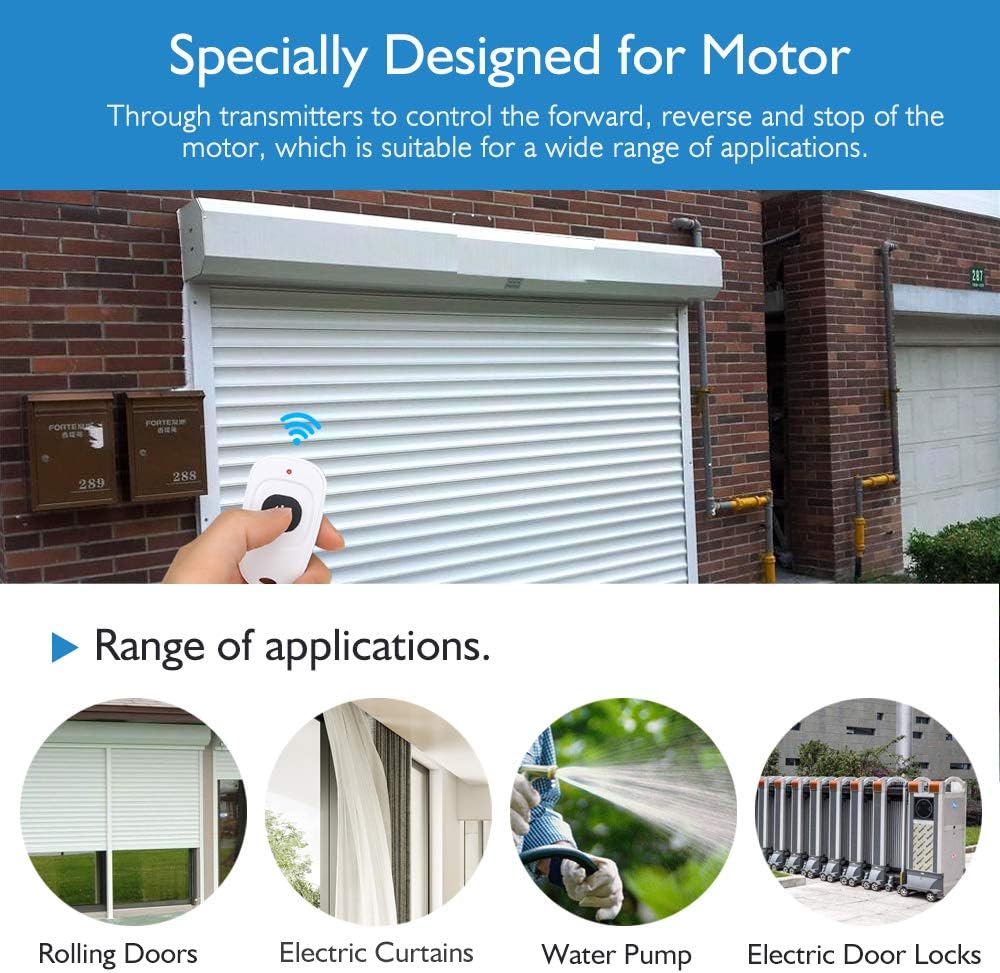
Image: Visual examples of the controller's versatility, including its use with rolling doors, electric curtains, water pumps, and electric door locks.
7. Maintenance
- Cleaning: Use a dry, soft cloth to clean the module. Do not use liquid cleaners or solvents.
- Inspection: Periodically check wiring connections to ensure they remain secure.
- Battery Replacement: If remote control range decreases or buttons become unresponsive, replace the battery in the remote control. Refer to the remote's specific instructions for battery type and replacement procedure.
- Storage: If storing the module for an extended period, disconnect it from the power supply.
8. Troubleshooting
| Problem | Possible Cause | Solution |
|---|---|---|
| Motor does not respond to remote. | No power to module; Remote battery low/dead; Remote not paired; Obstruction between remote and module. | Check power connections; Replace remote battery; Re-pair remote control (see Setup section); Reduce distance or remove obstructions. |
| Motor moves in the wrong direction. | Incorrect wiring of motor output. | Disconnect power and swap the motor's output wires connected to the module. |
| Module LED indicator is off. | No power supply; Faulty module. | Check power input connections and power source; If power is confirmed, the module may be faulty and require replacement. |
| Reduced remote control range. | Low remote battery; RF interference; Physical obstructions. | Replace remote battery; Minimize other RF devices nearby; Ensure clear line of sight if possible, or move closer. |
9. Warranty and Support
eMylo products are designed for reliability and performance. For warranty information, technical support, or any inquiries regarding your product, please contact eMylo customer service or visit the official eMylo brand store on Amazon:
Please retain your purchase receipt for warranty claims.