
Franke A600 FM
Franke A600 FM Super Automatic Espresso Machine
Instruction Manual
1. Introduction
This manual provides comprehensive instructions for the installation, operation, and maintenance of your Franke A600 FM Super Automatic Espresso Machine with SU05 FoamMaster™ Fridge and 3-syrup Flavor Station. This commercial-grade system is designed for high-volume environments, offering a wide range of coffee and milk-based beverages with advanced features like iQFlow™ and an integrated cleaning system.
Please read this manual thoroughly before operating the machine to ensure safe and efficient use and to maximize the lifespan of your equipment.
2. Key Features
- Super Automatic Operation: Fully automated brewing process from bean to cup.
- Dual Grinders: Equipped with two precision grinders for different coffee types.
- Powder Doser: For chocolate or chai powder.
- SU05 FoamMaster™ Fridge: Integrated milk refrigeration and advanced milk frothing technology for perfect foam.
- 3-Unit Flavor Station: Dispenses up to three different syrup flavors.
- iQFlow™ Technology: Ensures consistent extraction and optimal flavor.
- 8-inch Touch Screen Display: Intuitive interface for beverage selection and machine control.
- Hot Water Wand: For tea or other hot beverages.
- CleanMaster System: Fully automatic cleaning system for hygiene and efficiency.

Figure 1: Front view of the Franke A600 FM Super Automatic Espresso Machine, showing the main unit, integrated milk fridge on the left, and flavor station on the right. The central touch screen displays beverage options.
3. Setup
3.1 Unpacking
Carefully remove all components from the packaging. Retain packaging materials for future transport or service. Verify all parts are present according to the packing list.
3.2 Placement and Connections
Place the machine on a stable, level surface with adequate clearance for ventilation and access. Ensure proximity to appropriate power outlets and a water supply.
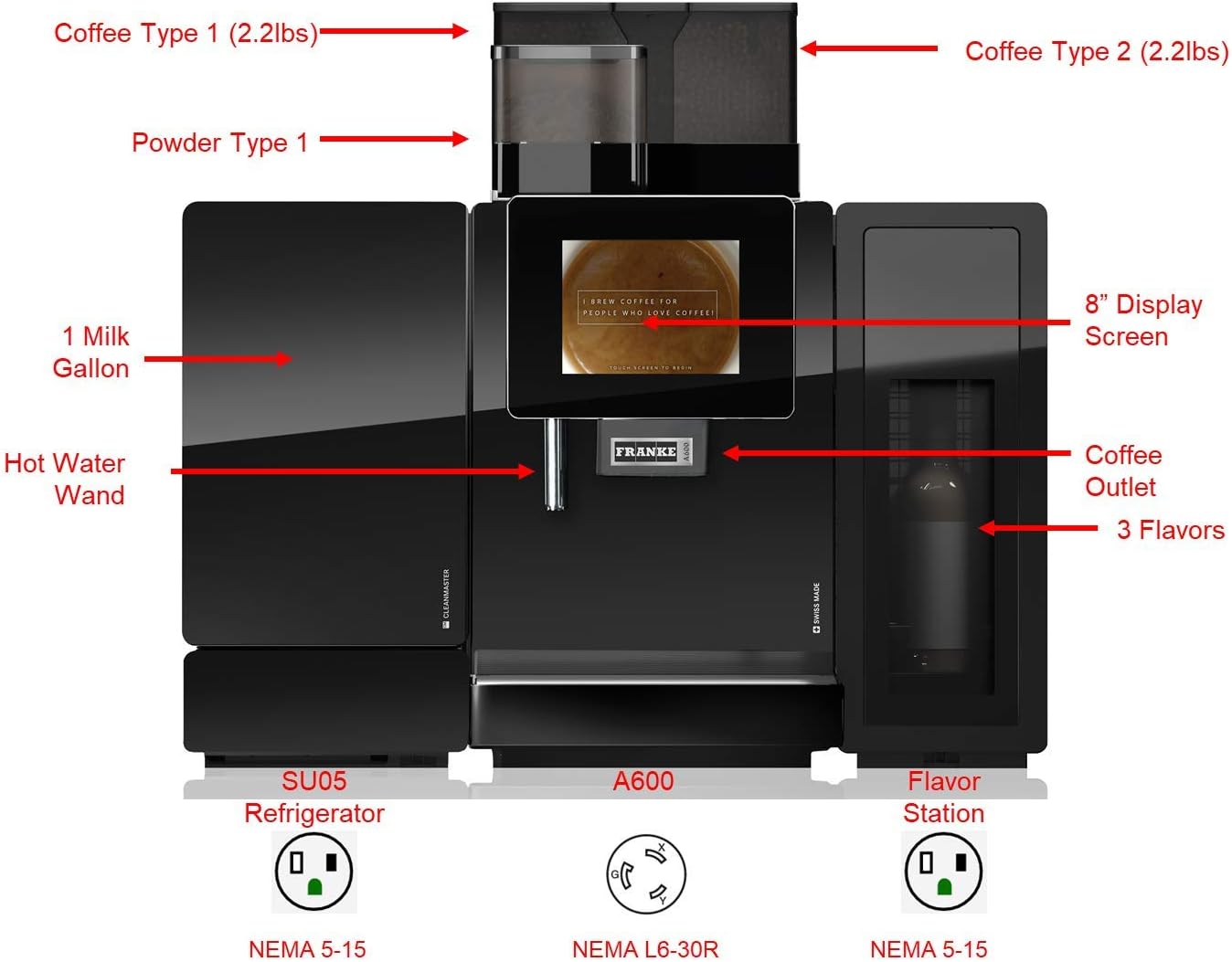
Figure 2: Labeled diagram of the Franke A600 FM system. It highlights two coffee bean hoppers (2.2 lbs each), a powder type dispenser, an 8-inch display screen, hot water wand, coffee outlet, 3 flavor syrup outlets, a 1-gallon milk fridge (SU05 Refrigerator), the A600 main unit, and the Flavor Station. Electrical connections are shown: SU05 Refrigerator (NEMA 5-15), A600 (NEMA L6-30R), and Flavor Station (NEMA 5-15).
- Power Supply: Connect the SU05 Refrigerator and Flavor Station to standard NEMA 5-15 outlets. The main A600 unit requires a NEMA L6-30R outlet. Ensure dedicated circuits are available for each connection as per local electrical codes.
- Water Connection: Connect the machine to a potable water supply using the provided water filtration system. Ensure the water pressure is within the specified range (refer to specifications section).
- Drainage: Connect the machine's drain hose to an appropriate waste water drain.
- Milk Fridge (SU05): Position the milk fridge next to the main unit and connect the milk hose.
- Flavor Station: Position the flavor station next to the main unit and connect the syrup lines.
4. Operating Instructions
4.1 Initial Start-up
- Ensure all connections (power, water, milk, syrup) are secure.
- Fill the coffee bean hoppers with fresh coffee beans.
- Fill the powder container with chocolate or chai powder.
- Place milk in the SU05 FoamMaster™ Fridge.
- Insert syrup bottles into the Flavor Station.
- Turn on the main power switch. The machine will perform an initial self-test and warm-up cycle.
- Follow on-screen prompts for initial setup, including language selection and water hardness settings.
4.2 Beverage Preparation
The 8-inch touch screen display provides an intuitive interface for beverage selection.
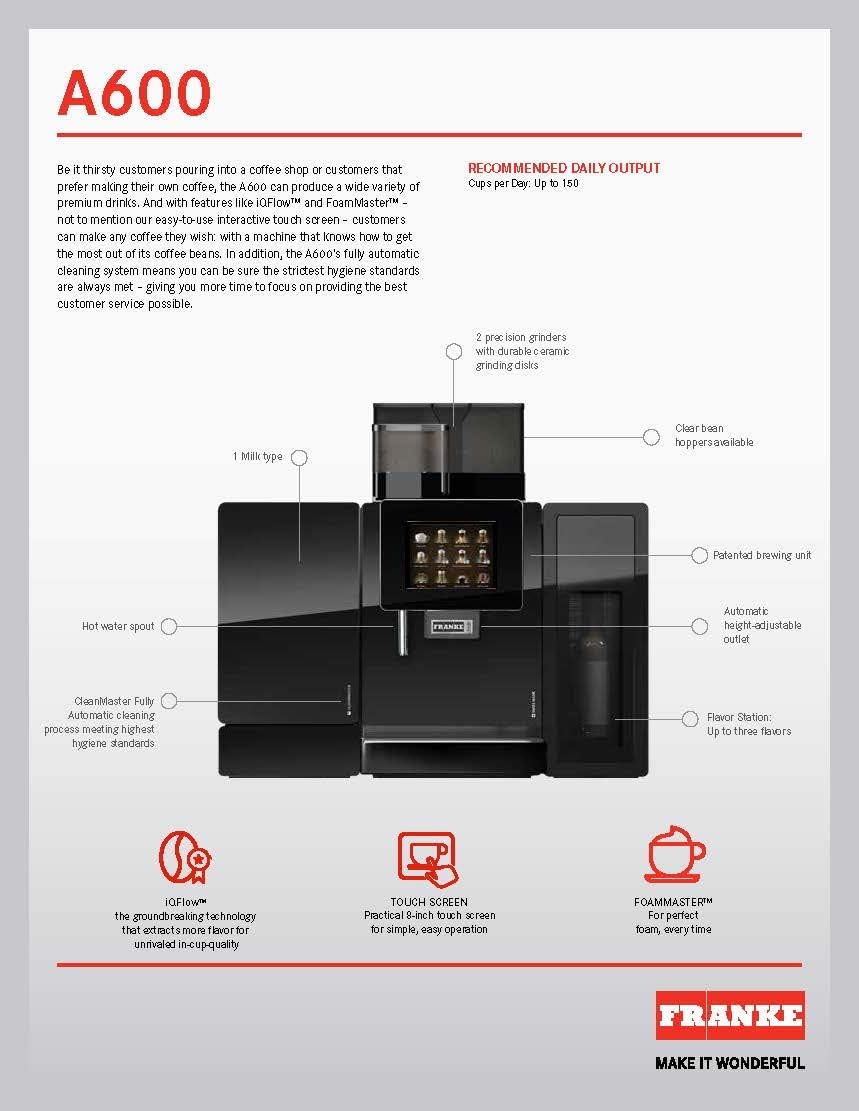
Figure 3: Diagram illustrating key features of the Franke A600. It shows the two precision grinders, clear bean hoppers, patented brewing unit, automatic height-adjustable outlet, flavor station for up to three flavors, hot water spout, CleanMaster fully automatic cleaning process, iQFlow™ technology, and the practical 8-inch touch screen.
- Place a cup under the coffee outlet.
- On the touch screen, select your desired beverage (e.g., Espresso, Cappuccino, Latte, Hot Chocolate).
- Customize options if available (e.g., coffee strength, milk volume, syrup flavor).
- Press the "Start" button. The machine will automatically grind beans, brew coffee, froth milk, and dispense syrup as required.
- For hot water, select the hot water option and place a cup under the hot water wand.
5. Maintenance
Regular maintenance is crucial for optimal performance and longevity of your Franke A600 FM.
5.1 Daily Cleaning
- Automatic Cleaning: The CleanMaster system provides fully automatic cleaning. Follow the on-screen prompts for daily cleaning cycles, which typically involve inserting a cleaning cartridge.
- Milk System Cleaning: The FoamMaster™ system requires daily cleaning to prevent milk residue buildup. The machine will guide you through this process.
- Drip Tray and Grounds Container: Empty and clean the drip tray and spent coffee grounds container daily.
- Exterior Cleaning: Wipe down the exterior surfaces with a damp cloth. Do not use abrasive cleaners.
5.2 Refilling Supplies
- Coffee Beans: Refill bean hoppers when prompted by the machine or when levels are low.
- Powder: Replenish powder as needed.
- Milk: Ensure the SU05 FoamMaster™ Fridge always has sufficient milk.
- Syrups: Replace empty syrup bottles in the Flavor Station.
- Water Filter: Replace the water filter cartridge as recommended by the machine or manufacturer guidelines to maintain water quality and prevent scale buildup.
6. Troubleshooting
This section addresses common issues you might encounter. For more complex problems, refer to the full service manual or contact Franke customer support.
| Problem | Possible Cause | Solution |
|---|---|---|
| Machine not turning on | No power supply; main switch off | Check power connections and ensure main switch is on. Verify NEMA L6-30R outlet is functional. |
| Coffee not dispensing | Empty bean hopper; clogged grinder; brewing unit issue | Refill beans. Check for foreign objects in grinder. Perform a cleaning cycle. |
| Milk not frothing correctly | Low milk level; clogged milk system; incorrect milk temperature | Ensure sufficient cold milk. Perform milk system cleaning. Check fridge temperature. |
| "Empty Grounds" message persists | Grounds container not properly reinserted; sensor issue | Ensure grounds container is fully pushed in. Clean sensor area if accessible. |
7. Specifications
Detailed technical specifications for the Franke A600 FM system.

Figure 4: Diagram showing the modularity and configuration options for the Franke A600. It highlights A600 features (grinders, powder doser, cup sensor, adjustable outlet), cleaning systems (CleanMaster, EasyClean), milk systems (FoamMaster, MS), flavor station, accounting system, and cup warmer. It also shows available colors (Black/Chrome, Anthracite/Chrome) and contact information for Franke Coffee Systems.
| Feature | Detail |
|---|---|
| Brand | Franke |
| Model Name | A600 FM |
| Coffee Maker Type | Super-Automatic Espresso Machine |
| Operation Mode | Fully Automatic |
| Grinders | 2 precision grinders (2.2 lbs capacity each) |
| Powder Doser | 1 (for chocolate/chai) |
| Milk System | SU05 FoamMaster™ (1 gallon milk fridge) |
| Flavor Station | 3-unit syrup dispenser |
| Display | 8-inch Touch Screen |
| Special Features | iQFlow™, Water Filtration System (included) |
| Electrical Requirements (A600) | NEMA L6-30R |
| Electrical Requirements (SU05/Flavor Station) | NEMA 5-15 (each) |
| Recommended Daily Output | Up to 150 cups (as per image) |
8. Warranty and Support
For warranty information, please refer to the documentation provided at the time of purchase or contact Franke customer service. Franke provides comprehensive support for its commercial espresso machines, including installation and water filtration system setup as part of the purchase price.
For technical assistance, spare parts, or service requests, please contact Franke Coffee Systems directly. Contact details can typically be found on the manufacturer's website or in your purchase agreement.
Note: This machine is intended for commercial use only.
Related documentsA600 FM


Ask a question about this manual
Ask about setup, troubleshooting, compatibility, parts, safety, or missing instructions. Manuals+ will review the question and use this page’s manual context to help answer it.