
Introduction
This instruction manual provides essential information for the safe operation, maintenance, and troubleshooting of your Holy Stone 9200E 1:10 Scale High-Speed Remote Control Car. Please read this manual thoroughly before operating the vehicle to ensure proper function and longevity of the product.
Safety Information
Operating remote control vehicles requires caution. Adhere to the following safety guidelines:
- Always operate the RC car in open areas away from people, pets, and obstacles.
- Do not operate near public roads, busy streets, or in residential areas where it could cause disturbance or danger.
- Keep hands, hair, and loose clothing away from moving parts, especially the wheels and motor.
- Ensure batteries are charged using only the provided charger and according to instructions to prevent fire or explosion hazards.
- Do not expose the vehicle or remote control to water or moisture beyond its specified IPX4 waterproof level. Avoid submerging the vehicle.
- This product is recommended for users aged 14 years and up. Adult supervision is advised for younger users.
- In case of damage, discontinue use and perform necessary repairs before resuming operation.
CCPSA Warning Attribute: This product may contain small parts and is not suitable for children under 3 years of age due to choking hazards.
Package Contents
Verify that all items listed below are included in your package:
- 1 x Holy Stone 9200E RC Car (1:10 Scale)
- 1 x 2.4GHz Remote Control Transmitter
- 2 x 7.4V/1700mAh Rechargeable Lithium-Ion Batteries
- 2 x USB Charging Cables
- 1 x Screwdriver
- 1 x Hex Wrench
- Spare Body Clips
- Instruction Manual

Image: The Holy Stone 9200E RC car displayed with its full set of accessories, including the remote control, two batteries, charging cables, and tools.
Key Features
- High-Speed Performance: Equipped with a premium 540 high-speed motor, capable of reaching speeds up to 48 km/h.
- 4WD System: Four-wheel drive for enhanced traction and control across various terrains.
- Extended Playtime: Two 7.4V/1700mAh rechargeable batteries provide approximately 40 minutes of total running time (20+ minutes per battery).
- Proportional Control: 2.4GHz full-scale synchronous remote control system offers precise proportional throttle and steering control for nuanced driving.
- Durable Construction: Features metal oil-filled shock absorbers and high-toughness rubber tires for improved durability and performance on rough surfaces.
- IPX4 Waterproof Level: Designed to protect against splashing water and waves, allowing for operation in damp conditions (not submersible).

Image: The RC car demonstrating its 4x4 4WD capability and high-speed potential, with a graphic indicating 48 km/h speed.
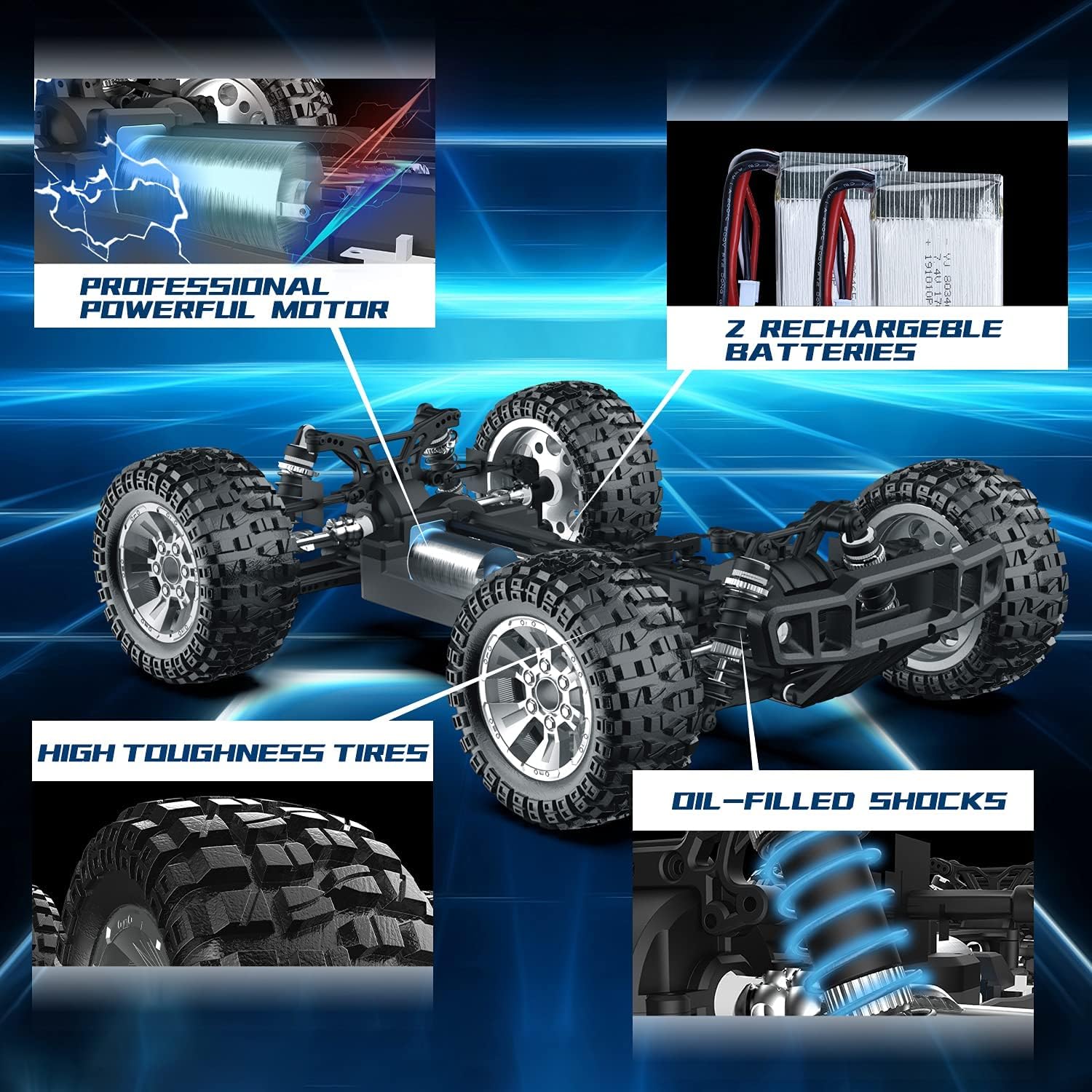
Image: A detailed view of the RC car's internal components, highlighting the professional powerful motor, rechargeable batteries, high toughness tires, and oil-filled shocks.

Image: The RC car in an outdoor setting, illustrating its extended running time of 40+ minutes with two batteries.

Image: The 2.4GHz radio system remote control, showing its steering trim, speed switch, power switch, indicator light, and proportional controls for throttle and steering.

Image: The RC car operating in shallow water, demonstrating its IPX4 waterproof level protection against splashing water and waves.
Setup Guide
1. Battery Charging
Use the provided USB charging cables to charge the 7.4V/1700mAh Lithium-Ion batteries. Connect the battery to the charging cable, then plug the USB end into a standard USB power adapter (e.g., phone charger, computer USB port). The indicator light on the charger will show charging status (typically red for charging, green for fully charged). Charging time is approximately 3-4 hours per battery.
2. Installing Batteries
- RC Car Battery: Open the battery compartment on the underside of the RC car. Insert a fully charged 7.4V battery and connect it to the car's power connector. Securely close the battery compartment.
- Remote Control Batteries: Open the battery cover on the back of the remote control. Insert 3 x AA batteries (not included) ensuring correct polarity (+/-). Close the cover.
3. Pairing the Remote Control
- Ensure both the RC car and the remote control are powered off.
- Place the RC car on a flat surface.
- Turn on the RC car's power switch. The car's indicator light will flash.
- Turn on the remote control's power switch. The remote's indicator light will flash.
- Wait a few seconds for the remote control and car to automatically pair. Once paired, both indicator lights will become solid.
- If pairing fails, turn off both devices and repeat the steps.
Operating Instructions
Basic Controls
- Throttle Trigger: Pull the trigger towards you to move the car forward. Push the trigger away from you to brake, and push further to reverse.
- Steering Wheel: Turn the steering wheel left to turn the car left, and right to turn the car right.
Proportional Control Adjustment
- Speed Switch: Located on the remote control. Rotate clockwise to increase the maximum speed, and counter-clockwise to decrease it. This allows for fine-tuning speed for different skill levels and terrains.
- Steering Trim: Use the steering trim knob on the remote control to adjust the car's steering if it pulls to one side when the steering wheel is centered.
Driving Tips
- Start with lower speed settings, especially for beginners, to gain control.
- Practice steering and throttle control in an open, clear area.
- The car is designed for all terrains, including beach, sand, rocky paths, and concrete roads. However, avoid deep water or extremely muddy conditions.
- For optimal performance, ensure the batteries are fully charged before each use.
Maintenance
- Cleaning: After each use, especially on dusty or dirty terrains, clean the car with a soft brush or cloth to remove dirt and debris. Avoid using water directly on electronic components.
- Battery Care:
- Always disconnect batteries from the car and charger when not in use.
- Store batteries in a cool, dry place away from direct sunlight and extreme temperatures.
- Do not overcharge or over-discharge batteries.
- Inspecting Components: Regularly check the wheels, tires, shocks, and steering linkages for any damage or loose connections. Tighten screws as needed.
- Lubrication: Periodically check moving parts for smooth operation. Apply appropriate RC-grade lubricant if necessary, avoiding electronic parts.
Troubleshooting
| Problem | Possible Cause | Solution |
|---|---|---|
| Car does not respond to remote. |
|
|
| Car runs slowly or lacks power. |
|
|
| Car pulls to one side. |
|
|
| Short operating time. |
|
|
Specifications
| Feature | Detail |
|---|---|
| Model | 9200E |
| Scale | 1:10 |
| Drive System | 4-Wheel Drive (4WD) |
| Max Speed | 48+ km/hour |
| Motor Type | 540 High-Speed Motor |
| Control Frequency | 2.4GHz |
| Control Range | Up to 100M |
| Battery (Car) | 2 x 7.4V/1700mAh Lithium-Ion |
| Battery (Remote) | 3 x AA (not included) |
| Approx. Running Time | 40+ minutes (20+ minutes per battery) |
| Charging Time | Approx. 3-4 hours per battery |
| Waterproof Level | IPX4 (Splash-proof) |
| Material | Metal, Plastic, Rubber |
| Product Dimensions | 14.2 x 11.8 x 5.9 inches (approx. 36 x 30 x 15 cm) |
| Recommended Age | 14 years and up |

Image: A diagram illustrating the key dimensions of the Holy Stone 9200E RC Car, including length, width, and height.
Warranty and Support
Holy Stone is committed to providing high-quality products and customer satisfaction. For any questions, concerns, or technical support regarding your 9200E RC Car, please contact Holy Stone customer service. Refer to the contact information provided on the product packaging or the official Holy Stone website for the most up-to-date support channels.
Please retain your proof of purchase for warranty claims. Specific warranty terms and conditions may apply and are subject to change. For detailed warranty information, please visit the Holy Stone official website or contact their support team directly.


