
EASYGUARD EC003N-V-1
EASYGUARD EC003N-V-1 Car Alarm System User Manual
Brand: EASYGUARD | Model: EC003N-V-1
Product Overview
The EASYGUARD EC003N-V-1 is a smart key PKE (Passive Keyless Entry) car alarm system designed to enhance vehicle security and convenience. It integrates remote engine start, push start button functionality, and passive keyless entry, allowing for automatic locking/unlocking as you approach or walk away from your vehicle.
Important Safety Information
- Professional Installation Required: This system is complex and requires installation by a qualified car alarm installer. Incorrect installation can lead to vehicle damage or malfunction.
- Compatibility: This system is not compatible with vehicles that have double pulse signals for lock/unlock, pneumatic or vacuum locking systems, factory OEM push start buttons, diesel engines, or certain luxury car models (e.g., BMW, Benz).
- Immobilizer Bypass: If your vehicle has a chip immobilizer in its factory OEM key fob, an extra bypass module (e.g., ASIN: B07NSLPBG7 or B00MEHBVIC) is required for remote start functionality.
- Steering Wheel Lock: The steering wheel lock must be unlocked, released, or removed during installation if present in your vehicle.
- No Shock Sensor Included: This kit does not include a shock sensor. If a shock sensor is desired, it must be purchased separately (e.g., ASIN: B07ZP19TG2).
Package Contents
The EASYGUARD EC003N-V-1 system typically includes the following components:

Complete System Kit: Includes two key fobs, the main control module, push start button, wiring harnesses, and antennas.
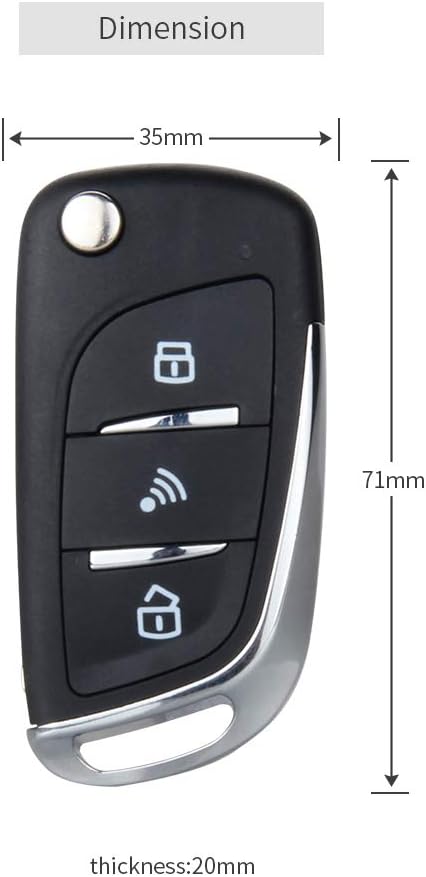
Key Fobs/Transmitters: Two remote key fobs for system control. Dimensions: 71mm (L) x 35mm (W) x 20mm (T).

Push Start Button: Used for engine ignition and shutdown. Features blue, red, and yellow illumination. Dimensions: 52mm (outer diameter), 40mm (middle diameter), 28mm (inner diameter).

Control Module: The main unit of the alarm system. Dimensions: 107mm (L) x 90mm (W) x 88.6mm (H).
- PKE Antennas (2 pieces)
- 6-pin Ignition Wire Harness
- 10-pin Main Wire Harness
- Relay
- Reset Switch
- User Manual & Wiring Diagram
Installation Guide
Installation of the EASYGUARD EC003N-V-1 system requires specialized knowledge of vehicle electrical systems. It is strongly recommended that this product be installed by a professional car alarm installer to ensure proper functionality and avoid damage to your vehicle.
A detailed wiring diagram and user manual are provided with the product. Please refer to these documents for specific wiring connections and installation steps tailored to your vehicle model.
Key Installation Considerations:
- Bypass Module: If your vehicle has a factory immobilizer chip in its key, a bypass module is essential for the remote start function to work.
- Steering Wheel Lock: Ensure any existing steering wheel lock mechanism is properly disengaged or removed to allow the push start button to function correctly.
- Wiring: All wiring connections should be secure and properly insulated to prevent short circuits and ensure reliable operation.
Installation Overview Video
This video provides an overview of the PKE and remote start features for the EASYGUARD EC003 series, demonstrating key functionalities relevant to installation and operation.
Product Demonstration Video
This video specifically demonstrates the features and operation of the EC003N-V-1 product, offering visual guidance for users.
Operating Your System
Passive Keyless Entry (PKE)
The PKE feature provides automatic locking and unlocking of your vehicle as you approach or walk away with the key fob.
- Automatic Unlock: When you approach the vehicle with the key fob within 1-2 meters (3-6 feet), the car doors will automatically unlock.
- Automatic Lock: When you walk away from the vehicle with the key fob beyond 2-3 meters (6-9 feet), the car doors will automatically lock.

Diagram illustrating the PKE feature: automatic unlocking upon approach and automatic locking upon walking away.
Push Start/Stop Button
The push start button allows for convenient engine ignition and shutdown without needing to insert a key.
- To Start the Car (Method 1): In disarm status, step on the foot brake pedal and short press the push start button once.
- To Start the Car (Method 2): In disarm status, keep pressing the start button for 3 seconds while stepping on the foot brake pedal.
- To Shut Off the Car: Once the car is started, step on the foot brake pedal and short press the push start button once.
Visual guide for starting and stopping the engine using the push button.
Remote Engine Start/Stop
Start or stop your vehicle's engine remotely using the key fob.
- To Remote Start: Press and hold the remote start button on your key fob for approximately 3 seconds. The vehicle's lights will flash, and the engine will start.
- To Remote Stop: Press and hold the remote start button again for approximately 3 seconds. The engine will shut off.

Illustration of remote engine start functionality.
Other Functions
- Arm/Lock & Disarm/Unlock: Standard remote locking and unlocking.
- Mute Alarm: Silence the alarm system.
- Panic Mode: Activate the alarm for emergency situations.
- Anti-Hijacking: Security feature to prevent vehicle theft.
- Remote Trunk Release: Open the trunk remotely (may require an extra trunk release solenoid kit, e.g., ASIN: B00N4RP8VM).
- Valet Mode: Temporarily disable security features for vehicle servicing.
- Central Door Locking Automation: Automatically locks doors when driving.
- Emergency Override & Disarm: Manual method to disarm the system in case of remote failure.
Maintenance
Key Fob Battery Replacement
The key fobs are powered by CR2032 batteries. If the remote range decreases or the fob stops responding, it may be time to replace the battery.
- Carefully pry open the key fob shell using a small flat-head screwdriver. Handle with care to avoid breaking the shell.
- Remove the old CR2032 battery from the PCB (Printed Circuit Board). No unscrewing is typically required.
- Insert a new CR2032 battery, ensuring correct polarity.
- Snap the key fob shell back together securely.

Visual steps for replacing the key fob battery.
Troubleshooting
If you encounter issues with your EASYGUARD EC003N-V-1 system, consider the following common problems and solutions. For complex issues, always consult a professional installer.
| Problem | Possible Cause | Solution |
|---|---|---|
| System not responding to key fob. | Low or dead key fob battery. Out of range. Interference. | Replace key fob battery. Move closer to the vehicle. Check for strong electromagnetic interference. |
| Remote start not working. | Vehicle immobilizer not bypassed. Incorrect wiring. Hood/door open. | Ensure bypass module is correctly installed. Verify all wiring connections. Close all doors and hood. |
| Push start button not working. | Foot brake not pressed. Steering wheel lock engaged. Wiring issue. | Ensure foot brake is firmly pressed. Disengage steering wheel lock. Consult wiring diagram for correct connections. |
| PKE (Passive Keyless Entry) not functioning. | Key fob not detected. PKE antennas improperly installed or obstructed. | Ensure key fob is active and within range. Check PKE antenna placement and ensure no metal obstructions. |
| Alarm triggers randomly. | Sensitive settings (if shock sensor added). Faulty sensor or wiring. | Adjust sensor sensitivity. Inspect wiring for loose connections or damage. |
Technical Specifications
| Feature | Detail |
|---|---|
| Item Weight | 1.63 pounds |
| Package Dimensions | 8.31 x 6.5 x 2.99 inches |
| Item Model Number | EC003N-V-1 |
| Batteries | 2 CR2 batteries required (included for key fobs) |
| Wireless Remote | Yes |
| Maximum PKE Range | 6 Feet (for passive keyless entry) |
| Manufacturer | ieasyguard.com |
| Compatible Devices | Most DC12V gas cars without double pulse locking/unlocking signals, factory push start button, diesel engines, or luxury models. |
Warranty and Support
For warranty information, technical support, or any installation-related queries, please contact the seller or manufacturer directly. It is recommended to have your purchase details readily available when seeking support.
You can often find contact information on the product packaging or through the retailer where the product was purchased. For general inquiries, you may visit the EASYGUARD Store on Amazon.
Ask a question about this manual
Ask about setup, troubleshooting, compatibility, parts, safety, or missing instructions. Manuals+ will review the question and use this page’s manual context to help answer it.