
1. Introduction
This manual provides essential information for the safe and efficient operation of your Icom IC-A16B (Bluetooth) VHF Air Band Handheld Transceiver Radio. The IC-A16B is a compact, waterproof communication-only transceiver designed for aviation use, suitable for students, ground crew, and pilots. It features Bluetooth connectivity for hands-free operation and a long-lasting Li-ion battery.
2. Safety Information
Please read and understand all safety precautions before using the radio. Failure to follow these instructions could result in injury or damage to the device.
- Do not operate the radio in explosive atmospheres or near flammable materials.
- Use only Icom approved batteries and chargers. Using unapproved accessories may cause fire, explosion, or injury.
- Do not disassemble or modify the radio. This could lead to electric shock or malfunction.
- Keep the radio away from extreme temperatures, direct sunlight, and excessive moisture.
- Ensure the antenna is properly connected before transmitting to prevent damage to the radio.
3. Package Contents
Verify that all items listed below are included in your package:
- Icom IC-A16B Transceiver
- Li-ion Battery Pack (included)
- Sit-in Rapid Charger
- Antenna
- Belt Clip
- Hand Strap
- User Manual (this document)
4. Product Overview
Familiarize yourself with the components and controls of your IC-A16B radio.
4.1. Front View
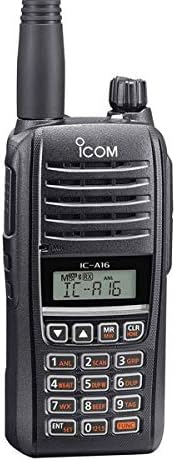
Figure 4.1: Front view of the Icom IC-A16B handheld transceiver, showing the display, keypad, speaker, and microphone.
The front panel features the LCD display, full keypad for direct frequency input, speaker, and microphone. Keypad buttons include numerical inputs, function keys, and dedicated buttons for specific operations like the 121.5MHz emergency channel.
4.2. Top and Side Views


Figure 4.2: Left image shows the Icom IC-A16B with its antenna attached, highlighting the top-mounted controls and side buttons. Right image shows the radio with its LCD backlight activated, useful for night operation.
The top of the radio includes the antenna connector and the power/volume knob. The side features the Push-To-Talk (PTT) button and other programmable function keys. The LCD backlight ensures visibility in low-light conditions.
5. Setup
5.1. Battery Installation and Charging
- Ensure the radio is turned off.
- Align the battery pack with the grooves on the back of the radio and slide it into place until it clicks securely.
- To charge, place the radio with the battery pack installed into the supplied sit-in rapid charger. Ensure the charging contacts on the radio align with those in the charger.
- Connect the AC adapter to the rapid charger and plug it into a power outlet. The charging indicator on the charger will illuminate.
- A full charge typically takes several hours. Refer to the charger's indicator for charging status.
5.2. Antenna Attachment
- Hold the base of the antenna and screw it clockwise onto the antenna connector on the top of the radio until it is finger-tight. Do not overtighten.
- Ensure the antenna is securely attached before operation to optimize performance and prevent damage.
6. Operating
6.1. Power On/Off and Volume Adjustment
- To turn the radio ON, rotate the power/volume knob clockwise.
- To adjust the volume, continue rotating the knob clockwise to increase volume or counter-clockwise to decrease.
- To turn the radio OFF, rotate the power/volume knob counter-clockwise until it clicks.
6.2. Frequency and Channel Selection
- Direct Frequency Input: Use the numerical keypad to enter the desired frequency directly. Press the 'ENT' key to confirm.
- Channel Mode: Press the 'MR' (Memory Recall) button to switch to channel mode. Use the Up/Down arrow keys to scroll through programmed memory channels.
- The radio supports 8.33kHz and 25kHz channel spacing.
6.3. Bluetooth Operation (IC-A16B only)
The Bluetooth version of the IC-A16B allows for hands-free communication with compatible aviation headsets.
- Pairing: Access the Bluetooth menu through the radio's settings. Enable Bluetooth and initiate pairing mode. Follow the instructions for your specific Bluetooth headset to complete the pairing process.
- Once paired, audio will be routed through your headset, and the headset's microphone will be used for transmission.
- A user review mentions that accessing the Bluetooth microphone portion might require navigating a sub-menu. Refer to the detailed Bluetooth section in the full manual for specific steps.
6.4. Emergency Channel (121.5MHz)
The radio features an exclusive button for quick access to the 121.5MHz emergency channel. Pressing this dedicated button will immediately switch the radio to this frequency for emergency communications.
6.5. Sidetone Function
The sidetone function allows you to hear your own voice through a connected third-party aviation headset during transmission. This feature helps in monitoring your voice level and clarity.
6.6. LCD Backlight
The LCD backlight can be activated for improved visibility in dark environments. Refer to the radio's menu settings to configure backlight duration or to toggle it on/off.
7. Maintenance
- Cleaning: Wipe the radio with a soft, damp cloth. Do not use harsh chemicals or solvents. For waterproof models, ensure all covers are securely closed before cleaning with water.
- Battery Care: To prolong battery life, avoid overcharging and fully discharging the battery frequently. Store the battery in a cool, dry place when not in use for extended periods.
- Storage: When storing the radio for a long time, remove the battery pack.
8. Troubleshooting
| Problem | Possible Cause | Solution |
|---|---|---|
| Radio does not power on. | Battery is depleted or not properly installed. | Charge the battery or ensure it is securely attached. |
| No audio or weak audio. | Volume too low, squelch level too high, or speaker blocked. | Increase volume, adjust squelch, check speaker for obstructions. |
| Cannot transmit or receive. | Incorrect frequency/channel, antenna not connected, or out of range. | Verify frequency, check antenna connection, move closer to transmitting station. |
| Bluetooth pairing issues. | Headset not in pairing mode, radio Bluetooth off, or interference. | Ensure headset is discoverable, activate radio Bluetooth, try pairing in a different location. |
9. Specifications
| Feature | Detail |
|---|---|
| Model Number | IC A16B |
| Brand | ICOM |
| Item Weight | 9.1 ounces |
| Package Dimensions | 9.72 x 8.54 x 3.39 inches |
| Battery Type | 1 Lithium Ion (included) |
| Color | Black |
| Number of Channels | 100 |
| Special Feature | Waterproof |
| Frequency Range | 108 MHz - 137 MHz |
| Tuner Technology | VHF |
| Voltage | 3.7 Volts |
| Water Resistance Level | Waterproof |
10. Warranty and Support
Your Icom IC-A16B radio is covered by a standard manufacturer's warranty. Please refer to the warranty card included with your product for specific terms and conditions, or visit the official Icom website for detailed warranty information.
For technical support, service, or inquiries regarding your product, please contact Icom customer service directly. Contact information can typically be found on the Icom website or in the product packaging.


