
1. Overview
The Motorola M700 is a cordless landline phone designed for clear communication and ease of use. It features DECT 6.0 technology for enhanced sound quality and security, along with essential functions like caller ID and a built-in phonebook.
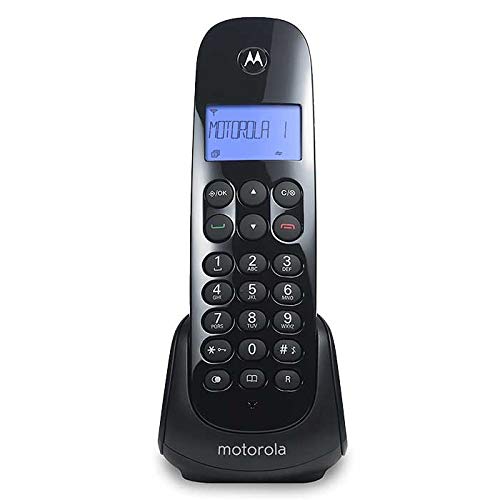
Figure 1: Motorola M700 Cordless Phone and Base
2. Package Contents
Ensure all items are present in the package:
- Motorola M700 Handset
- Base Unit
- AC Power Adapter
- Telephone Line Cord
- 2 x AAA Rechargeable Batteries
- User Manual (this document)
3. Setup
3.1. Battery Installation
- Locate the battery compartment cover on the back of the handset.
- Slide the cover downwards to open.
- Insert the two AAA rechargeable batteries, observing the correct polarity (+ and -).
- Replace the battery compartment cover, sliding it upwards until it clicks into place.
3.2. Connecting the Base Unit
- Connect one end of the telephone line cord to the TEL LINE jack on the base unit.
- Connect the other end of the telephone line cord to a telephone wall jack.
- Plug the small end of the AC power adapter into the POWER jack on the base unit.
- Plug the large end of the AC power adapter into a standard electrical outlet.
3.3. Initial Charging
Place the handset on the base unit. The handset will begin charging. For optimal battery performance, allow the handset to charge continuously for at least 15-20 hours before its first use.
4. Basic Operation
4.1. Making Calls
- Pick up the handset from the base or press the TALK/FLASH button.
- Dial the desired phone number.
- To end the call, press the END button or place the handset back on the base.
4.2. Answering Calls
When the phone rings:
- Press the TALK/FLASH button.
- Alternatively, if the Auto Answer feature is enabled, simply pick up the handset from the base.
4.3. Adjusting Volume
During a call, use the UP and DOWN arrow buttons on the handset to adjust the earpiece volume.
5. Advanced Features
5.1. Caller ID
The phone displays the caller's name and number (if available and subscribed to Caller ID service) before you answer. You can review the list of the last 10 received calls using the navigation buttons.
5.2. Phonebook (Agenda)
The Motorola M700 allows you to store up to 20 contacts in its phonebook. Refer to the on-screen menu for instructions on adding, editing, and deleting entries.
5.3. Ringtones
Customize your phone's ringtone by selecting from various available melodies in the settings menu.
5.4. Paging (Handset Locator)
If you misplace your handset, press the PAGE button on the base unit. The handset will ring, allowing you to locate it.
5.5. Reminder Alarm
Set a reminder alarm through the handset's menu options.
6. Maintenance
- Clean the handset and base unit with a soft, damp cloth. Do not use abrasive cleaners or solvents.
- Avoid exposing the phone to direct sunlight, moisture, or extreme temperatures.
- Ensure the battery contacts on the handset and base are clean for proper charging.
7. Troubleshooting
7.1. No Dial Tone
- Check that the telephone line cord is securely connected to both the base unit and the wall jack.
- Ensure the AC power adapter is properly connected to the base unit and a working electrical outlet.
- Verify that your telephone service is active.
7.2. Handset Not Charging
- Make sure the handset is correctly seated in the base unit.
- Clean the charging contacts on both the handset and base with a dry cloth.
- Confirm that the AC power adapter is connected and the outlet is functional.
7.3. Poor Sound Quality
- Move closer to the base unit to improve signal strength.
- Ensure there are no large metal objects or other electronic devices interfering with the signal.
- Check for any damage to the telephone line cord.
8. Specifications
| Brand | Motorola |
| Model Number | M700 |
| Color | Black |
| Phone Type | Cordless |
| Technology | DECT 6.0 |
| Caller ID | Yes |
| Phonebook Capacity | 20 Contacts |
| Call History | Last 10 received calls |
| Batteries | 2 x AAA (included) |
| Dimensions (Handset) | 11.3 x 8.3 x 17.9 cm |
| Weight | 490 g |
9. Warranty and Support
For warranty information and technical support, please refer to the documentation included with your purchase or visit the official Motorola support website. Keep your proof of purchase for warranty claims.


