
1. Introduction
The SHIDU M600 is a portable voice amplifier designed to project your voice clearly and effectively. It features a 15W output, a wired microphone headset, and supports various audio inputs including USB, TF card, and AUX. This device is suitable for a wide range of applications such as teaching, public speaking, tour guiding, and fitness instruction.
This manual provides detailed instructions for the proper setup, operation, and maintenance of your SHIDU M600 Portable Voice Amplifier.

Figure 1: SHIDU M600 Portable Voice Amplifier with wired microphone headset.
2. Package Contents
Please check the package contents upon unboxing to ensure all items are present:
- 1 x SHIDU M600 Voice Amplifier
- 1 x Wired Microphone Headset
- 1 x Belt
- 1 x Audio Cable
- 1 x USB Charging Cable
- 1 x User Manual
3. Product Overview
3.1. Controls and Ports
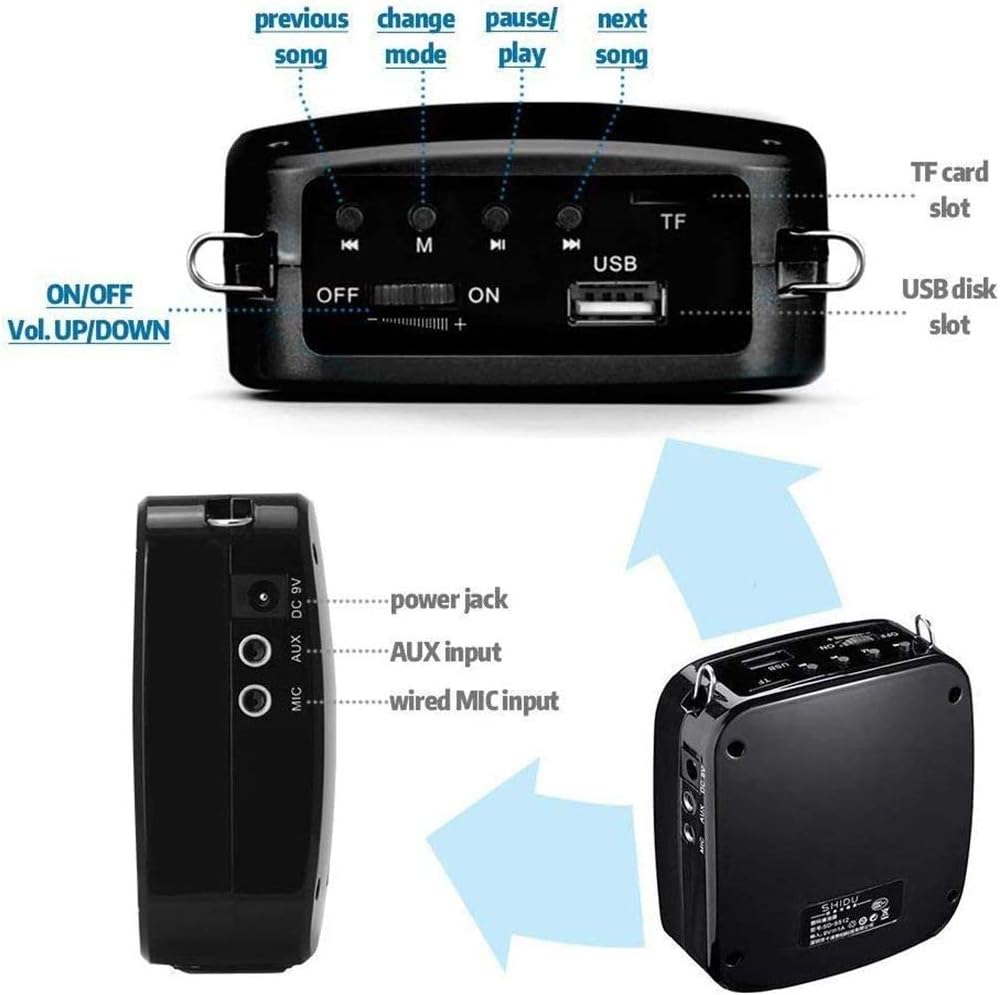
Figure 2: Overview of SHIDU M600 controls and ports.
- ON/OFF / Volume UP/DOWN Switch: Powers the device on or off and adjusts the volume.
- Previous Song Button: Skips to the previous track in music mode.
- Mode Button (M): Switches between different playback modes (e.g., Microphone, USB, TF Card, AUX).
- Play/Pause Button: Plays or pauses audio playback.
- Next Song Button: Skips to the next track in music mode.
- TF Card Slot: Insert a TF (Micro SD) card for music playback.
- USB Disk Slot: Insert a USB flash drive for music playback.
- Power Jack (DC 5V): Connect the USB charging cable here.
- AUX Input: Connect external audio devices using the audio cable.
- Wired MIC Input: Connect the wired microphone headset here.
3.2. Indicator Lights

Figure 3: Explanation of SHIDU M600 indicator lights.
- Red Light (Solid): Indicates the device is fully charged.
- Red Light (Flashing): Indicates the device is charging or has low power.
- Blue Light (Solid): Indicates the device is working (powered on).
- Blue Light (Flashing): Indicates music is playing.
- Yellow Light (Solid): Indicates the device is in Microphone mode.
4. Setup
4.1. Charging the Amplifier
- Connect the small end of the USB charging cable to the Power Jack (DC 5V) on the amplifier.
- Connect the large end of the USB charging cable to a standard USB power adapter (DC 5V, 500mAh-2A, not included) or a computer's USB port.
- The red indicator light will flash, indicating that the device is charging.
- Once fully charged (approximately 3-5 hours), the red indicator light will turn solid.
Note: For optimal battery life, fully charge the amplifier before first use.
4.2. Connecting the Microphone Headset
- Insert the 3.5mm jack of the wired microphone headset into the Wired MIC Input port on the amplifier.
- Position the microphone close to your mouth for clear voice pickup. The flexible gooseneck allows for easy adjustment.
5. Operating Instructions
5.1. Power On/Off and Volume Control
- To power on, slide the ON/OFF switch to the "ON" position. The blue indicator light will turn solid, and the yellow light will illuminate for Microphone mode.
- To power off, slide the ON/OFF switch to the "OFF" position.
- Adjust the volume by sliding the ON/OFF / Volume UP/DOWN switch. Slide towards "+" to increase volume and towards "-" to decrease volume.
5.2. Microphone Mode
When the amplifier is powered on with the microphone connected, it will automatically enter Microphone mode. The yellow indicator light will be solid. Speak into the microphone to amplify your voice.

Figure 4: The SHIDU M600 is capable of amplifying voice for audiences of up to 300 people.

Figure 5: The amplifier provides clear, high-fidelity sound with minimal distortion or feedback.
5.3. Music Playback (USB/TF Card/AUX)
The SHIDU M600 supports music playback from USB flash drives, TF (Micro SD) cards, and external devices via AUX input.

Figure 6: The amplifier supports various music playback options.
- USB/TF Card Playback:
- Insert a USB flash drive into the USB Disk Slot or a TF card into the TF Card Slot.
- The amplifier will automatically detect the media and begin playing music. If not, press the Mode (M) button to switch to the correct mode.
- Use the Previous Song, Play/Pause, and Next Song buttons to control playback.
- Long press the Mode (M) button to loop the current song; long press again to undo.
- AUX Input Playback:
- Connect one end of the audio cable to the AUX Input port on the amplifier and the other end to the headphone jack of your external audio device (e.g., smartphone, MP3 player).
- Press the Mode (M) button until the amplifier enters AUX mode.
- Control music playback from your external audio device.
6. Maintenance
- Cleaning: Use a soft, dry cloth to clean the surface of the amplifier. Do not use harsh chemicals or abrasive cleaners.
- Storage: Store the amplifier in a cool, dry place away from direct sunlight and extreme temperatures.
- Battery Care: To prolong battery life, avoid fully discharging the battery frequently. If the device will not be used for an extended period, charge it to about 50% every three months.
- Water Exposure: This device is not waterproof. Avoid exposure to water or high humidity.
7. Troubleshooting
| Problem | Possible Cause | Solution |
|---|---|---|
| No sound from amplifier |
|
|
| Distorted sound or feedback |
|
|
| Cannot play music from USB/TF card |
|
|
| Amplifier not charging |
|
|
8. Specifications
| Output Power | 15W |
| Battery Capacity | 1200mAh |
| Charging Voltage | DC 5V 500mAh |
| Working Time (Microphone Mode) | 8-12 hours (volume dependent) |
| Working Time (Music Mode) | 6-8 hours (volume dependent) |
| Charging Time | 3-5 hours |
| Sound Coverage | Up to 25,000 sq.ft. |
| Product Dimensions | 98 mm x 88 mm x 43 mm |
| Weight | 0.36 kg (360 g) |
| Material | Plastic |
| Audio Input | USB, AUX |
| Connectivity Technology | Wired |
9. Warranty and Support
9.1. Warranty Information
The SHIDU M600 Portable Voice Amplifier comes with a ONE YEAR WARRANTY from SHIDU, covering manufacturing defects from the date of purchase.
Please retain your proof of purchase for warranty claims.
9.2. Customer Support
For technical assistance, warranty claims, or further inquiries, please contact SHIDU customer support:
- Manufacturer: Shenzhen SHIDU Digital Co., Ltd
- Website: www.10shidu.com
- Tel: +86-755-2163 5866
- Fax: +86-755-2910 5099
- Address: Building A8, Zone 2, Xinhe Xinxing Industrial Park, Fuhai Street, Bao'an District, Shenzhen, China


