
Introduction
This manual provides instructions for the Beyution RMT-AH100U replacement infrared remote control. This remote is designed to operate specific Sony Sound Bar Speaker Systems. Please read this manual carefully to ensure proper setup and operation of your remote control.
Compatible Models:
- HT-CT180
- SA-CT180
- SA-WCT180
- 1-492-930-11
- 149293011
Setup
Battery Installation
The RMT-AH100U remote control requires two AAA alkaline batteries for operation. Follow these steps to install the batteries:
- Locate the battery compartment on the back of the remote control.
- Slide the battery compartment cover downwards or press the latch and lift to open.
- Insert two new AAA alkaline batteries, ensuring the positive (+) and negative (-) terminals align correctly with the markings inside the compartment.
- Replace the battery compartment cover, sliding it back into place until it clicks securely.

Image: Rear view of the remote control with the battery cover removed, illustrating the correct orientation for AAA battery insertion.
Important: Use only new alkaline batteries. Rechargeable batteries may not provide sufficient power for optimal performance. Ensure nothing is blocking the front of your sound bar system when using the remote.
Operating
Basic Operation
Once batteries are installed, the remote control is ready for use. Point the remote directly at the infrared receiver on your Sony Sound Bar Speaker System. Press the desired function button to control your device.
Button Functions Overview
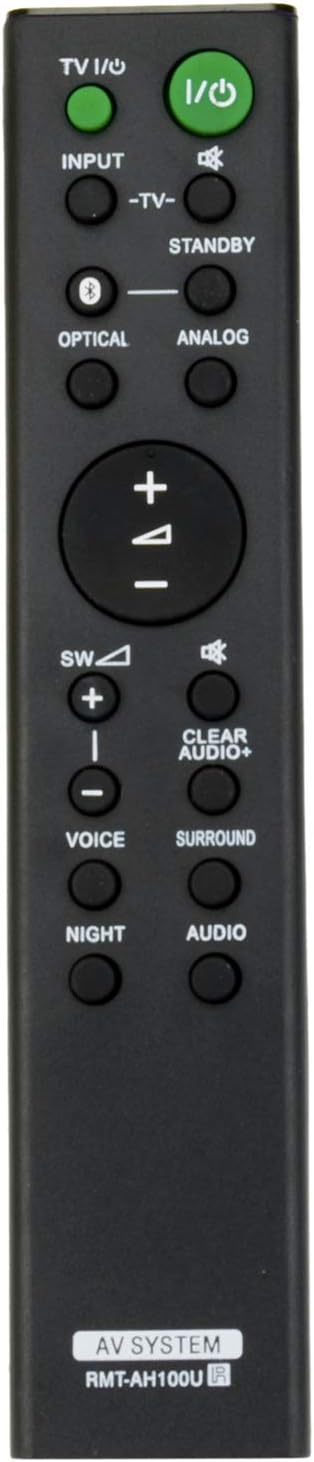
Image: Front view of the RMT-AH100U remote control, displaying the layout of all control buttons.
- TV I/O (Power): Turns the connected TV on or off.
- I/O (Power): Turns the sound bar system on or off.
- INPUT: Cycles through available input sources for the sound bar.
- -TV-: Controls basic TV functions (may vary by TV model).
- STANDBY: Puts the sound bar into standby mode.
- OPTICAL: Selects the optical input source.
- ANALOG: Selects the analog input source.
- Volume (+/-): Adjusts the main volume level of the sound bar.
- Mute: Mutes or unmutes the sound.
- SW (+/-): Adjusts the subwoofer volume level.
- CLEAR AUDIO+: Activates or deactivates the ClearAudio+ sound mode.
- VOICE: Enhances dialogue clarity.
- SURROUND: Activates or deactivates surround sound effects.
- NIGHT: Optimizes sound for low-volume listening at night.
- AUDIO: Cycles through various audio modes or settings.
Maintenance
Cleaning the Remote Control
To maintain the remote control's appearance and functionality, clean it regularly:
- Wipe the surface with a soft, dry cloth.
- For stubborn dirt, lightly dampen the cloth with water or a mild, non-abrasive cleaner.
- Avoid using harsh chemicals, solvents, or abrasive materials, as these can damage the remote's finish or internal components.
Battery Replacement
Replace the batteries when the remote control's response becomes sluggish or it stops functioning. Always replace both batteries at the same time with new AAA alkaline batteries. Remove batteries if the remote will not be used for an extended period to prevent leakage.
Troubleshooting
Remote Control Not Working
- Check Batteries: Ensure new AAA alkaline batteries are correctly installed with the proper polarity (+/-). Replace old batteries with new ones.
- Line of Sight: Make sure there are no obstructions between the remote control and the infrared receiver on your sound bar system.
- Distance: Operate the remote within a reasonable distance from the sound bar.
- Sound Bar Power: Confirm that your Sony Sound Bar Speaker System is powered on.
Incorrect Functionality
- Compatibility: Verify that your sound bar model is listed as compatible with the RMT-AH100U remote control. This remote is specifically designed for the listed Sony models.
- Interference: Ensure no strong light sources (like direct sunlight or fluorescent lights) are interfering with the infrared signal.
Specifications
| Model Number | RMT-AH100U |
| Product Dimensions | 7 x 2 x 0.65 inches (approximately) |
| Item Weight | 0.634 ounces (approximately) |
| Batteries Required | 2 x AAA (Alkaline recommended) |
| Connectivity Technology | Infrared (IR) |
| Compatible Devices | Sony Sound Bar Speaker Systems (HT-CT180, SA-CT180, SA-WCT180) |
Support Information
For further assistance, warranty inquiries, or if your specific sound bar model is not listed and you require compatibility confirmation, please contact the seller directly. They can provide detailed support and guidance regarding this replacement remote control.