
1. Introduction
Thank you for choosing the UBISHENG U-003 Digital TV Converter Box. This device is designed to convert over-the-air ATSC digital broadcast signals for display on analog and digital televisions. It features 1080P output, DVR recording capabilities, Electronic Program Guide (EPG), and a USB media player. Please read this manual thoroughly before operation to ensure proper setup and usage.

Figure 1: UBISHENG U-003 Digital TV Converter Box and included remote control.
2. Product Overview
2.1 Front Panel
The front panel of the U-003 converter box features essential controls and indicators:
- POWER Button: Turns the unit on or off.
- VOL+ / VOL- Buttons: Adjusts the volume level.
- MENU Button: Accesses the main menu for settings and features.
- CH+ / CH- Buttons: Changes channels up or down.
- OK Button: Confirms selections in the menu.
- USB 2.0 Port: For connecting USB storage devices for DVR recording and media playback.
- LED Display: Shows current channel number or time.
2.2 Rear Panel
The rear panel provides various connection ports for your television and antenna:
- ANT IN: Connects to your external antenna.
- ANT OUT: Passes through the antenna signal to another device (e.g., TV tuner).
- CH3/CH4 Switch: Selects the RF output channel for older TVs.
- HDMI 1080: High-Definition Multimedia Interface output for digital TVs and projectors.
- VIDEO (Yellow RCA): Composite video output for analog TVs.
- L (White RCA): Left audio output for analog TVs.
- R (Red RCA): Right audio output for analog TVs.
- AC Power Input: Connects to the power adapter.

Figure 2: Detailed view of the front and rear panels, highlighting controls and connection ports.
3. Setup Instructions
3.1 Connecting the Converter Box
- Connect Antenna: Connect your outdoor or indoor antenna to the ANT IN port on the rear of the converter box.
- Connect to TV:
- For Digital TVs (HDTVs): Connect an HDMI cable (not included) from the HDMI 1080 port on the converter box to an available HDMI input on your TV.
- For Analog TVs (Older TVs): Connect an AV cable (red, white, yellow RCA) from the VIDEO, L, and R ports on the converter box to the corresponding AV input ports on your TV. Alternatively, you can use a coaxial cable from the ANT OUT port to your TV's antenna input and set the converter box's CH3/CH4 switch to match your TV's input.
- Connect Power: Plug the power cord into the AC Power Input on the converter box and then into a standard electrical outlet.
- Power On: Turn on your TV and the converter box. Select the correct input source on your TV (e.g., HDMI 1, AV, or TV/Antenna if using coaxial output).
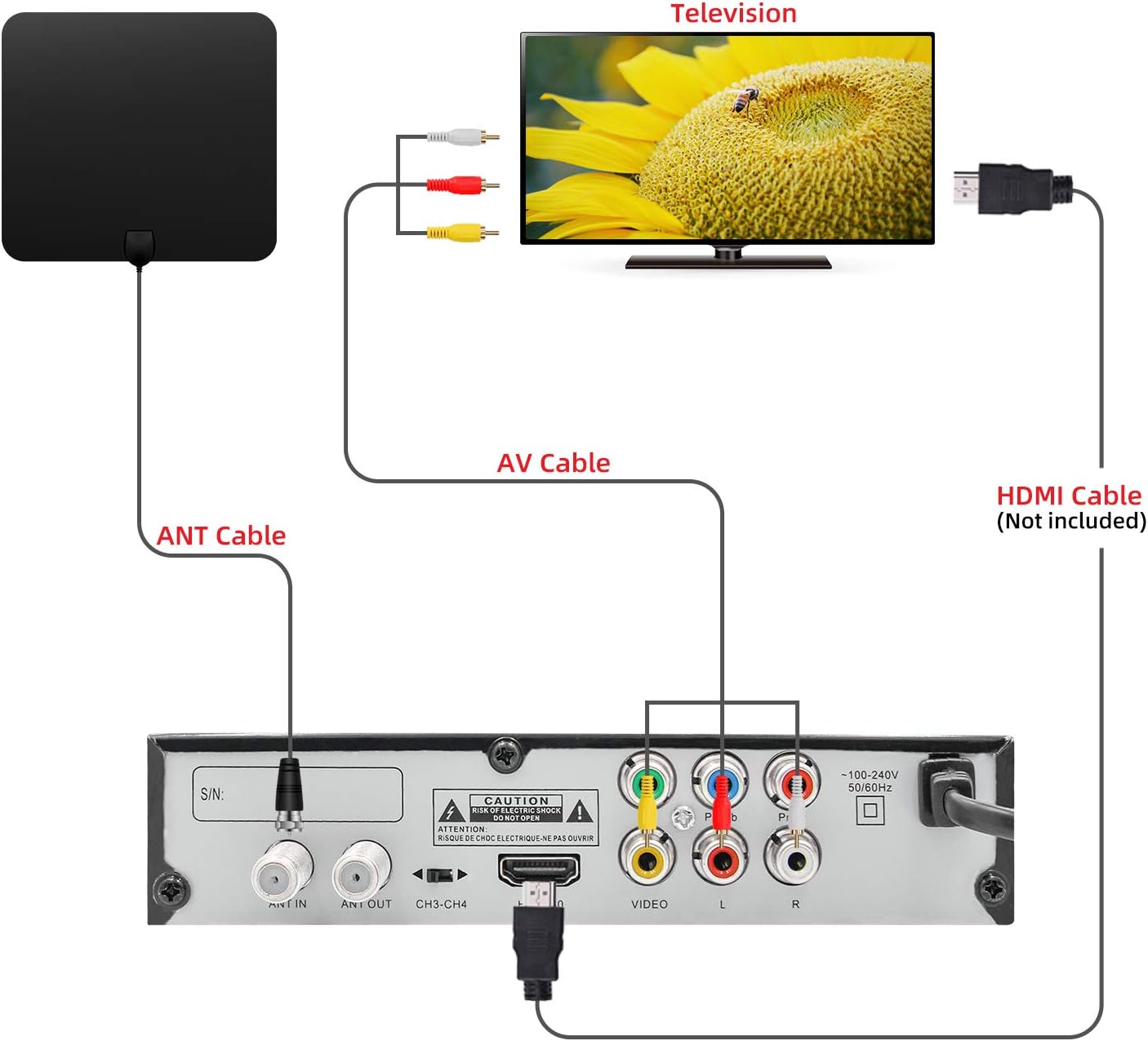
Figure 3: Connection diagram illustrating how to connect the converter box to an antenna and a television using either AV or HDMI cables.
3.2 Initial Channel Scan
Upon first power-on or after connecting a new antenna, you will need to perform a channel scan:
- Use the remote control to navigate to the MENU.
- Select Channel Search or Auto Scan from the menu.
- Confirm your country/region settings.
- Initiate the scan. The converter box will search for available digital channels. This process may take several minutes.
- Once the scan is complete, the channels will be saved, and you can begin watching TV.
4. Operating Instructions
4.1 Basic TV Viewing
- Channel Selection: Use the CH+ / CH- buttons on the remote or front panel to change channels. You can also enter channel numbers directly using the numeric keypad on the remote.
- Volume Control: Use the VOL+ / VOL- buttons to adjust the audio level.
- Mute: Press the MUTE button on the remote to silence the audio.
- Information Display: Press the INFO button to view current program details, channel number, and time.
4.2 DVR Recording
To record live TV, a USB storage device (not included) must be connected to the USB 2.0 port.
- Connect USB Device: Insert a formatted USB flash drive or external hard drive into the USB port on the front panel.
- Instant Recording: While watching a program, press the RECORD button on the remote to start recording. Press it again to stop.
- Scheduled Recording (EPG): Access the EPG (Electronic Program Guide) from the menu. Navigate to the desired program and press the RECORD button to schedule a recording.
- Playback Recordings: Go to the Multimedia section from the main menu, then select PVR to access and play your recorded files.

Figure 4: Recording TV programs by plugging in a USB flash drive and accessing the PVR function.
4.3 USB Media Player
The U-003 supports playback of various media files from a connected USB storage device.
- Connect USB Device: Ensure your USB device is connected to the USB port.
- Access Multimedia: From the main menu, select the Multimedia option.
- Select Media Type: Choose between Music, Photo, or Movie to browse your files.
- Playback: Navigate to your desired file and press OK to start playback.
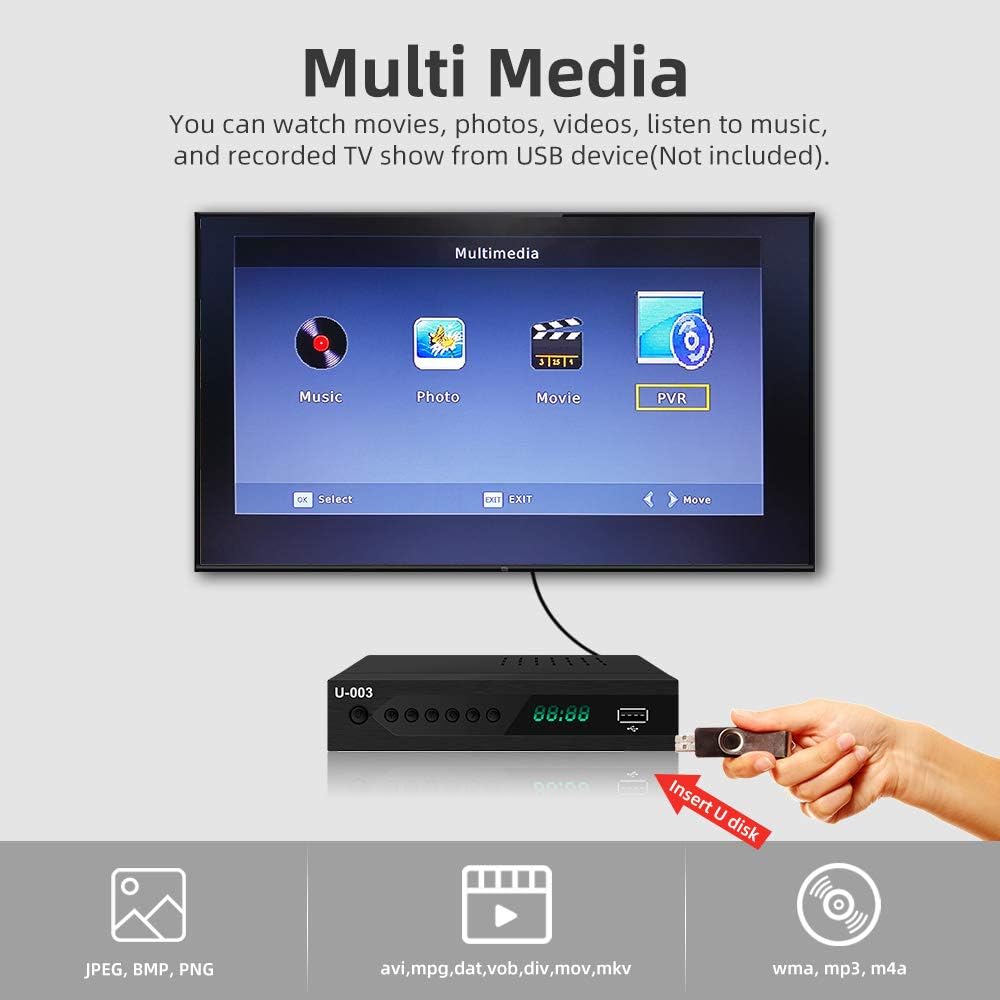
Figure 5: The Multimedia interface allows playback of various file types from a USB device.
4.4 Electronic Program Guide (EPG)
The EPG provides a schedule of upcoming programs.
- Press the EPG button on the remote to access the program guide.
- Use the arrow keys to navigate through channels and program listings.
- Select a program to view more details or to schedule a recording.
5. Maintenance
- Cleaning: Use a soft, dry cloth to clean the exterior of the converter box. Do not use liquid cleaners or abrasive materials.
- Ventilation: Ensure the ventilation slots on the top and sides of the unit are not blocked to prevent overheating.
- Storage: If storing the unit for an extended period, disconnect it from power and store it in a cool, dry place.
6. Troubleshooting
6.1 No Picture/Sound
- Check Connections: Ensure all cables (antenna, HDMI/AV, power) are securely connected.
- TV Input: Verify your TV is set to the correct input source (e.g., HDMI 1, AV).
- Power: Confirm the converter box is powered on and the power indicator light is active.
- Channel Scan: Perform a channel scan if you haven't done so or if channels are missing.
6.2 Poor Signal Reception
- Antenna Position: Adjust your antenna's position or direction. Try different locations for better signal strength.
- Antenna Type: Consider upgrading to a more powerful outdoor antenna if you are in a weak signal area.
- Rescan Channels: After adjusting the antenna, perform another channel scan.
6.3 Remote Control Not Working
- Batteries: Replace the batteries in the remote control (requires 2 AAA batteries).
- Line of Sight: Ensure there are no obstructions between the remote and the converter box.
- Distance: Operate the remote within the effective range of the converter box.
7. Specifications
| Feature | Specification |
|---|---|
| Brand | UBISHENG |
| Model Number | U-003 |
| Mounting Type | Coaxial, HDMI Cable, Plug Mount, Surface Mount |
| Interface Type | Coaxial, HDMI, USB |
| Product Dimensions | 6.6 x 3.9 x 1.4 inches |
| Item Weight | 10.6 ounces |
| Batteries Required | 2 AAA batteries (for remote) |
8. Warranty and Support
For warranty information or technical support, please refer to the documentation included with your purchase or contact UBISHENG customer service. Keep your purchase receipt as proof of purchase.

