
Introduction
This manual provides essential information for the safe and efficient operation of your Utilitech 500-Watt Halogen Stand Work Light. This work light is ETL rated for wet locations and features a 2 ft cord with a 3-prong grounded plug. Please read all instructions carefully before use and retain this manual for future reference.
Safety Information
Always follow basic safety precautions to reduce the risk of fire, electric shock, and personal injury.
- Ensure the work light is placed on a stable, level surface.
- Do not operate the light near flammable materials.
- Allow the bulb to cool completely before handling or replacing. Halogen bulbs become extremely hot during operation.
- Do not look directly into the light source when it is on.
- Keep the cord away from heat, oil, sharp edges, and moving parts.
- Always unplug the light from the power source before performing any maintenance or adjustments.
- This product is designed for temporary outdoor use and is ETL rated for wet locations. However, avoid submerging the unit in water.
Product Overview
The Utilitech 500-Watt Halogen Stand Work Light is designed to provide bright illumination for various tasks. It features a durable construction and adjustable head for directional lighting.
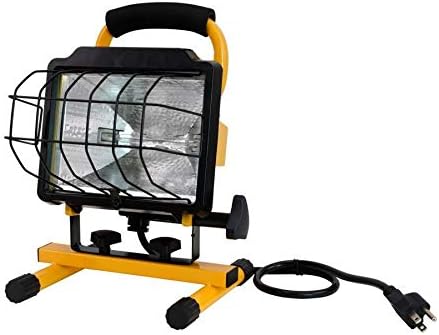
Figure 1: Front view of the Utilitech 500-Watt Halogen Stand Work Light, showing the yellow stand, black light housing, and protective metal grill.
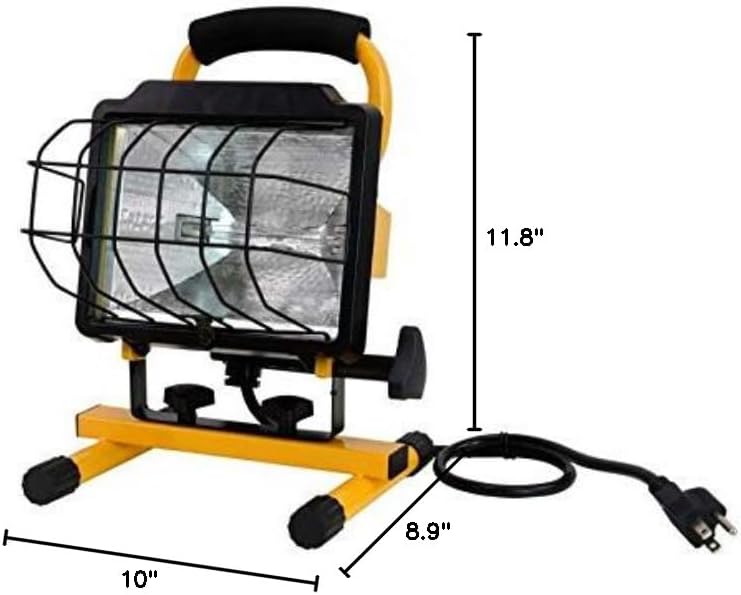
Figure 2: Dimensions of the Utilitech 500-Watt Halogen Stand Work Light. The light measures approximately 10 inches in length, 8.9 inches in width, and 11.8 inches in height.
Setup
The Utilitech 500-Watt Halogen Stand Work Light comes pre-assembled. Follow these steps for initial setup:
- Place the work light on a stable, flat surface.
- Ensure the power cord is free from kinks or damage. The light features a 2-foot cord with a 3-prong grounded plug.
- To adjust the horizontal angle of the light, loosen the knob located on the underside of the light housing. Rotate the light to the desired left or right position, then tighten the knob securely.
- To adjust the vertical angle of the light, loosen the knob located on the side of the light housing. Tilt the light up or down to the desired angle, then tighten the knob securely.
Operating Instructions
To operate your work light:
- Plug the 3-prong grounded plug into a compatible electrical outlet.
- Ensure the light is positioned to illuminate your work area effectively.
- The light will turn on immediately upon plugging in. There is no separate on/off switch on this model.
- When finished, unplug the light from the electrical outlet.
- Allow the light to cool down completely before moving or storing.
Maintenance
Regular maintenance ensures the longevity and safe operation of your work light.
- Cleaning: Disconnect the power before cleaning. Use a soft, damp cloth to wipe down the exterior of the light. Do not use abrasive cleaners or solvents.
- Bulb Replacement:
- Ensure the light is unplugged and completely cool.
- Carefully remove the protective metal grill.
- Gently remove the old halogen bulb. Avoid touching the new bulb with bare hands, as oils can reduce its lifespan. Use a clean cloth or glove.
- Insert the new 500-watt halogen bulb, ensuring it is seated correctly.
- Replace the protective metal grill.
- Cord Inspection: Periodically inspect the power cord for any signs of damage, cuts, or fraying. If damage is found, discontinue use and have the cord repaired by a qualified electrician.
- Storage: Store the work light in a dry, cool place when not in use.
Troubleshooting
| Problem | Possible Cause | Solution |
|---|---|---|
| Light does not turn on. | No power to the outlet. Bulb is burnt out. Loose connection. | Check the power outlet with another device. Replace the halogen bulb. Ensure the plug is fully inserted into the outlet. |
| Light flickers. | Loose bulb. Unstable power supply. | Ensure the bulb is securely seated. Try plugging into a different outlet. |
| Light is dim. | Bulb nearing end of life. Dirt/debris on bulb or reflector. | Replace the bulb. Clean the bulb and reflector when cool and unplugged. |
Specifications
- Brand: Utilitech
- Model Number: MPL1025-C500K9030
- Power Source: Corded Electric
- Wattage: 500 Watts
- Light Source Type: Halogen
- Color: Yellow
- Material: Glass (Shade), Metal (Stand)
- Finish Type: Brushed
- Product Dimensions: 10"L x 8.9"W x 11.8"H
- Cord Length: 2 ft
- Plug Type: 3-prong grounded plug
- Safety Rating: ETL rated for wet locations
- UPC: 354838487954
Official Product Videos
No official product videos from the seller are available for this product at this time.
Warranty and Support
Specific warranty information and direct support contact details are not provided in the available product data. Please refer to the product packaging or the manufacturer's official website for warranty terms and customer support contacts.

