
Awei A780BL
Awei A780BL Bluetooth 5.0 Over-Ear Headphones User Manual
Model: A780BL | Brand: Awei
Introduction
This manual provides comprehensive instructions for the Awei A780BL Bluetooth 5.0 Over-Ear Headphones. Please read this manual carefully before using the product to ensure proper operation and to maximize your listening experience. These headphones offer high-quality audio, a built-in microphone, and a comfortable over-ear design, suitable for various uses including gaming, music, and calls.
Package Contents
Ensure all items are present in the package:
- 1 x Awei A780BL Bluetooth Headset
- 1 x USB Charging Cable
- 1 x User Manual (this document)

Image: The Awei A780BL headphones shown alongside their retail packaging, highlighting the included components.
Product Overview

Image: Front view of the Awei A780BL Over-Ear Headphones in black, showcasing their design.
The Awei A780BL headphones are designed for comfort and superior sound quality. They feature a foldable design for portability and intuitive controls for ease of use.
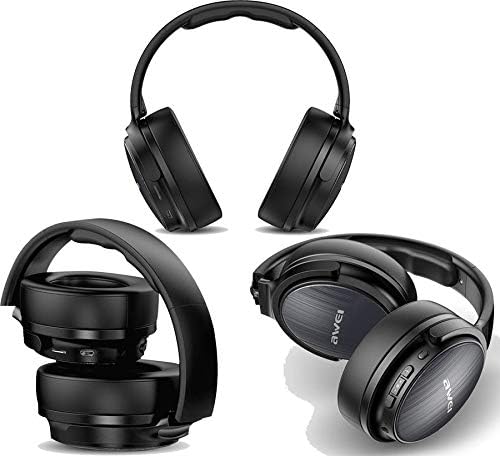
Image: Multiple views of the Awei A780BL headphones, demonstrating their foldable earcups and compact storage capability.
Key Features:
- Bluetooth V5.0 for stable and efficient wireless connection.
- Dynamic 40mm drivers for powerful and clear audio.
- Built-in microphone for hands-free calls and gaming communication.
- IPX5 water and sweat resistance, suitable for sports and outdoor activities.
- Supports both wireless (Bluetooth) and wired (3.5mm AUX) connectivity.
- Long battery life: Up to 15 hours of music/talk time.
- Comfortable over-ear design with soft earcups.

Image: A graphic highlighting the "All-Around Stereo Sound" feature of the Awei A780BL headphones, noting the 40mm driver, 32 Ohm impedance, and 122dB sensitivity.
Setup
Charging the Headphones:
- Locate the USB charging port on the headphones.
- Connect one end of the provided USB charging cable to the headphone's charging port.
- Connect the other end of the USB cable to a compatible USB power source (e.g., computer USB port, USB wall adapter).
- The indicator light will illuminate during charging and turn off or change color once fully charged.
- A full charge takes approximately 2 hours.
Powering On/Off:
- To Power On: Press and hold the Power button (usually the Multi-function button) for a few seconds until the indicator light flashes and you hear a power-on prompt.
- To Power Off: Press and hold the Power button for a few seconds until the indicator light turns off and you hear a power-off prompt.
Operating Instructions
Bluetooth Pairing:
- Ensure the headphones are fully charged and powered off.
- Press and hold the Power button for approximately 5-7 seconds until the indicator light flashes red and blue alternately, indicating pairing mode.
- On your device (smartphone, tablet, computer), enable Bluetooth and search for available devices.
- Select "AWEI A780BL" from the list of found devices.
- Once paired, the indicator light will typically turn solid blue or flash slowly, and you will hear a connection confirmation.
- If prompted for a password, enter "0000".
Wired Connection (AUX Mode):
The headphones can also be used with a 3.5mm audio cable (not included) when the battery is low or for devices without Bluetooth.
- Connect one end of a 3.5mm audio cable to the AUX port on the headphones.
- Connect the other end to the 3.5mm audio jack of your device.
- In wired mode, the headphone's battery is not consumed, and the power button is not required for operation.
Basic Controls:
| Function | Action |
|---|---|
| Play/Pause Music | Press the Multi-function button once. |
| Next Track | Long press the Volume Up (+) button. |
| Previous Track | Long press the Volume Down (-) button. |
| Volume Up | Short press the Volume Up (+) button. |
| Volume Down | Short press the Volume Down (-) button. |
| Answer/End Call | Press the Multi-function button once during an incoming call. |
| Reject Call | Long press the Multi-function button during an incoming call. |
| Redial Last Number | Double-press the Multi-function button. |
| Activate Voice Assistant | Triple-press the Multi-function button (if supported by your device). |
Maintenance
- Cleaning: Use a soft, dry cloth to clean the headphones. Do not use abrasive cleaners or solvents.
- Storage: When not in use, store the headphones in a cool, dry place, away from direct sunlight and extreme temperatures. The foldable design allows for compact storage.
- Battery Care: To prolong battery life, avoid fully discharging the headphones frequently. Charge them regularly, even if not in constant use.
- Water Resistance: The headphones are IPX5 water resistant, meaning they can withstand splashes and sweat. Do not submerge them in water or expose them to heavy rain.
Troubleshooting
| Problem | Possible Solution |
|---|---|
| Headphones do not power on. | Ensure the headphones are fully charged. Press and hold the Power button for a longer duration. |
| Cannot pair with device. |
|
| No sound or low volume. |
|
| Microphone not working. |
|
| Short battery life. |
|
Specifications
| Feature | Detail |
|---|---|
| Model Name | A780BL |
| Brand | Awei |
| Connectivity Technology | Wireless (Bluetooth V5.0), Wired (3.5mm AUX) |
| Bluetooth Protocol | HSP/A2DP/HFP/AVRCP |
| Operating Distance | Up to 10 meters (barrier-free space) |
| Headphone Form Factor | Over-Ear |
| Driver Size | 40mm |
| Impedance | 32 Ohm |
| Sensitivity | 122 dB |
| Frequency Range | 2.402 GHz - 2.480 GHz |
| Microphone | Yes |
| Noise Control | None (No Active Noise Cancellation) |
| Water Resistance Rating | IPX5 (Water and Sweat Resistant) |
| Battery Type | Lithium Polymer |
| Battery Capacity | 250 mAh |
| Charging Time | Approximately 2 hours |
| Music Playback Time | Up to 15 hours |
| Talk Time | Up to 12 hours |
| Standby Time | Up to 300 hours |
| Net Weight | 270 grams |
| Color | Black |
| Product Dimensions | 4 x 10 x 16.5 cm |
Warranty and Support
Specific warranty information for the Awei A780BL headphones is not provided in this manual. Please refer to the product packaging or the retailer's website for details regarding warranty coverage and support options.
For technical assistance or customer service, please contact the vendor or manufacturer directly through their official channels.
Related documentsA780BL


Ask a question about this manual
Ask about setup, troubleshooting, compatibility, parts, safety, or missing instructions. Manuals+ will review the question and use this page’s manual context to help answer it.