
I2GO PROEAR003
I2GO PRO Sport Extreme Bluetooth Earphones with Microphone (Model PROEAR003) User Manual
Model: PROEAR003 | Brand: I2GO
Introduction
This manual provides detailed instructions for the I2GO PRO Sport Extreme Bluetooth Earphones. Please read this manual carefully before using the product to ensure proper operation and to maximize its lifespan. These earphones are designed for active use, featuring a secure fit and sweat resistance.
Package Contents
Verify that all items are present in the package:
- 1 x I2GO PRO Sport Extreme Bluetooth Earphones
- 1 x Cable Clip
- 1 x Micro USB Charging Cable
- 3 x Sets of Silicone Ear Tips (Sizes: Small, Medium, Large)
- 1 x Carrying Pouch
Product Overview
Familiarize yourself with the components of your I2GO PRO Sport Extreme Bluetooth Earphones.
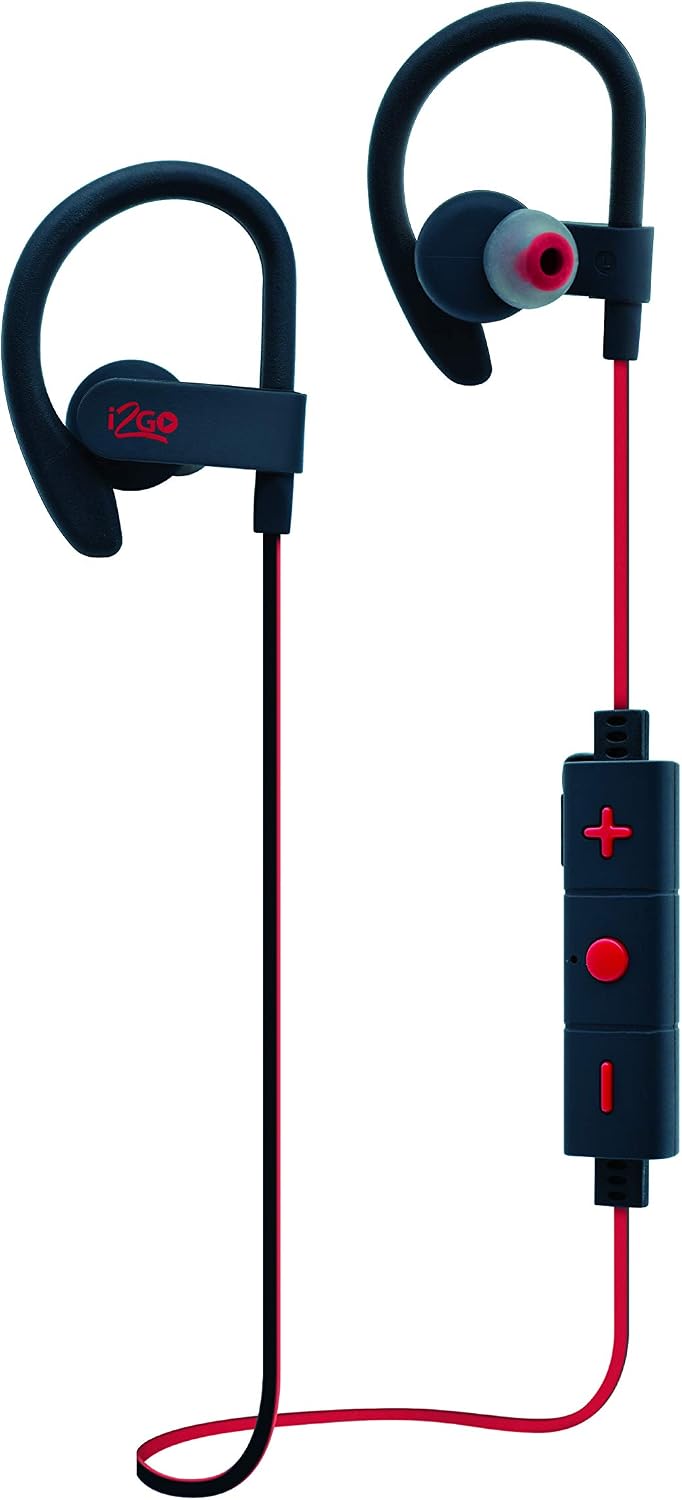
Figure 1: Front view of the I2GO PRO Sport Extreme Bluetooth Earphones, showing the ear hooks, earbuds, and inline control panel.

Figure 2: Angled view of the earphones, highlighting the flexible ear hooks designed for a secure fit during physical activity.

Figure 3: Close-up of the rubberized inline control panel, featuring volume up (+), multi-function button (center), and volume down (-) buttons.
Control Panel Functions:
- Multi-function Button (Center): Power On/Off, Play/Pause, Answer/End Calls, Bluetooth Pairing.
- Volume Up (+): Increase volume, Next track (long press).
- Volume Down (-): Decrease volume, Previous track (long press).
- Microphone: Integrated for hands-free calls.
- Micro USB Port: For charging the earphones.
Setup
1. Charging the Earphones
- Connect the Micro USB charging cable to the charging port on the inline control panel.
- Connect the other end of the cable to a USB power source (e.g., computer USB port, USB wall adapter).
- The LED indicator will illuminate during charging. It will change color or turn off once fully charged.
- A full charge typically takes approximately 1.5 to 2 hours. The earphones provide up to 5 hours of music playback and 120 hours of standby time on a full charge.
2. Bluetooth Pairing
- Ensure the earphones are fully charged and turned off.
- Press and hold the Multi-function Button (center button) for approximately 5-7 seconds until the LED indicator flashes red and blue alternately. This indicates pairing mode.
- On your device (smartphone, tablet, etc.), enable Bluetooth and search for available devices.
- Select "I2GO PRO Sport Extreme" or a similar name from the list of found devices.
- Once paired, the LED indicator will flash blue slowly, and you may hear an audible confirmation.
- The earphones will automatically attempt to reconnect to the last paired device when powered on.
3. Wearing the Earphones
- Choose the correct size of silicone ear tips for a comfortable and secure fit. Experiment with the included Small, Medium, and Large sizes.
- Place the earphones in your ears, ensuring the ear hooks are positioned over the top of your ears for stability.
- Adjust the cable length using the included cable clip if necessary to prevent excessive movement during activity.
Operating Instructions
Power On/Off
- Power On: Press and hold the Multi-function Button for approximately 3 seconds until the LED flashes blue and you hear a power-on tone.
- Power Off: Press and hold the Multi-function Button for approximately 3-4 seconds until the LED flashes red and you hear a power-off tone.
Music Playback
- Play/Pause: Press the Multi-function Button once.
- Next Track: Long press the Volume Up (+) button.
- Previous Track: Long press the Volume Down (-) button.
Call Management
- Answer/End Call: Press the Multi-function Button once during an incoming call or an active call.
- Reject Call: Long press the Multi-function Button during an incoming call.
- Redial Last Number: Double-press the Multi-function Button when not on a call.
Volume Control
- Increase Volume: Press the Volume Up (+) button.
- Decrease Volume: Press the Volume Down (-) button.
Maintenance
- Cleaning: Use a soft, dry cloth to clean the earphones. Do not use abrasive cleaners or solvents. The earphones are sweat-resistant, but avoid submerging them in water.
- Ear Tips: Remove and clean the silicone ear tips regularly with mild soap and water. Ensure they are completely dry before reattaching.
- Storage: When not in use, store the earphones in the provided carrying pouch to protect them from dust and damage. Avoid extreme temperatures.
- Battery Care: To preserve battery life, charge the earphones at least once every three months if not used regularly.
Troubleshooting
| Problem | Solution |
|---|---|
| Earphones do not power on. | Ensure the earphones are fully charged. Connect to a power source and check the LED indicator. |
| Cannot pair with device. |
|
| No sound or low volume. |
|
| Intermittent connection. |
|
Specifications
| Model | PROEAR003 |
| Connectivity | Bluetooth 4.2 |
| Material | ABS Plastic |
| Color | Black and Red |
| Impedance | 16 Ohms |
| Sensitivity | 92 dB |
| Frequency Response | 20-20,000 Hz |
| Bluetooth Range | Up to 10 meters (33 feet) |
| Battery Capacity | 80 mAh |
| Music Playback Time | Up to 5 hours |
| Standby Time | Up to 120 hours |
| Charging Time | Approx. 1.5 - 2 hours |
| Weight | 65 grams |
| Cable Length | 60 cm |
| Driver Size | 10 mm |
| Special Features | Flexible ear hooks, Flat tangle-free cable, Sweat-resistant, Integrated microphone, Multimedia control. |
Warranty and Support
Warranty Information
The I2GO PRO Sport Extreme Bluetooth Earphones (Model PROEAR003) come with a 1-year warranty against manufacturing defects, effective from the date of purchase. To claim warranty service, the original purchase invoice is required.
This warranty does not cover damages resulting from misuse, accidents, normal wear and tear, or unauthorized modifications to the product.
Customer Support
For technical assistance, warranty claims, or any questions regarding your I2GO PRO Sport Extreme Bluetooth Earphones, please contact our customer support team:
- Email: sac@i2go.com.br
Ask a question about this manual
Ask about setup, troubleshooting, compatibility, parts, safety, or missing instructions. Manuals+ will review the question and use this page’s manual context to help answer it.